58
4.1.2.2. Advanced Setup
You can set more values.
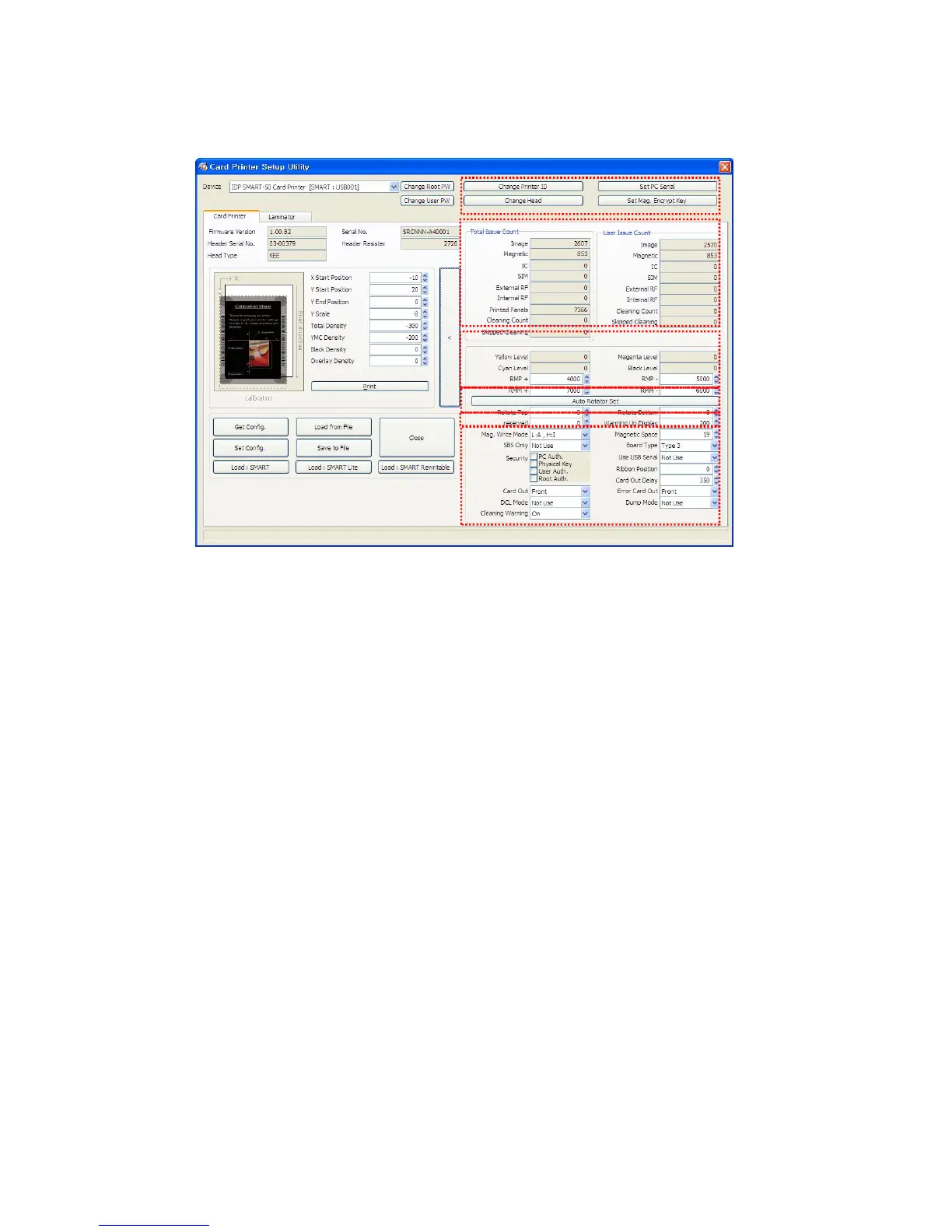
Pic.113 CardPrinterSetup – Card Printer Advanced Setup
① You can set Printer ID, PC serial, Print head and Magnetic encryption key.
Change Printer ID: When SMART-50 is used by SDK, you can set unique ID for SMART-50
printer regardless of whether it is connected by USB or what IP address is. It is useful to
connect and use several printers. Default is “SMART-50”.
Set PC Serial: One of security function. You can use a printer with specific PC.
It is activated when you click “Set PC Serial” after “PC Authentication” of ⑥ is ticked and
rebooted. At that time, the specific information of used PC is saved to SMART-50 printer.
Change Head: When you replace thermal print head, you must change head information for
optimal quality. Please change head serial number, resistor and type of head in the Change
Head Dialog window after click “Change Head”.
Set Mag. Encrypt Key: One of security function. When you use SDK, you can encrypt
magnetic stripe encoding data transmitted by USB. You can define and save the encryption key
to SMART-50 using “Set Mag. Encrypt Key”.
② To show how many cards are issued with SMART-50 printer. “Total Issue Count” is the number
of issued cards from factory shipment, “User Issue Count” is the number of issued cards from
replacing head. When you replace a head, please initialize the number by ticking “Reset User
Issue Count”.
③ To show color and motor management. SMART-50 recognizes ribbon color automatically and
controls motor by ribbon remaining. “Yellow Level”, “Magenta Level”, “Cyan Level”, “Black Level”
are default value for ribbon and user does not change values. “RMP+”, “RMP-“, “RMM+”, “RMM-
“ are necessary variables to control ribbon motor. Please do not change values for them as it
affects card quality.
④ SMART-50 DUAL is made by attaching a flipper in SMART-50, so you need to adjust it to be
tuned in the horizontal. “Rotate Top” is a value when the card of top side is in line. “Rotate
Bottom” is a value when card of bottom side is in line. Please click “Auto Rotator Set” when
error is occurred during a card moved to or from a flipper.
①
②
③
④
⑤
⑥



 To Next Page