PRODUCT INSTALLATION
iTDC
p.37
6 INPUT DEVICE WIRING
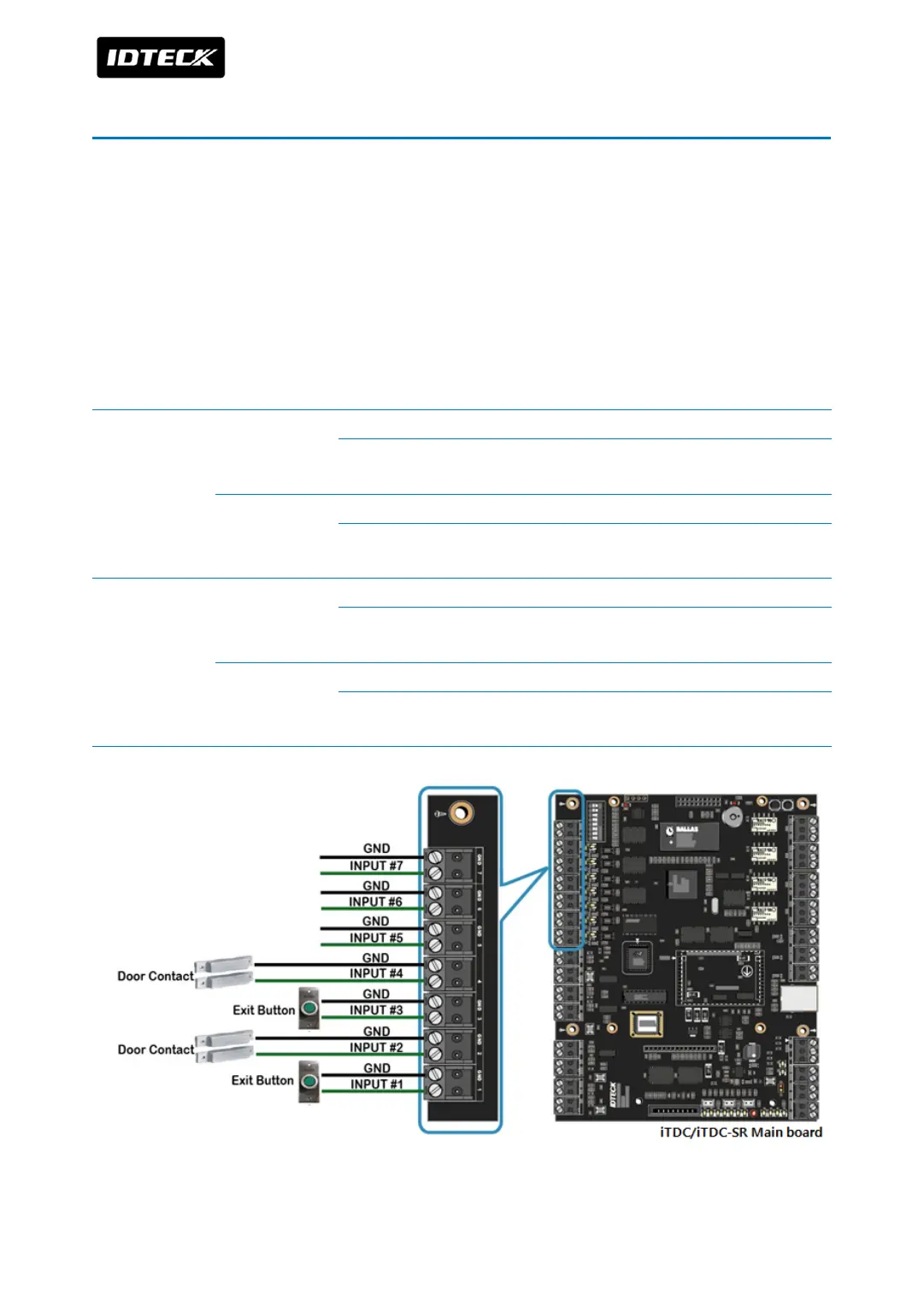
You can connect door contact and exit button, etc to input ports (INPUT#1~INTPUT#7) of
iTDC/iTDC-SR. Depending on number of door control, wire input device as following table
below. I/O board (EIO88) is required to control 3, 4 doors.
6.1 2-DOOR CONTROL
Without distinction of 2 wires of exit button, one wire is connected to Input then the other is
connected to GND.
Door 1 Exit Button
Connect one wire to Input#1 of iTDC/iTDC-SR main board.
Connect the other wire to Input#1 GND of iTDC/iTDC-SR main
board.
Door Contact
Connect one wire to Input#2 of iTDC/iTDC-SR main board.
Connect the other wire to INPUT#2 GND of iTDC/iTDC-SR main
board.
Door 2 Exit Button
Connect one wire to Input#3 of iTDC/iTDC-SR main board.
Connect the other wire to Input#3 GND of iTDC/iTDC-SR main
board.
Door Contact
Connect one wire to Input#4 of iTDC/iTDC-SR main board.
Connect the other wire to Input#4 GND of iTDC/iTDC-SR main
board.



 To Next Page