p.58
COMMUNICATION WIRING
iTDC
Connect one end of Shield wire to power GND of device as figure above. If both
ends of Shield wire are connected to GND, current flows by potential difference
then it makes communication error. Only one end of shield wire has to be
connected to power GND of device.
4 External TCP/IP CONVERTER (ILAN422)
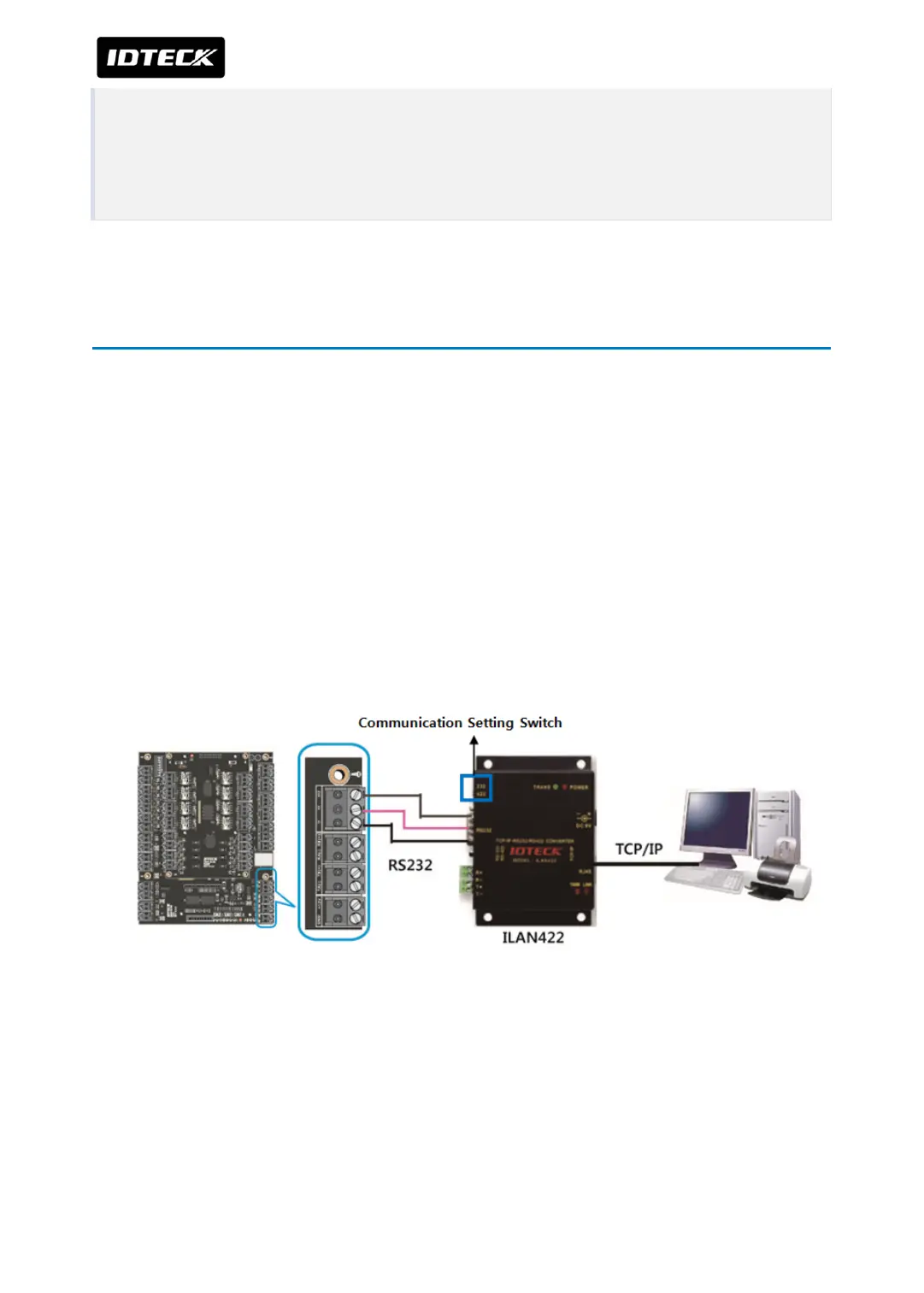
When using the TCP/IP converter (ILAN422) for communication, select either RS232 or
RS422 by the communication setting switch on left top of the ILAN422.
4.1 Wiring for RS232 communication
●
Set the communication setting switch to RS232. The switch is located at upper left of
ILAN422.
●
Connect TX of iTDC/iTDC-SR RS232 port to RX (pin 2) of ILAN422.
●
Connect RX of iTDC/iTDC-SR RS232 port to TX (pin 3) of ILAN422.
●
Connect GND of iTDC/iTDC-SR RS232 port to GND(pin 9) of ILAN422.
4.2 Wiring for RS422 communication
●
Set the communication setting switch to RS422. The switch is located at upper left of
ILAN422
●
Connect TX+ of iTDC/iTDC-SR RS422 port to RX+ of ILAN422.
●
Connect TX- of iTDC/iTDC-SR RS422 port to RX- of ILAN422.



 To Next Page