16
9 Parameter setting
Parameters can be set before installation and set-up of the unit or during operation�
If you change parameters during operation, the operating principle of the
plant will be influenced�
► Ensure that there will be no malfunctions in your plant�
Using an IO-Link capable parameter setting tool such as the FDT service program
ifm Container the following options are available:
- Reading current process values�
- Reading, changing and saving current parameter settings and transmitting
them to other units of the same type�
The catalogue of the available DTM objects, the IO-Link Device Description
(IODD) and the FDT service program ifm Container can be downloaded at
www.ifm.com→Service→Download.
9.1 General parameter setting
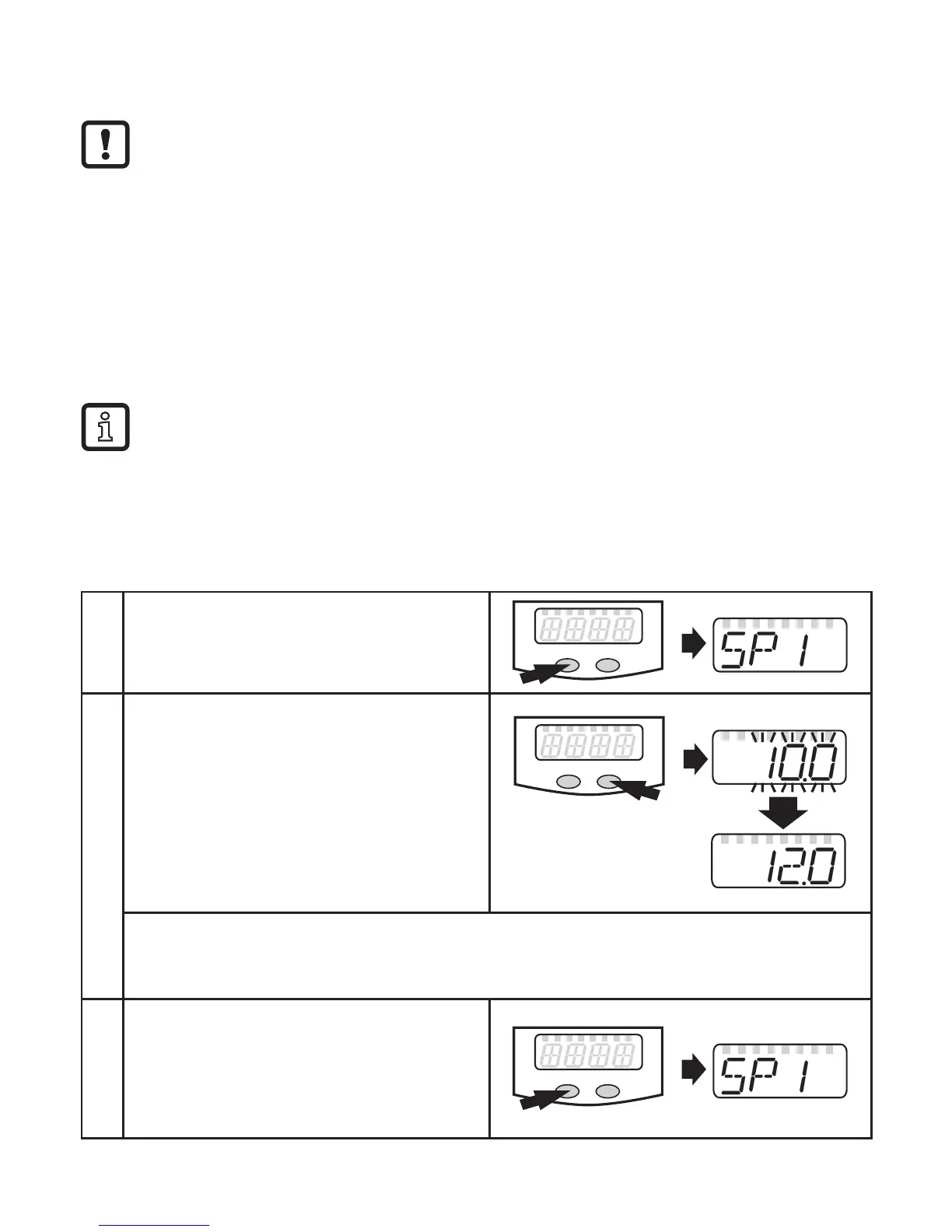
3 steps must be taken for each parameter setting:
1
Parameter selection
► Press [Mode/Enter] until the re-
quested parameter is displayed�
2
Setting of the parameter value
► Press [Set] and keep it pressed�
> Current setting value of the param-
eter flashes for 5 s�
> After 5 s: setting value is changed:
incrementally by pressing the button
once or continuously by keeping the
button pressed�
Numerical values are incremented continuously� For reducing the value: let the dis-
play move to the maximum setting value� Then the cycle starts again at the minimum
setting value�
3
Acknowledgement of the parameter
value
► Press [Mode/Enter] briefly�
> The parameter is displayed again�
The new setting value is stored�












 To Next Page