60
ifm Device Manual SmartSPS AC14 with EtherNet/IP interface (AC1421, AC1422), Firmware 3.1.2 2015-11-30
Menu AS-i 1 / AS-i 2
>
Display the voltage supply analysis
9088
To display the voltage supply analysis:
1 Select the menu page
► > or >
► Select [Power supply] tab.
2 Display the voltage supply analysis
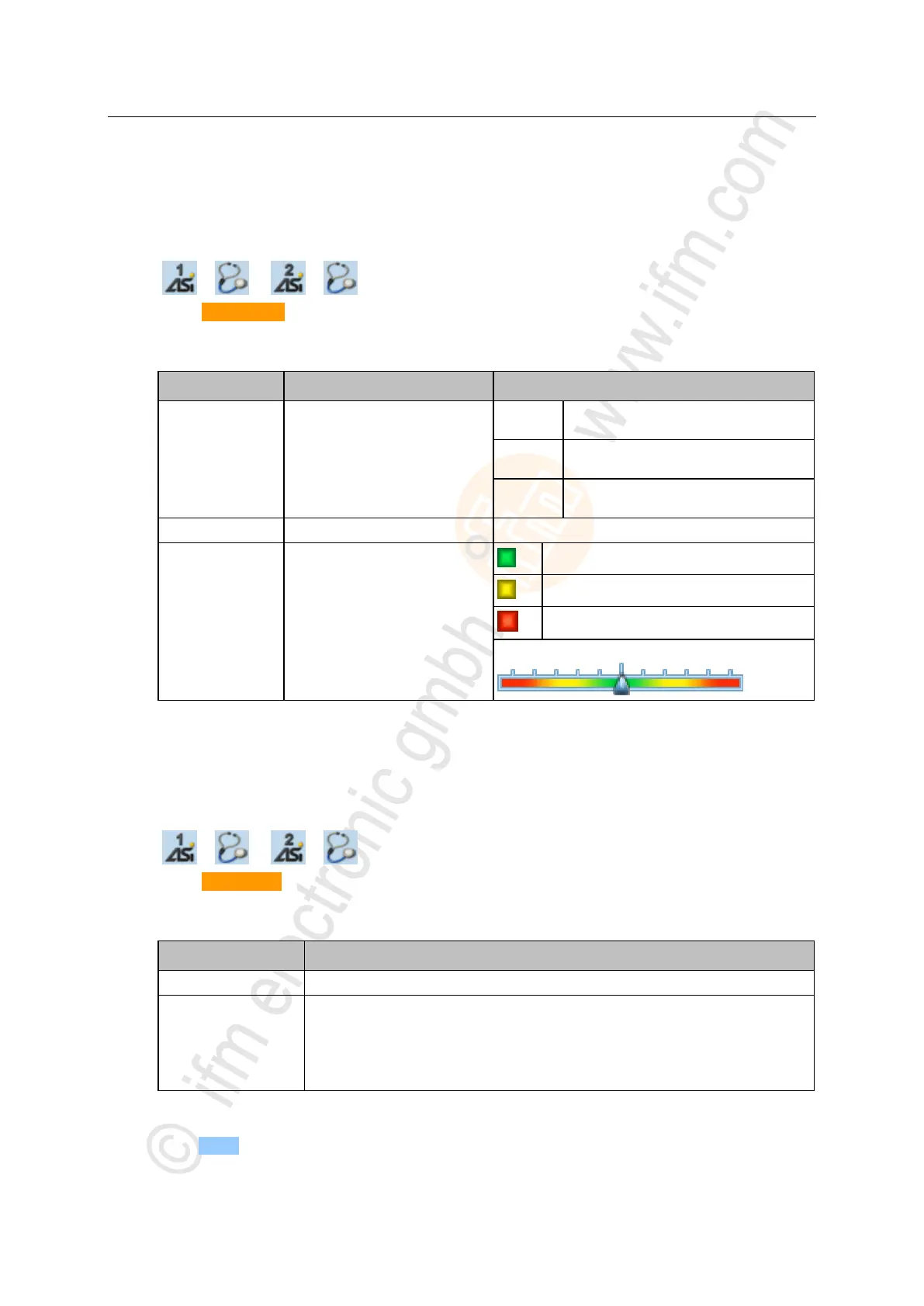
> Page shows the following information:
Voltage is supplied separately by the
AS-i network and AUX 24 V.
Voltage is only supplied by the
AS-i network.
Voltage is supplied by data decoupling
module.
AS-i voltage measured (in [V])
Evaluation of the network symmetry
AS-i network is symmetrical
AS-i network is asymmetrical
AS-i network has earth fault
Graphical representation of the network symmetry:
>
Display and reset performance data
9089
To display the performance statistics of the selected AS-i master:
1 Select the menu page
► > or >
► Select [Performance] tab.
2 Display performance data
> Page shows the following information:
Number of active AS-i slaves on the AS-i network
AS-i cycle time (value in [ms])
3 Optional: reset the performance data
► Press [Reset] button.
> The saved statistic data for minimum and maximum cycle times are deleted.


 To Next Page