Maintenance
1.
Cleaning side brushes
Clean the side brushes when it gets dirty and replace if it's are
damaged.
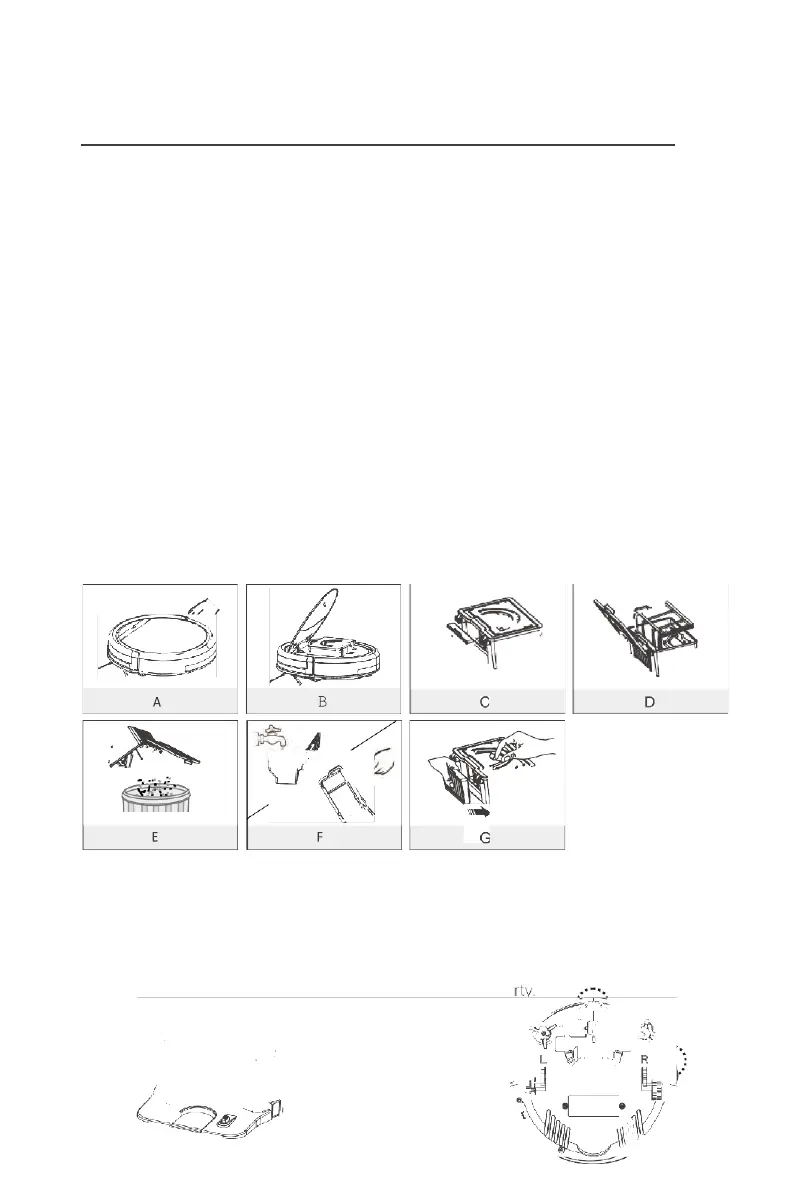
Note: Before replacing side brushes, check and match "L" "R"
marks on both and
bottom of robot.
2.
Cleaning dustbin and filter
Clean and empty dustbin after each use, steps are as shown in below
figures.
•
After taking dustbin, check whether there is foreign matter stuck
in suck passage and clean it.
•
Clean Filter after 15-30 days of use. And replace it after
use for 6 months at maximum.
•
Install both Filter and primary filters when they are dry.
•
Filter and primary filter could be replaced if needed.
3.
Cleaning cliff sensors and auto charging pins
Slightly clean the sensor window and onto charging pins with a
soft dry cloth. Note: Charging pins on charging dock need to
clean if dirty.



 To Next Page