EasyManua.ls Logo

Ilife V7s - Product Maintaining; Clean the brush and mop cloth; Cleaning the dust bin and filters

Ilife V7s
17 pages
Print Icon
To Next Page IconTo Next Page
To Previous Page IconTo Previous Page
Loading...
Product
Maintaining
Clean
the
brush
and mop
cloth
When
they
are
dirty, clean side
brush,
turbo brush
and
cloth;
When they
are
damaged, replace
the
brushes
and
cloth.
Press turbo brush cover buckle
in the
bottom
of the
robot, remove
it
to
clean.
Hold bracket outward from robot. When installation,
fix the
bracket
on the
robot, with
the
four feet
on
bracket
to the
four round holes
at the
bottom
of the
robot
,
press down
and
can
complete
the
installation.
Cleaning
the
dust
bin and
filters
Note:
If you
need
to
pick
up the
robot,
please turn display panel
side
upwards
to
avoid
dusts
leaking
out.
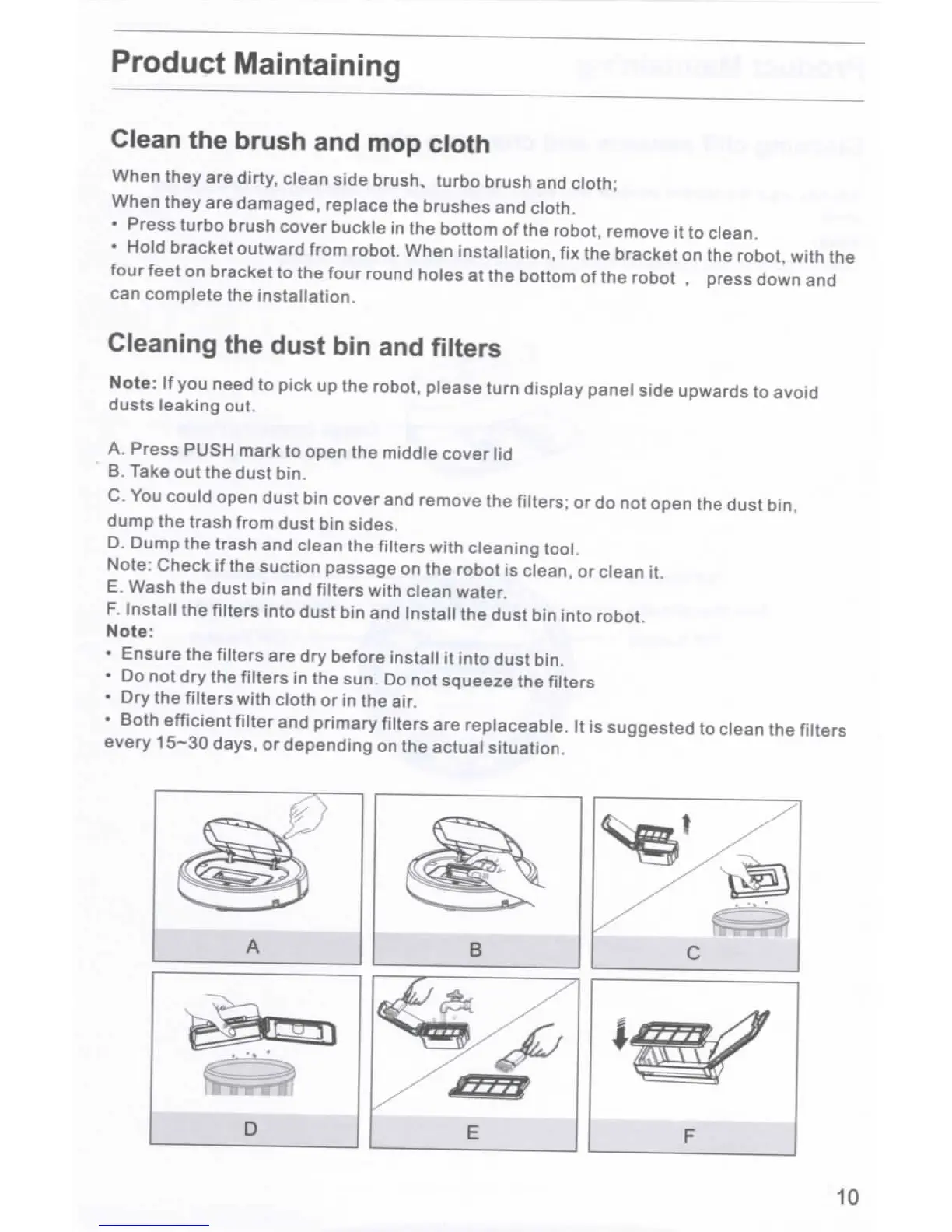
A.
Press PUSH mark
to
open
the
middle cover
lid
B.
Take
out the
dust bin.
C. You
could open dust
bin
cover
and
remove
the
filters;
or do not
open
the
dust bin,
dump
the
trash from dust
bin
sides,
D.
Dump
the
trash
and
clean
the
filters with cleaning
tool.
Note:
Check
if the
suction passage
on the
robot
is
clean,
or
clean
it.
E.
Wash
the
dust
bin and
filters with clean water.
F.
Install
the
filters
into
dust
bin and
Install
the
dust
bin
into
robot.
Note:
Ensure
the
filters
are dry
before
install
it
into
dust
bin.
Do not dry the
filters
in the
sun.
Do not
squeeze
the
filters
Dry the
filters with cloth
or in the
air.
Both efficient filter
and
primary filters
are
replaceable.
It is
suggested
to
clean
the
filters
every
15-30
days,
or
depending
on the
actual situation.
3
10

Related product manuals