10
EN
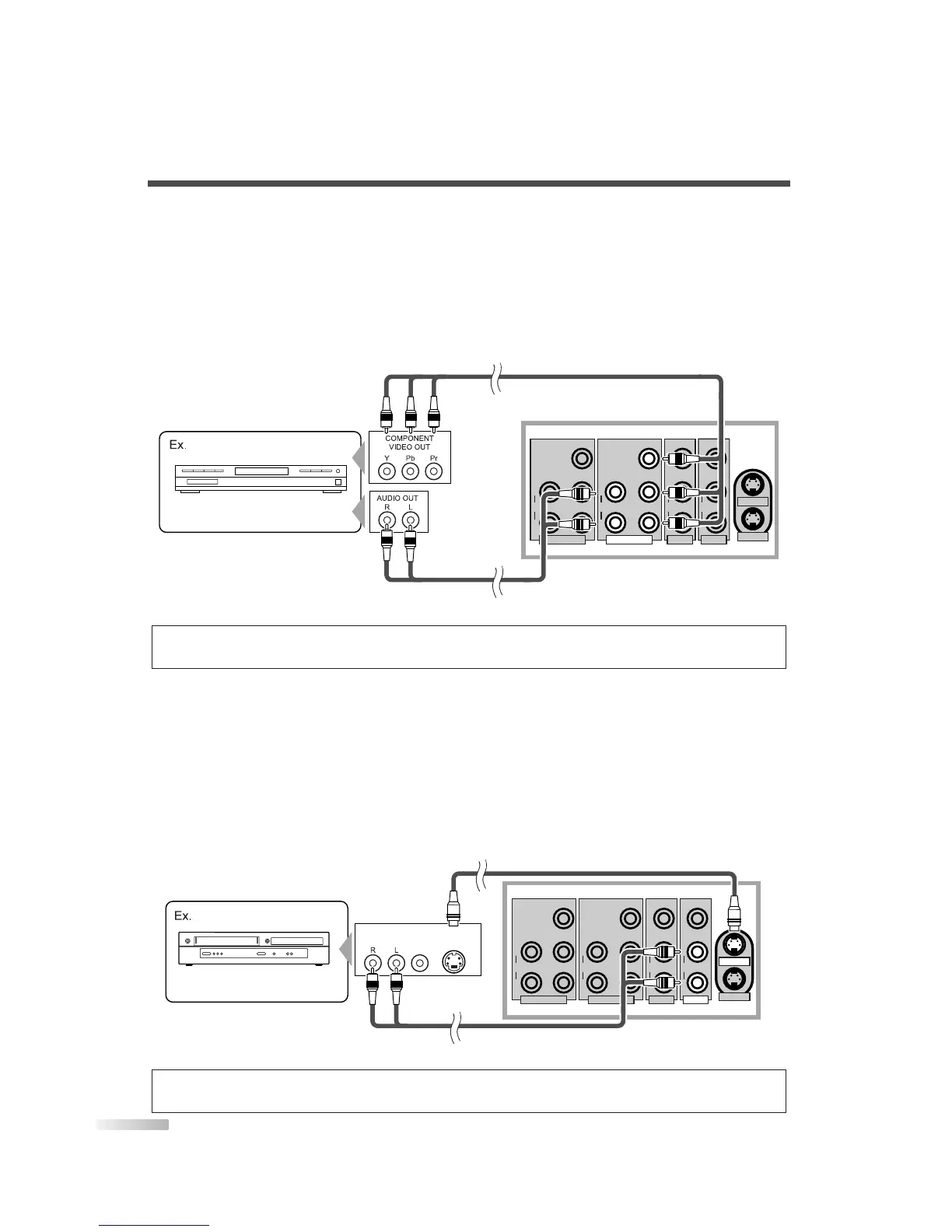
[COMPONENT CONNECTION]
1) This is a better method to connect this TV to video devices with the Component output jack, such as a
DVD player, etc.
Use the Component video cable for connection.
If you connect component output jacks to COMPONENT1 input jack, connect an audio cable to AUDIO L/R
jacks of COMPONENT1.
If you connect component output jacks to COMPONENT2 input jack, connect an audio cable to AUDIO L/R
jacks of COMPONENT2.
[S-VIDEO CONNECTION]
1) This is a good method to connect this TV to the video devices with the S-Video output jack. You can
expect better picture quality than the normal video cable connection.
Use the S-Video cable for connection.
If you connect S-Video output jack to S-VIDEO1 input jack, connect an audio cable to AUDIO L/R jacks of
VIDEO1.
If you connect S-Video output jack to S-VIDEO2 input jack, connect an audio cable to AUDIO L/R jacks of
VIDEO2.
NOTE:
• If you connect to the S-VIDEO jack and the VIDEO jack at the same time, S-Video connection will have priority.


 To Next Page