21
EN
WATCHING TV
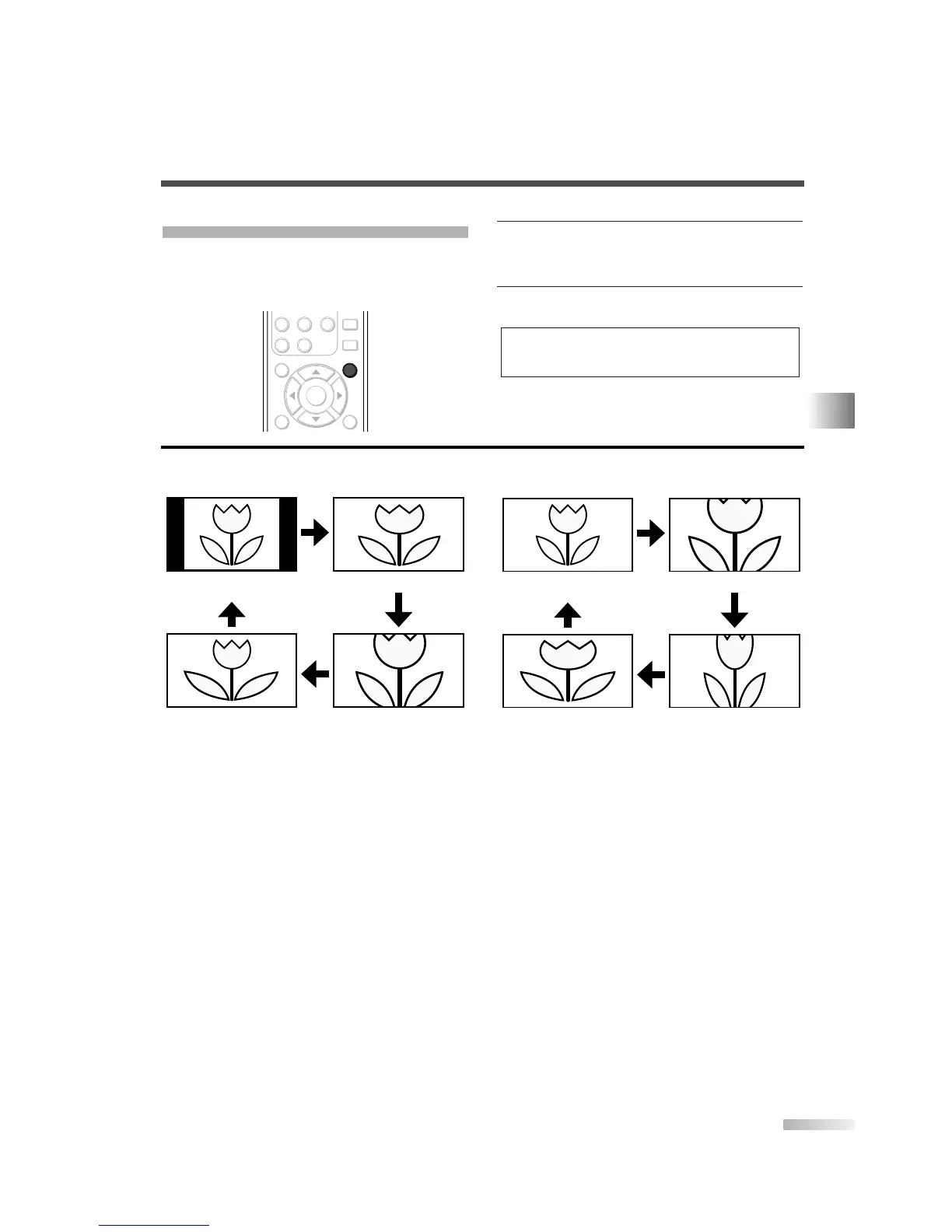
CHANGING THE SCREEN DISPLAY MODE
Each 4 types of display mode can be selected in the
screen mode in both 4:3 and 16:9 TV aspect ratio.
You can select your favorite screen mode and enjoy
the program.
1
Switch the Screen mode.
• Every time you press
[SCREEN MODE], the TV
aspect ratio will be switched alternately.
2
Press [SCREEN MODE] repeatedly until the nor-
mal screen displays.
NOTE:
• You may not switch the display mode depending on the pro-
gram.
[Sidebar]
Sidebar will display a 4:3 picture at its standard
4:3 size. Sidebars will be displayed on the right
and left edges of the screen.
[Full]
Full will display a 4:3 picture at a 16:9 size,
with horizontal elongation necessary to fill the
screen.
[Cinema]
Cinema will display a 4:3 picture at a 16:9 size,
with less horizontal elongation necessary to fill
the screen because a little bit of the top and
bottom edge of the screen will be cut off.
[Wide]
Wide will display the center of the picture as orig-
inal size and the outer sides of the picture will be
elongated. The size of the picture will depend on
the original signal.
[Full]
A picture will be displayed at 16:9 size as it is.
[Zoom]
Zoom will display a 16:9 picture without chang-
ing its horizontal to vertical ratio, at its maxi-
mum size.
[Cinema]
Cinema will display a 16:9 picture with vertical
elongation.
[Expand]
Expand will display a 16:9 picture with horizon-
tal elongation.
When the broadcast is sending 4:3 video
signal...
When the broadcast is sending 16:9 video
signal...


 To Next Page