28
EN
V-CHIP
You can set the viewing limitations to prevent your
children from watching inappropriate programs
including disagreeable expression and description.
The viewing limitations set for the program can be
released by entering the password.
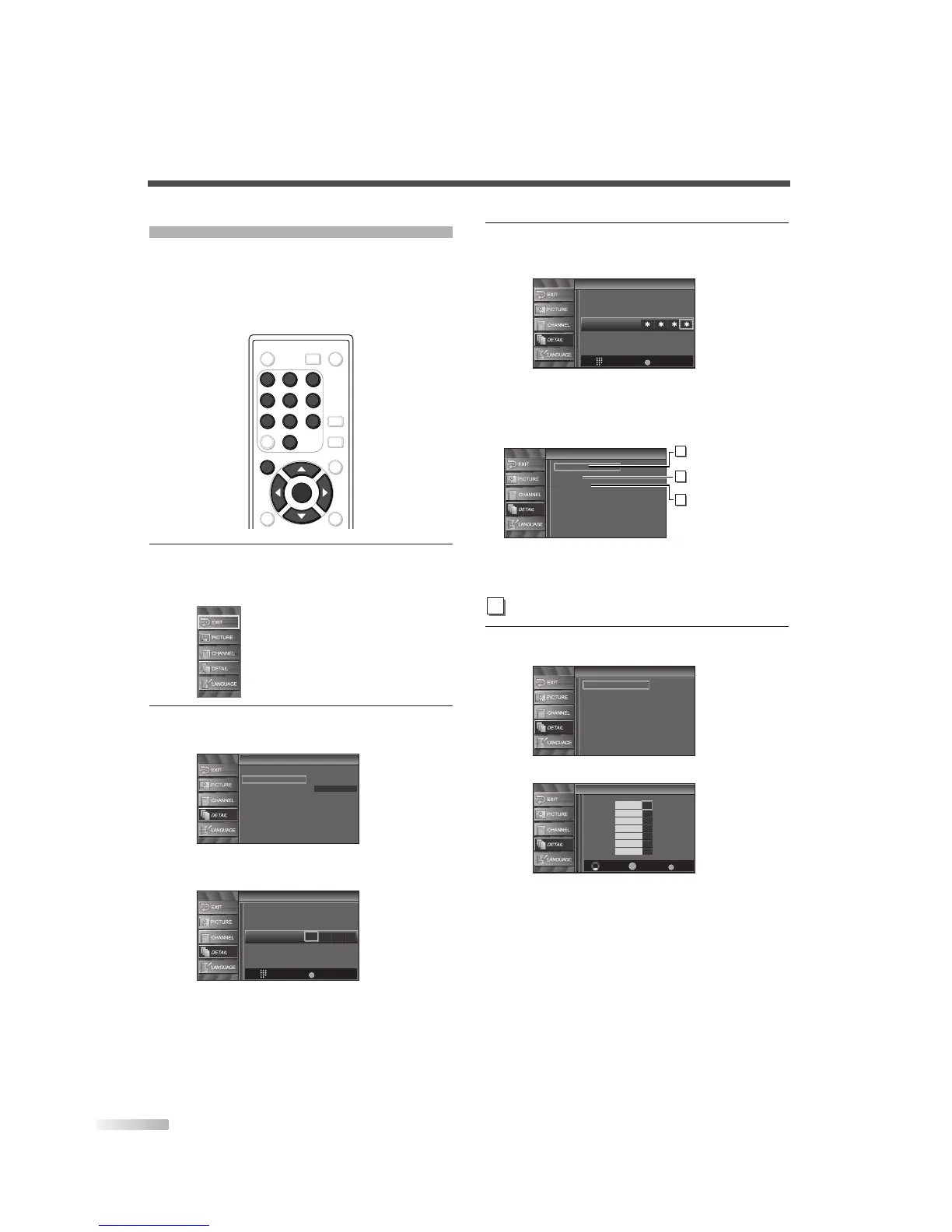
1 Display the setup screen.
• Press
[SETUP].
The following setup screen is displayed.
2
Select “DETAIL” and press [ENTER] to confirm.
• Using
[
K
/
L
], select “V-chip”.
• Press
[ENTER].
The password entry screen is displayed.
3 Enter the password.
• Use
Channel number buttons and enter the
4-digit number.
• When you have not set up your password,
enter 0000.
• When the password is correct, the following
“V-Chip” screen is displayed.
See the following description for setting each
item.
4
Display the “MPAA Rating” screen.
• Using
[
K
/
L
], select “MPAA Rating”.
• Press
[ENTER].


 To Next Page