27
EN
OPTIONAL SETTINGS
6
Set each item.
• When “User Setting” is set to “On”, you can set
the following items.
• CC style set by “User Setting” will be displayed.
• Using
[
K
/
L
], select the item you want to set.
• You can switch the setting for each item with
[
K
/
L
].
• The setting description for each item is shown
below.
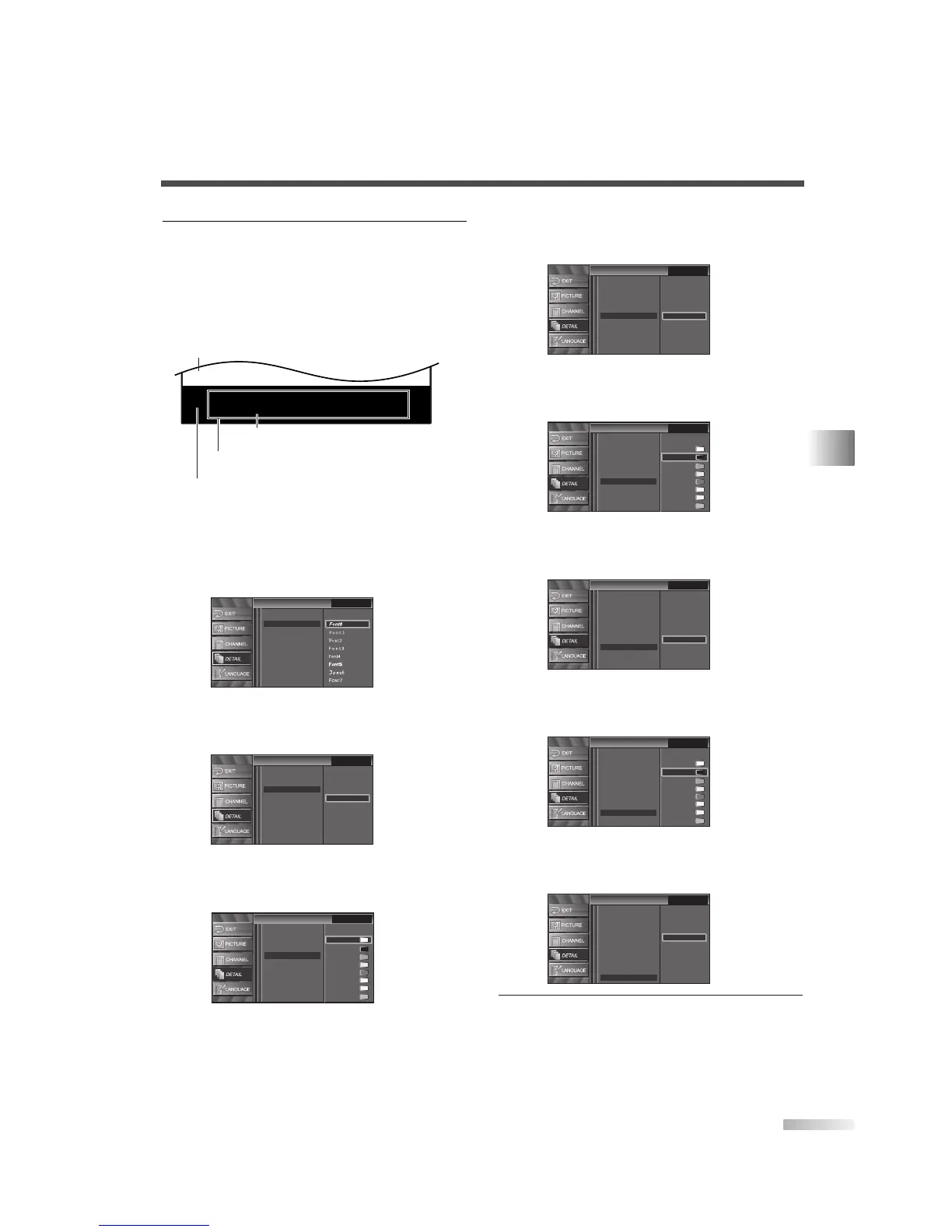
[Font Style]
Font style of the displayed caption can be
switched as below.
[Font Size]
Font size of the displayed caption can be
switched as below.
[Font Color]
Font color of the displayed caption can be
switched as below.
CC Style
CC Style
White
Black
Red
Green
Blue
Yellow
Magenta
Cyan
Closed Caption
User Setting
Font Style
Font Size
Font Opacity
Back Color
Back Opacity
Edge Color
Edge Type
Font Color
CC Style
CC Style
Small
Large
Middle
Closed Caption
User Setting
Font Style
Font Color
Font Opacity
Back Color
Back Opacity
Edge Color
Edge Type
Font Size
CC Style
CC Style
Closed Caption
User Setting
Font Size
Font Color
Font Opacity
Back Color
Back Opacity
Edge Color
Edge Type
Font Style
ABCDEFGHIJKL
ABCDEFGHIJKL
Picture display
Back
(Back Color and Back Opacity)
Font
(Font Style, Font Size, Font Color and Font Opacity)
Edge
(Edge Color and Edge Type)
[Font Opacity]
Font opacity of the displayed caption can be
switched as below.
[Back Color]
Background color of the displayed caption can
be switched as below.
[Back Opacity]
Background opacity of the displayed caption can
be switched as below.
[Edge Color]
Edge color of the displayed caption can be
switched as below.
[Edge Type]
Edge type of the displayed caption can be
switched as below.
7 To exit the setup, press [SETUP].
CC Style
CC Style
Raised
Depressed
Uniform
L.Shadow
R.Shadow
None
Closed Caption
User Setting
Font Style
Font Color
Font Opacity
Back Color
Edge Color
Font Size
Back Opacity
Edge Type
CC Style
CC Style
White
Black
Red
Green
Blue
Yellow
Magenta
Cyan
Closed Caption
User Setting
Font Style
Font Size
Font Opacity
Back Color
Back Opacity
Edge Type
Font Color
Edge Color
CC Style
CC Style
Flash
Translucent
Transparent
Solid
Closed Caption
User Setting
Font Style
Font Color
Font Opacity
Back Color
Edge Color
Edge Type
Font Size
Back Opacity
CC Style
CC Style
White
Red
Green
Blue
Yellow
Magenta
Cyan
Closed Caption
Black
User Setting
Font Style
Font Size
Font Opacity
Back Opacity
Edge Color
Edge Type
Font Color
Back Color
CC Style
CC Style
Flash
Translucent
Transparent
Solid
Closed Caption
User Setting
Font Style
Font Size
Font Color
Back Color
Back Opacity
Edge Color
Edge Type
Font Opacity



 To Next Page