9
EN
PREPARATION FOR USE
EXTERNAL CONNECTION
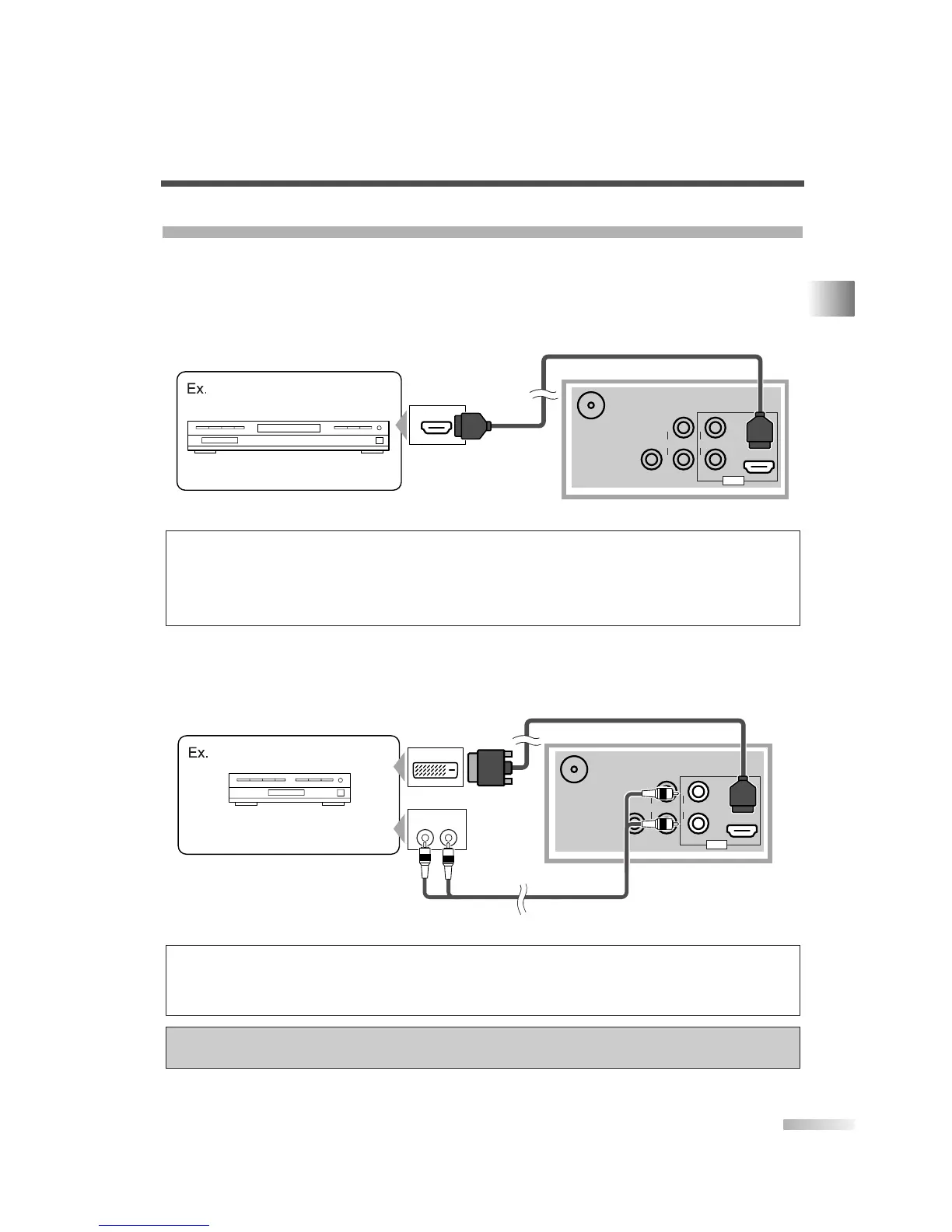
[HDMI CONNECTION]
1) This is the best method to connect this TV to a video device with the HDMI output jack, such as a DVD
player with HDMI output jack, etc. It can minimize the deterioration of image quality.
Use the HDMI cable for connection.
2) When your video device has the DVI output jack, use the HDMI conversion cable from DVI output jack for
connection as illustrated below.
“HDMI, the HDMI logo and High-Definition Multimedia Interface are trademarks or registered
trademarks of HDMI Licensing LLC.”
NOTES:
• This TV accepts 480i / 480p / 720p / 1080i video signals.
• Audio signals are converted to an analog signal from the digital if you make a connection above.
• DVI does not show image if the 480i does not accept EIA/CEA-861/861B.
NOTES:
• This TV accepts 480i / 480p / 720p / 1080i video signals, and 32kHz / 44.1kHz / 48kHz audio signals.
• This TV accepts only 2 channel audio signal (LPCM).
• You need to select “PCM” for the digital audio output of the device you connect or the HDMI audio setting. Audio sometimes makes
no sound if you select “Bitstream”, etc.
• This TV only accepts signals corresponding EIA861.


 To Next Page