24
EN
PICTURE ADJUSTMENT
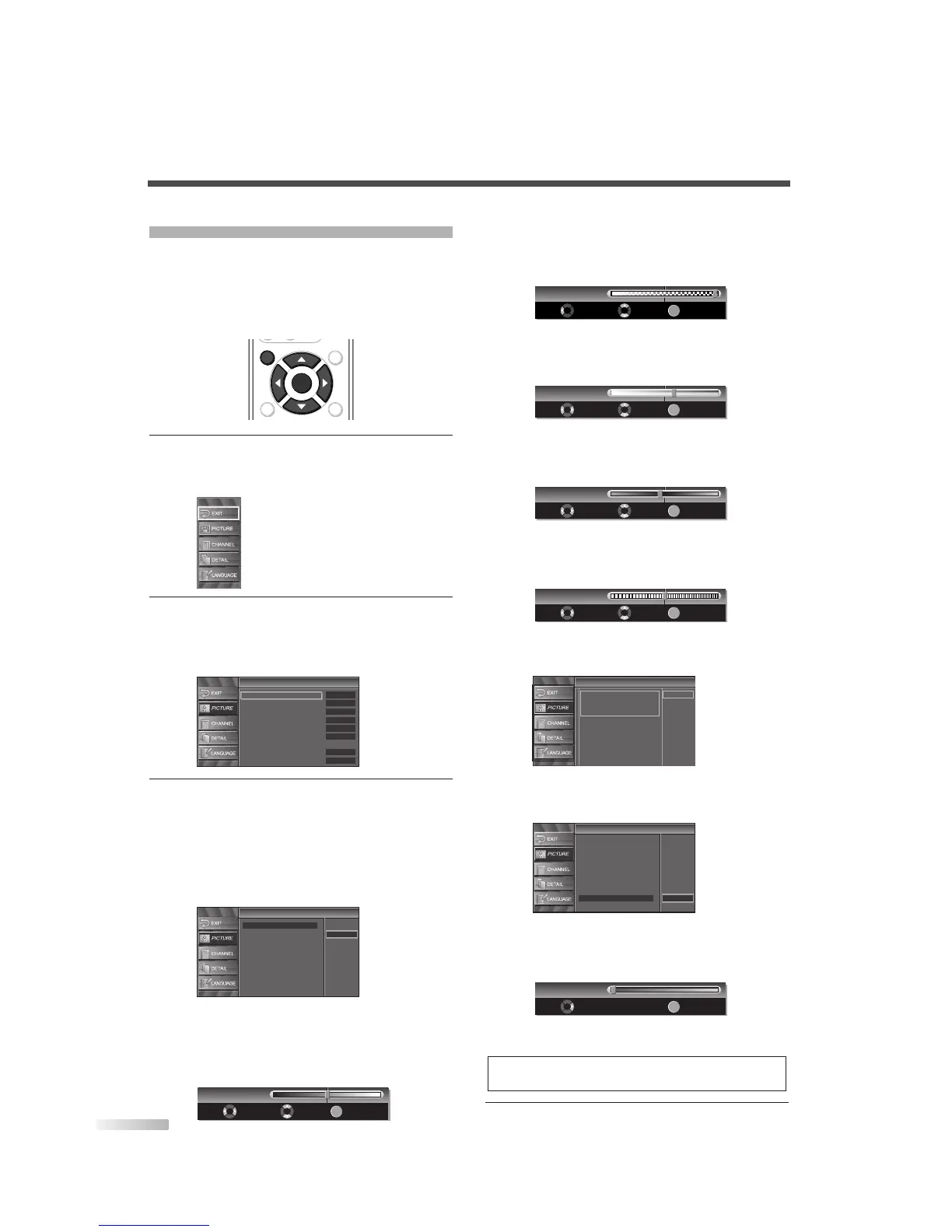
You can enjoy your favorite picture mode selecting
from four picture default settings that will adjust col-
ors to enhance your viewing experience. Also, the
brightness, contrast, color, tint, sharpness color
temperature, and energy saving settings can be
changed.
1
Display the setup screen.
• Press
[SETUP].
The following setup screen is displayed.
2 Select “PICTURE”, and press [ENTER] to con-
firm.
• Using [
K
/
L
], select your desired item and
press
[ENTER] to confirm.
3 Adjust the picture quality.
• Using
[
K
/
L
], select the picture quality item you
want to adjust.
Picture Mode
Using [
K
/
L
], adjust Picture Mode from the
selection, then press
[ENTER]. (Standard,
Dynamic, Movie and News)
Brightness
Using [
s
/
B
], adjust until the darkest parts of
the picture are as bright as you prefer.
s
:To decrease brightness
B
:To increase brightness
Contrast
Using [
s
/
B
], adjust to increase or decrease
contrast.
s
:To decrease contrast
B
:To increase contrast
Color
Using [
s
/
B
], adjust to be brilliant or pale color.
s
:To pale
B
:To brilliant
Tint
Using [s / B], adjust to obtain natural skin tones.
s
:To red
B
:To green
Sharpness
Using [
s
/
B
], adjust the detail of the picture.
s
:To soft
B
:To clear
Reset Settings
Using [
K
/
L
], select “Reset”.
You can reset setting of the Picture Mode you select.
Color Temp.
Using [
K
/
L
], adjust Color Temperature from the selec-
tion, then press [ENTER]. (Cool, Neutral and Warm)
Energy Saving
Using [
s
/
B
], adjust brightness of backlight.
s
:To bright
B
:To dark
• The adjustment bar for picture quality item is
displayed on the screen.
4 To exit the setup, press [SETUP].
NOTE:
• To move to the normal screen, press [SETUP].


 To Next Page