15
EN
CHANNEL SETTINGS
MANUAL REGISTER
You can register the remainder of channels that
were not scanned by the Autoscan function due to
the bad reception status at the initial setting.
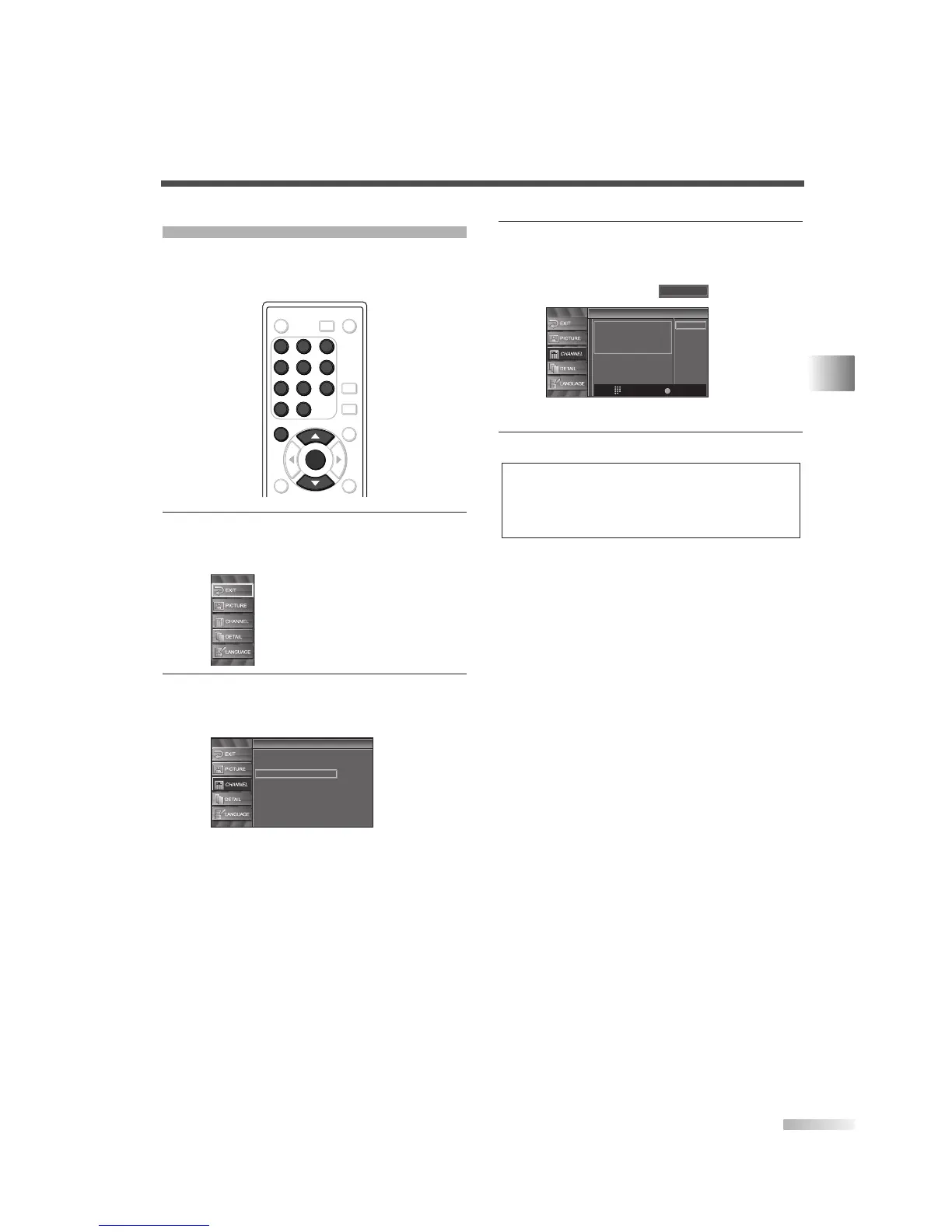
1
Display the setup screen.
• Press
[SETUP].
The following setup screen is displayed.
2 Select “CHANNEL” and press [ENTER] to con-
firm.
• Using [
K
/
L
], select “Manual Register”.
• Press
[ENTER].
Channel
Channel
Autoscan
Channel List
Manual Register
Antenna
ENTER
POWER SLEEP
AUDIO
STILL
SETUP
BACK
SCREEN
MODE
INFO
1 2 3
4 5 6
7 8 9
-
0
INPUT
SELECT
ENTER
SETUP
1 2 3
4 5 6
7 8 9
-
0
3 Select the channel you want to add.
• Using
Channel number buttons, select your
desired channel.
• Select “Register” with
[ENTER].
4 To exit the setup, press [SETUP].
NOTES:
• If the setup is completed successfully, “Registered to the
channel list.” is shown on the screen.
• If “Video1” is being used, set up will not be completed suc-
cessfully. “Unavailable” will be shown on screen.
Manual Register
Manual Register
For Analog channels,
select a channel to register
using number keys.
For Digital channels,
you must perform Autoscan function.
Register
Ch Change
11
Back
BACK


 To Next Page