CHARGING NICD/NIMH BATTERY IN THE CHARGE MODE
DEC
-
Batt type
Stop
Elapsed
time
INC
+
DEC
Start
Enter
-
‘>3 seconds’
INC
+
Charged
capacity
Battery
type
Charge
current
Battery
voltage
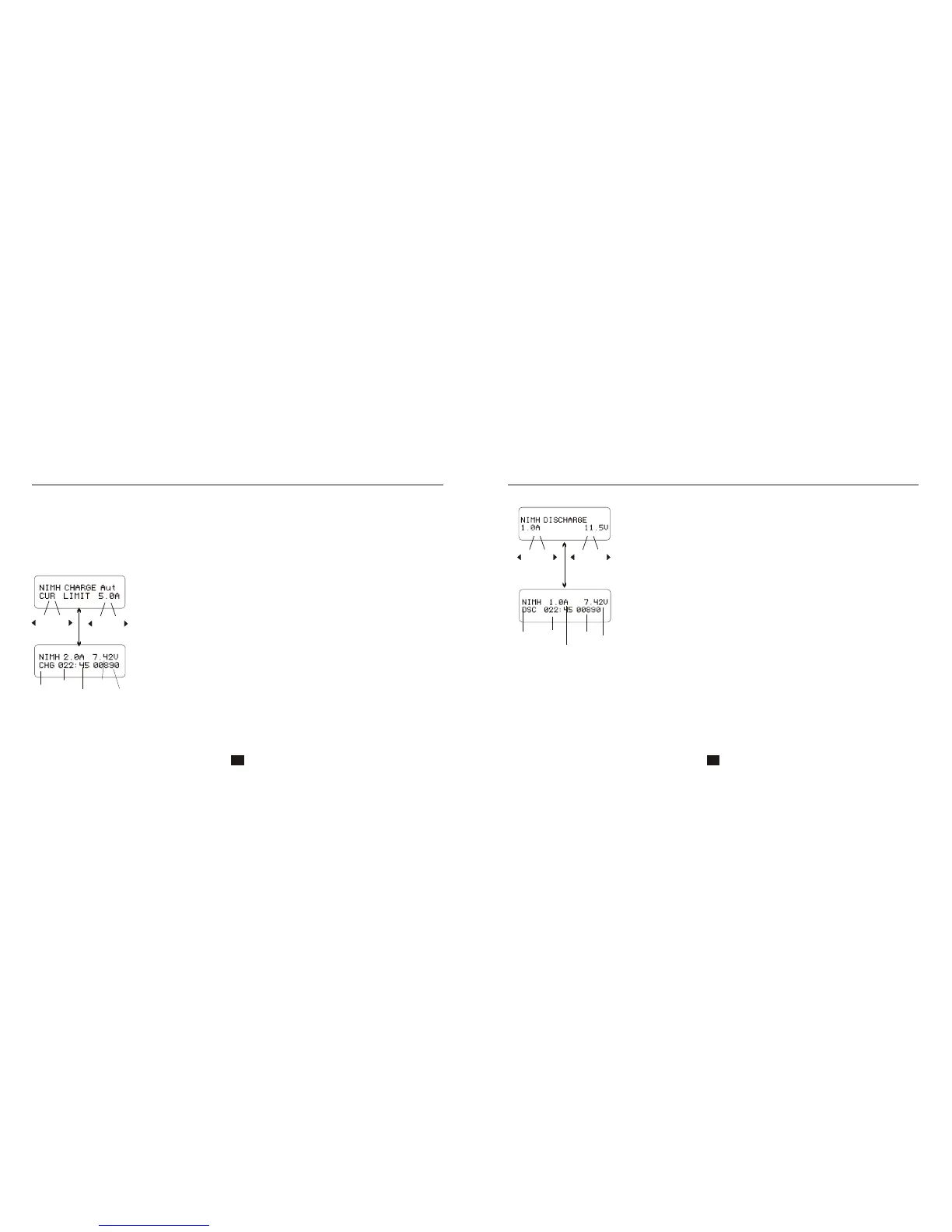
This program is for charging of NiCd/NiMH batteries associated with R/C
models applications. You can press START/ENTER key to make it blink
and then INC or DEC to change the parameter value. Press
START/ENTER key to store the value.
This program charge the battery using the current you set up. In the “auto” state, you should set up
the upper limit of the charge current to avoid damage by excessive feeding current. Some batteries
of low resistance and capacity can lead to higher current in the “auto” charging mode. But in the
manual mode, it will charge with the current you set. You can make it blink in the current field and
press INC and DEC simultaneously to swap between Auto and Manual Mode. NOTE: Allowable fast
charge current: 1C-2C
The screen shows the real-time status. Press BATT TYPE/STOP key to
end the program. The sound will emitted to indicates the end of program.
Charging NiCd/NiMH battery in the charge mode
DISCHARGE OF NICD/NIMH BATTERY
Discharge of NiCd/NiMH battery
Discharge
current
The screen indicates the discharging state. You can press
START/ENTER key to alter discharge current. Press START/ENTER
again to store the value. Press BATT TYPE/STOP key to stop
discharging. The emitted sound alerts the end of discharging.
Battery
type
Battery
voltage
Elapsed
time
Discharged
capacity
Batt type
Stop
Start
Enter
‘>3 seconds’
DEC
INC
DEC
INC
Set discharge current on the left and the final voltage on the right. Range
of the discharge current is 0.1-5.0A; range of final voltage is 0.1-25.0V.
Press START/ENTER key for more than 3 seconds to start the program.
-
+
-
+
27 28


 To Next Page