14
7.5 Removal and Installation of the Plug Adapter
Your Guardio Charger system includes an AC Adapter installed
with a U.S. Plug Adapter. If a different Plug Adapter is required,
the AC Adapter allows the option of removing and installing a
different Plug Adapter.
7.5.1 Removal of the Plug Adapter
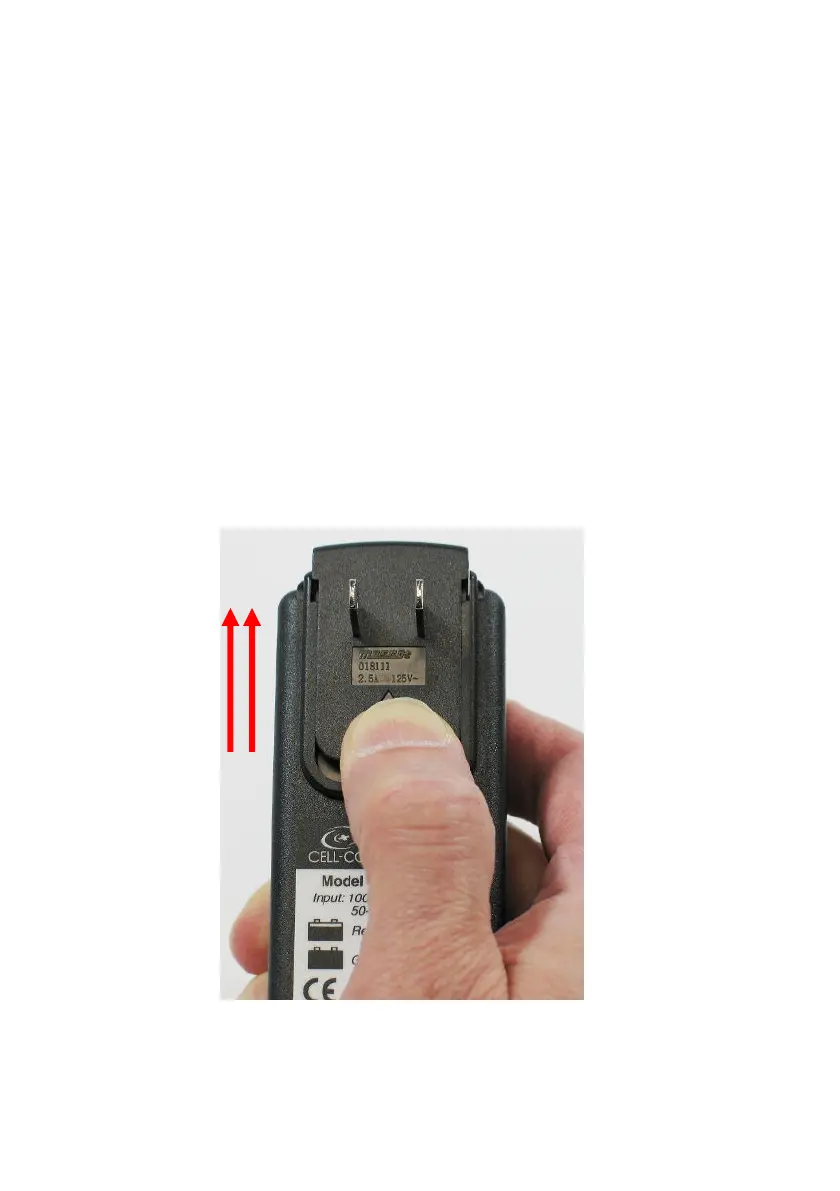
To remove the Plug Adapter from the AC Adapter,
perform the following steps:
1. Grasp the AC Adapter in your hand and place
your thumb on the ridged area below the plug
prongs of the Plug Adapter.
2. Using your thumb, push up on the Plug Adapter
to unlock it from the AC Adapter. See Figure 7.
3. Slide the Plug Adapter upwards to remove it from
the AC Adapter.
Figure 7: Removing the Plug Adapter
Push
Upwards to
Unlock and
Remove
Plug
Adapter



 To Next Page