16
7.6 Charging Your Guardio Charger
Note: Charging your Guardio Charger and charging your
OPTIMIZER Integra CCM-D IPG CANNOT be done at the same
time. Always charge the internal battery of your Guardio Charger
before attempting to charge the battery of your OPTIMIZER
Integra CCM-D IPG.
Note: Inspect the AC Adapter for any damage before each use.
Please call the 24-hour Support Hotline (866-312-5370) if a
replacement AC Adapter is needed.
Warning: Only use the AC Adapter provided with your Guardio
Charger to charge the battery in your Guardio Charger.
Otherwise damage to your Guardio Charger may result.
To connect the AC Adapter to your Guardio Charger and begin
charging its internal battery, perform the following steps:
1. Turn your Guardio Charger around so that the back of the
Charger is facing up.
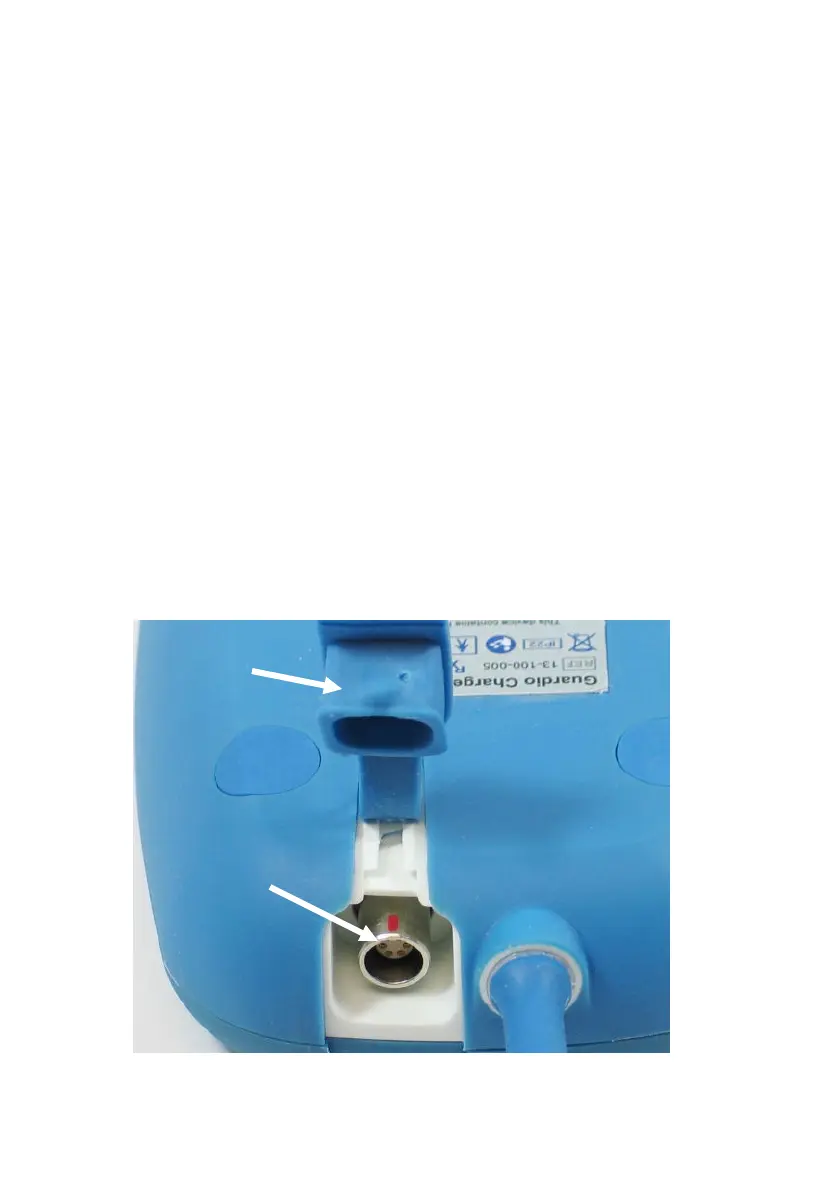
2. Remove the protective cover flap from the power input
connector located next to the base of the charging wand
cable. See Figure 9.
Figure 9: Back of the Charger


 To Next Page