26
7.8.4 Termination of Charging Session Due to Low
Charger Battery Level
If the battery charge level of your Guardio Charger drops
below 10% during a charging session, your Guardio
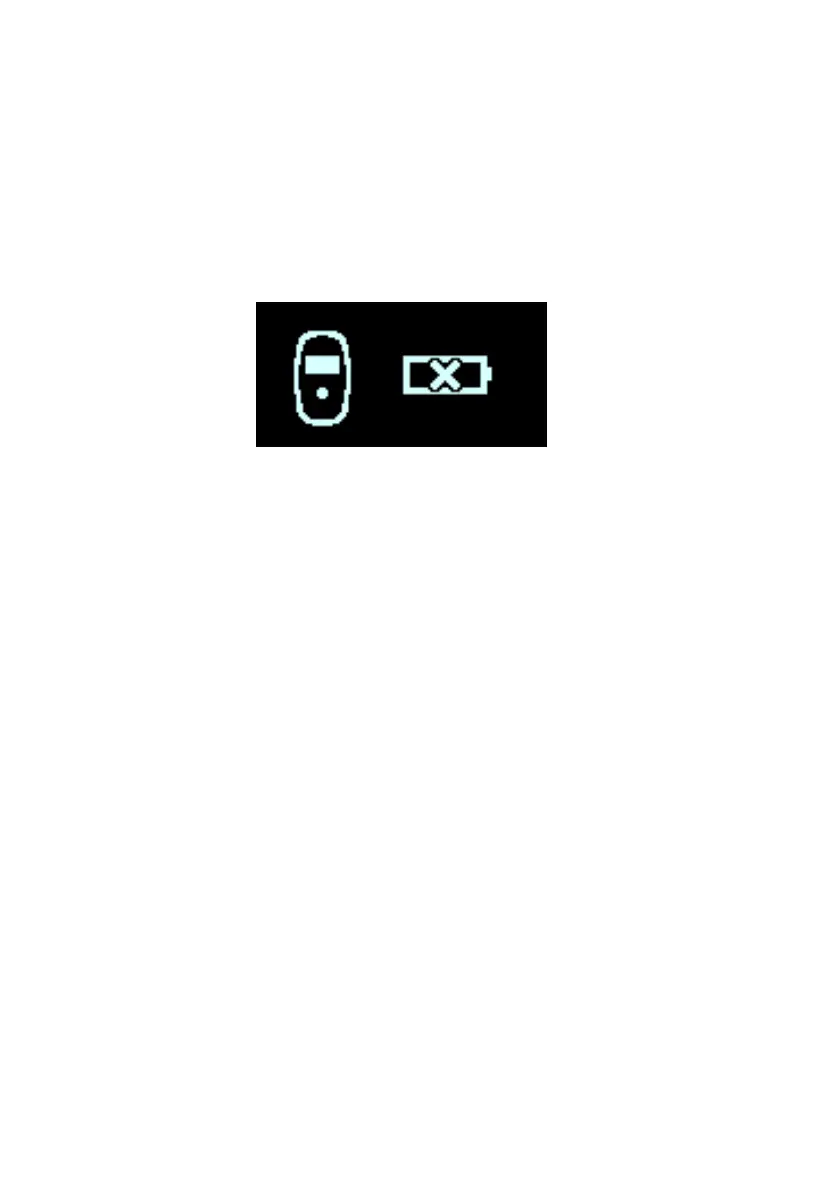
Charger will emit 3 long beeping tones and display the
Low Charger Battery Alert screen, indicated by an empty
battery icon with a flashing “X” over it (see Figure 23).
Your Guardio Charger will then shut off.
Figure 23: Low Charger Battery Alert Screen
If this occurs, recharge the battery of your Guardio
Charger as described in Section 7.6.
7.9 Guardio Charger Placement When Not Being
Used for Device Charging
Whenever your Guardio Charger is not being used to charge your
OPTIMIZER Integra CCM-D IPG, it should be placed in an area
frequented by you (e.g., bedside table in your bedroom),
connected to its AC Adapter, and the AC Adapter plugged into the
wall outlet. This will keep the battery of your Guardio Charger fully
charged as well as ensure regular communications between your
OPTIMIZER Integra CCM-D IPG and your Guardio Charger.
Note: Keeping your Guardio Charger continuously connected to
its AC Adapter while it is plugged into the wall outlet will not in any
way harm or weaken the battery in your Charger.



 To Next Page