29
If your Guardio Charger is not able to successfully complete
downloading data from your OPTIMIZER Integra CCM-D IPG, it
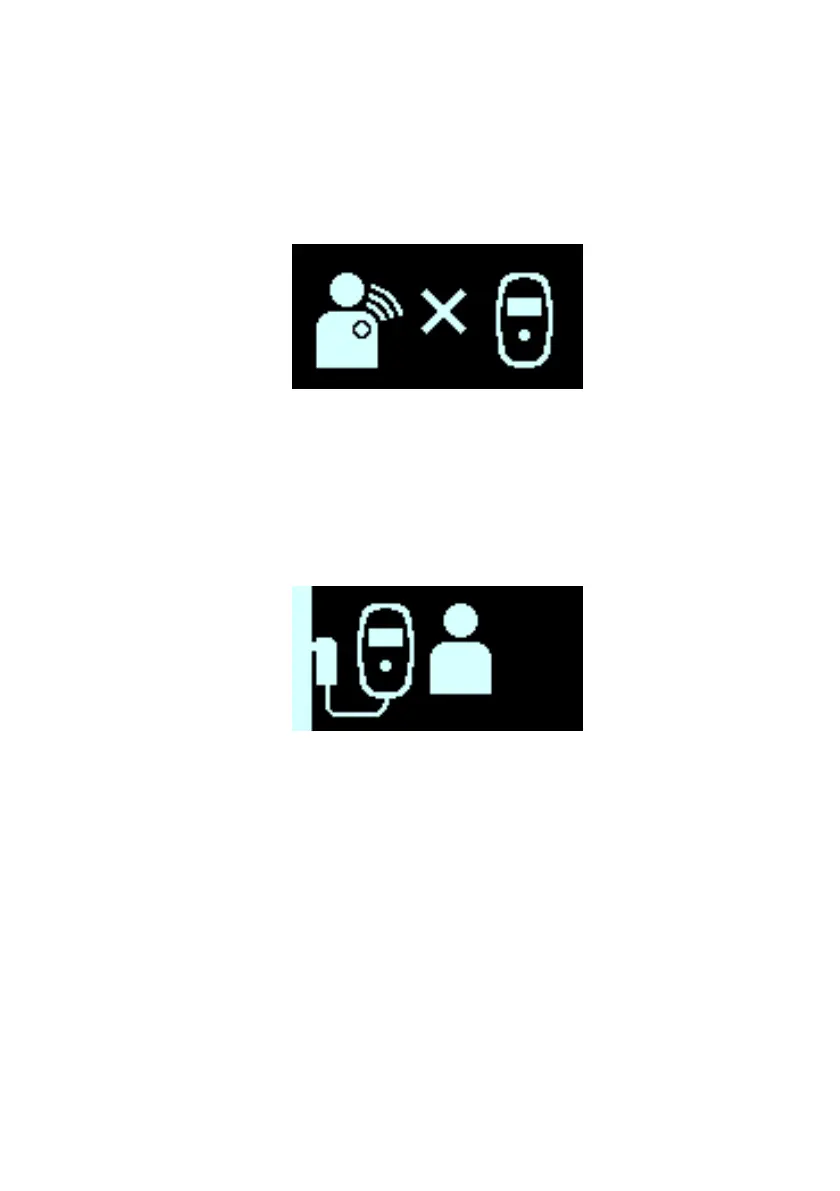
will display the IPG Data Download Error screen, indicated by a
flashing “X” at the center of the screen (see Figure 27). Should
this happen, your Guardio Charger will retry downloading data
from your OPTIMIZER Integra CCM-D IPG in a few minutes.
Figure 27: IPG Data Download Error Screen
If your Guardio Charger and your implanted OPTIMIZER Integra
CCM-D IPG do not communicate within the time period set by
your doctor, your Guardio Charger will emit a beeping tone and
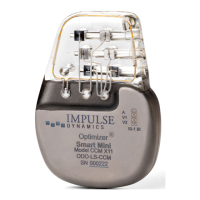
display the Long Time Without Downloading Data From IPG alert
screen, indicated by an animated image of a patient moving closer
to their Guardio Charger. See Figure 28.
Figure 28: Long Time Without Downloading Data From IPG Alert
Screen
If you see this message displayed by your Guardio Charger,
attempt to use your Guardio Charger to charge your OPTIMIZER
Integra CCM-D IPG. If you can successfully charge your
implanted OPTIMIZER Integra CCM-D IPG, then the alert screen
should no longer be displayed by your Guardio Charger. If your
attempt to charge your OPTIMIZER Integra CCM-D IPG with your
Guardio Charger is unsuccessful, please call the 24-hour Support
Hotline (866-312-5370).


 To Next Page