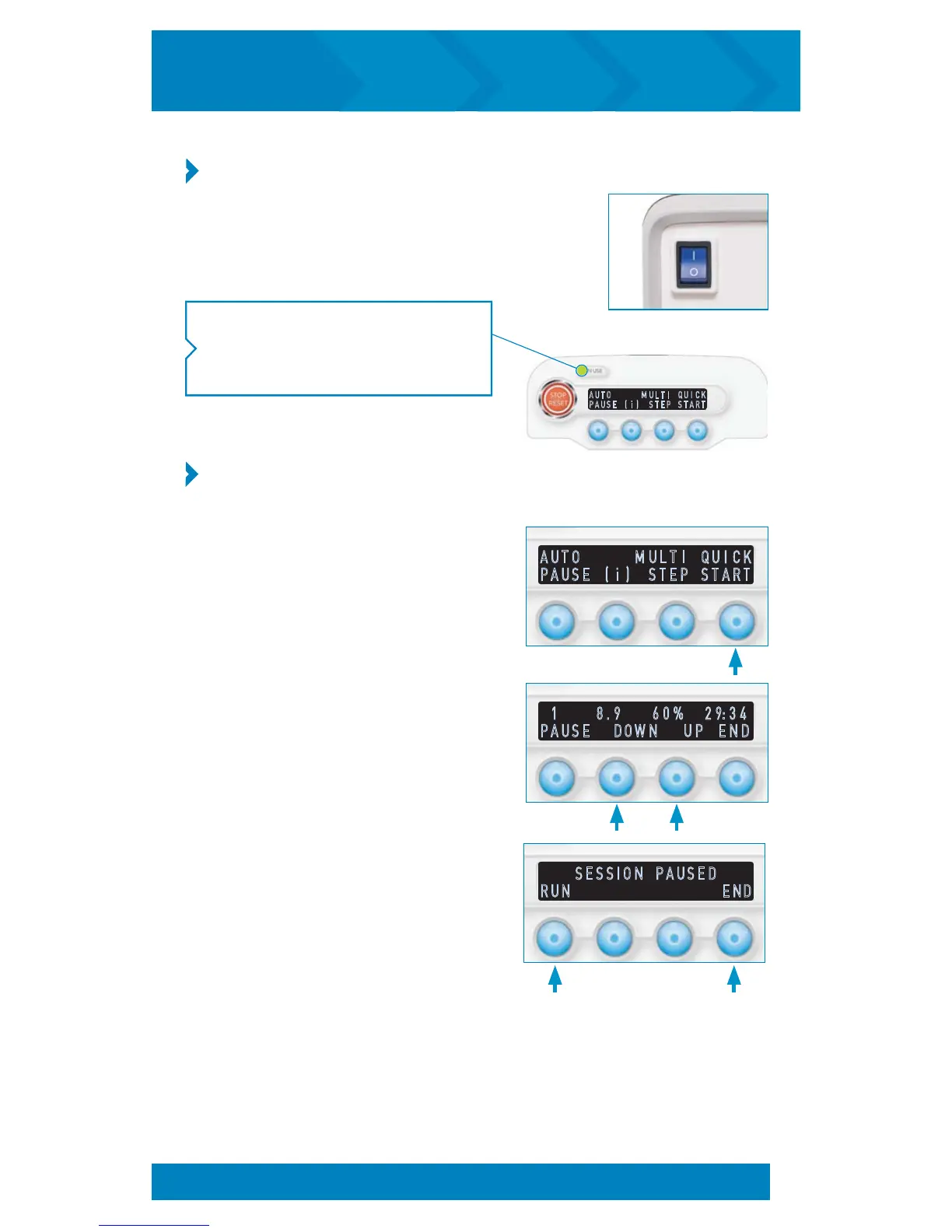
NOTE: The power indicator light on the
control panel will light green to show
that the unit is in use.
A U T O M U L T I Q U I C K
P A U S E ( i ) S T E P S T A R T
STEP 1: Turn On the inCourage Airway Clearance PTU
1.
Turn the power switch on the back of the PTU to
the On position. (Ensure unit is plugged in to a
properly grounded three-pronged outlet.)
2. Adjust pressure by pressing either DOWN
or UP. Press PAUSE to temporarily stop the
session. Press RUN to resume the session
or END to return to the startup screen
.
3. When the session pauses, press RUN
to resume the session or END to return
to the startup screen.
STEP 2: Choose a Session Mode (Quick Start,
Auto Pause, Multi Step)
To run Quick Start mode:
1. From the startup screen, select QUICK
START. Your QUICK START session
will begin.
A U T O M U L T I Q U I C K
P A U S E ( i ) S T E P S T A R T
1 8 . 9 6 0 % 2 9 : 3 4
P A U S E D O W N U P E N D
S E S S I O N P A U S E D
R U N E N D
STARTING A TREATMENT SESSION (cont’d)
14
inCourage
®
Airway Clearance Therapy | INSTRUCTION MANUAL


 To Next Page