Screen Saver:
If the device is not actively running a program and a button is not pressed for 10
minutes, the display will start a scrolling text. After an additional 20 minutes, the
screen will blackout. At any time, press any button to reactivate the display and
return to the main menu.
The screen saver cannot be modified.
Information Menu (i):
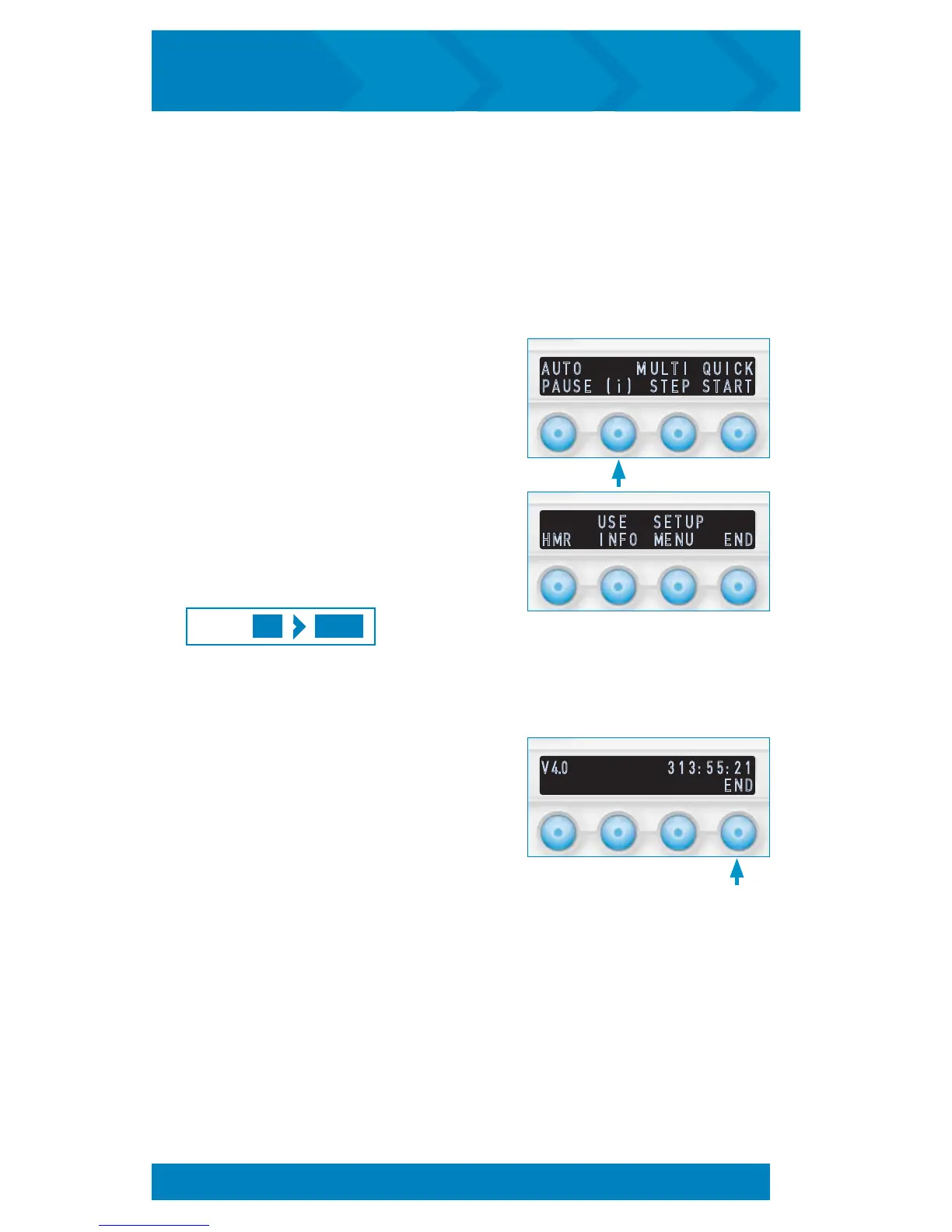
The Information Menu contains options to view
the device Hour Meter Reading (HMR), Average
Use Information, and Setup Menu. The Information
Menu is accessed by pressing the (i) option from
the startup screen.
Selecting END will return to the startup screen
.
To Retrieve Hour Meter
Reading (HMR) and Device
Software Version:
1. Press the Information (i) button to display
the Information Menu.
2. Press the HMR button.
3. The HMR will be displayed on the right
side of the screen, Hours : Minutes :
Seconds. The software version will be
displayed on the left side of the screen.
4. Press the END button to return to the
Information Menu. The HMR and
Software Version screen display will remain
up until the END button is pressed or the
screen saver timeout is reached.
(i) HMR
PRESS:
Information Menu (i)
V 4.0 3 1 3 : 5 5 : 2 1
E N D
A U T O M U L T I Q U I C K
P A U S E ( i ) S T E P S T A R T
U S E S E T U P
H M R I N F O M E N U
E N D
SYSTEM UTILITIES
20
inCourage
®
Airway Clearance Therapy | INSTRUCTION MANUAL


 To Next Page