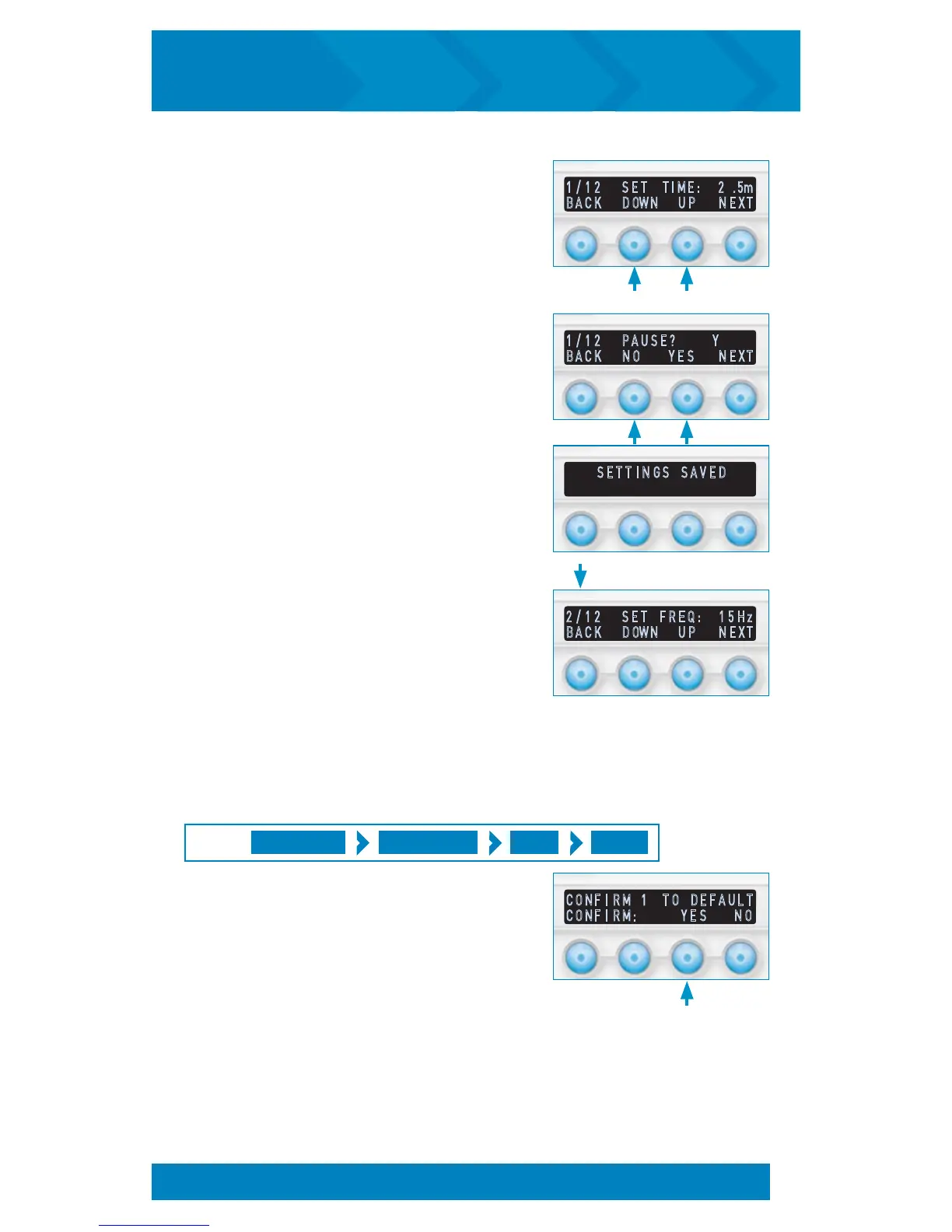
8. Press DOWN or UP to adjust the desired
length of time, then press NEXT.
9. Press YES or NO to enable or disable the Auto
Pause, then press NEXT.
10. After a full step is programmed, the display
will proceed to the next step.
11. Repeat 6 through 9 above to program
each of the remaining steps. The screen will
automatically bring you to the Program Ready
screen after the final step.
Note: After programming is completed, it is
recommended to verify program for accuracy.
Selecting DFLT as described in the Multi Step
Editing Options section on page 17 will bring
up the default confirmation screen. To confirm
program reset to default, select YES.
Set a Multi Step Session to Factory Default Settings:
MULTI STEP PROGRAM # EDIT DFLT
PRESS:
Note: As you complete programming
for each step, the display will briefly
show that settings were saved.
C O N F I R M 1 T O D E F A U L T
C O N F I R M : Y E S N O
2 / 1 2 S E T F R E Q : 1 5 H z
B A C K D OW N U P N E X T
1 / 1 2 P A U S E ? Y
B A C K N O Y E S N E X T
1 / 1 2 S E T T I M E : 2 . 5 m
B A C K D OW N U P N E X T
S E T T I N G S S A V E D
MODIFY A MULTI STEP SESSION (cont’d)
19
inCourage
®
Airway Clearance Therapy | INSTRUCTION MANUAL


 To Next Page