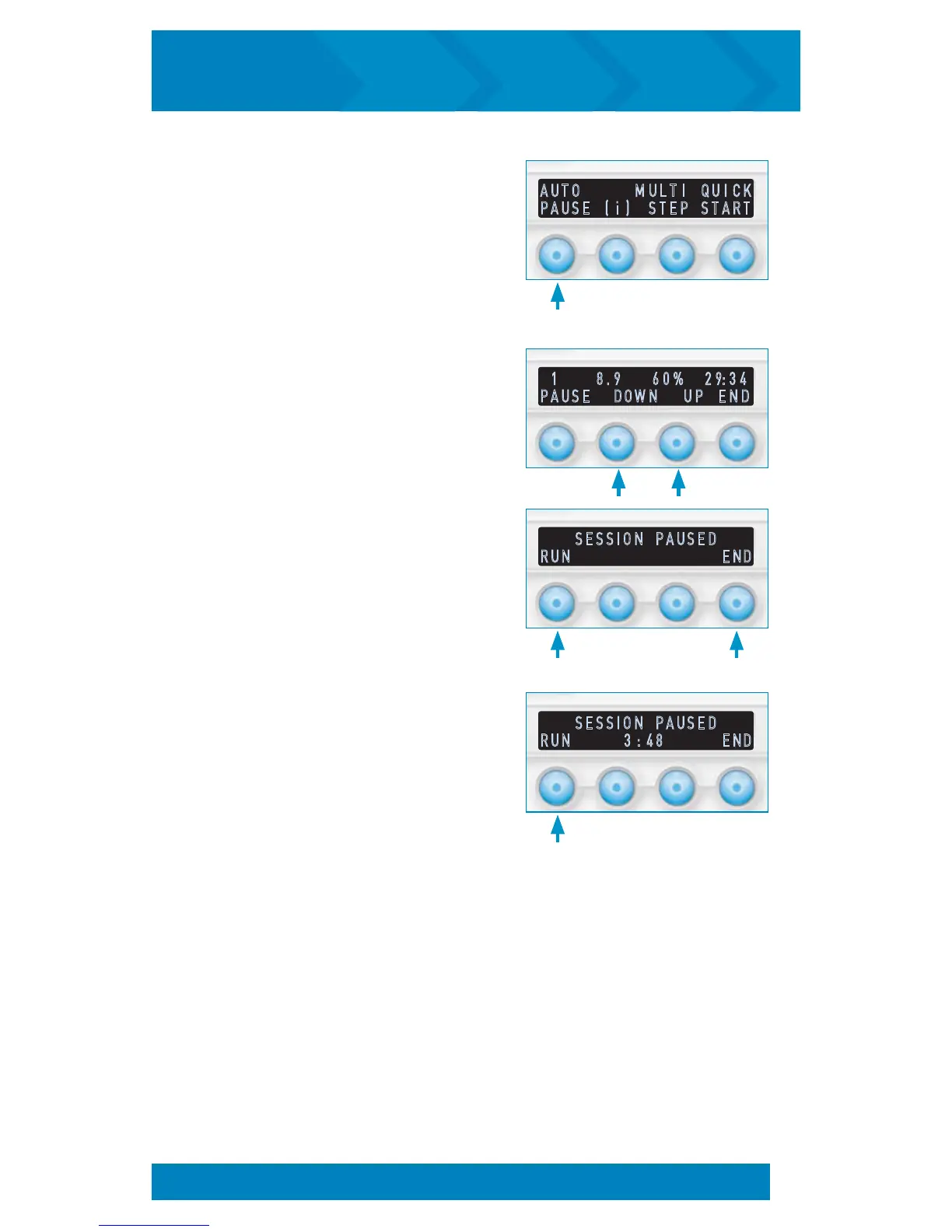
S E S S I O N P A U S E D
R U N 3 : 4 8 E N D
S E S S I O N P A U S E D
R U N E N D
A U T O M U L T I Q U I C K
P A U S E ( i ) S T E P S T A R T
To run Auto Pause mode:
1. From the startup screen, press
AUTO PAUSE. Your AUTO PAUSE
session will begin.
2. Adjust pressure by pressing either
DOWN or UP. Press PAUSE to temporarily
stop the session or END to return to the
startup screen.
3. When the session pauses, press RUN
to resume the session or END to return to
the startup screen.
4. When a Pause Time is set, a countdown
to resume will be displayed and therapy
will automatically resume when the
counter reaches 0:00. The RUN button
will also continue therapy at any time.
1 8 . 9 6 0 % 2 9 : 3 4
P A U S E D O W N U P E N D
STARTING A TREATMENT SESSION (cont’d)
15
inCourage
®
Airway Clearance Therapy | INSTRUCTION MANUAL


 To Next Page