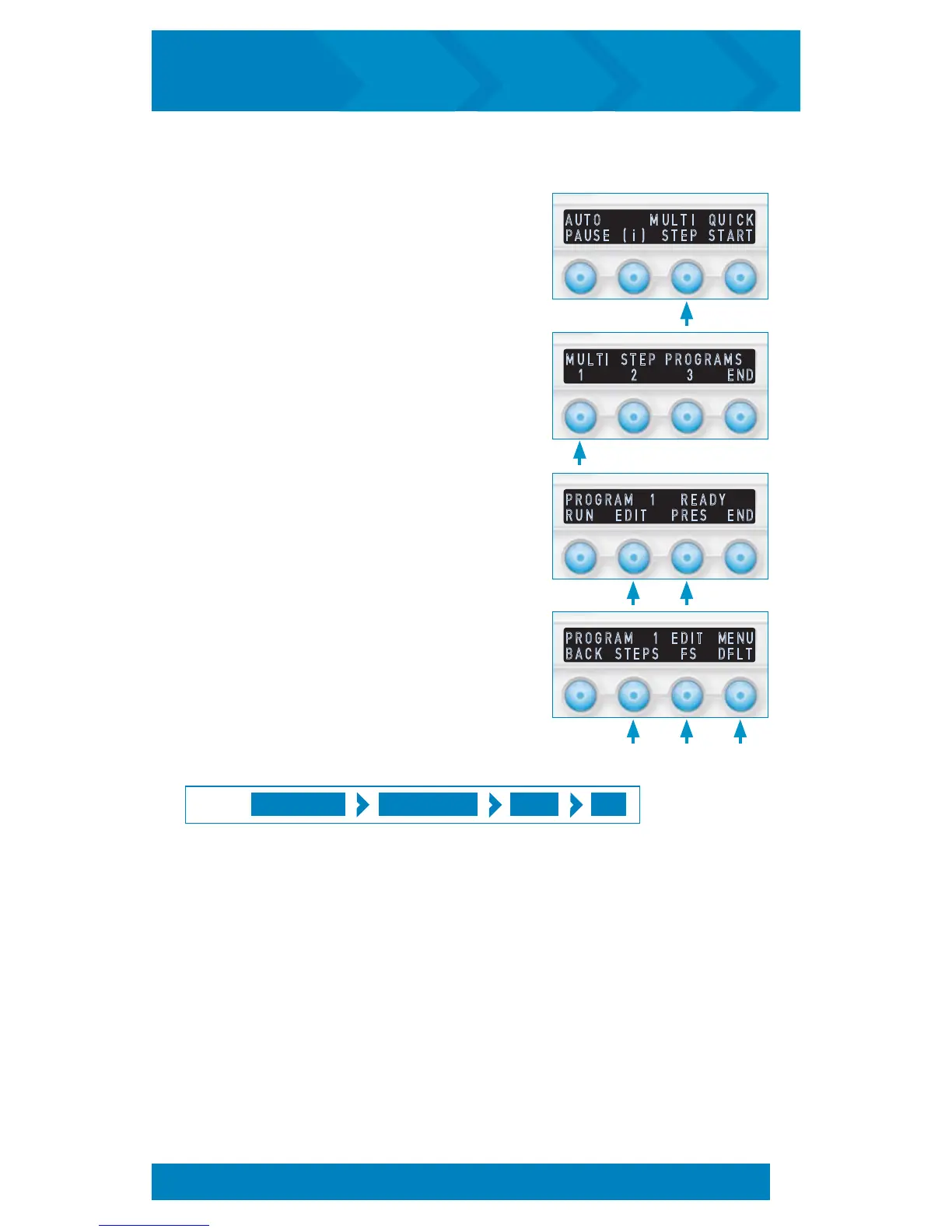
P R O G R A M 1 E D I T M E N U
B A C K S T E P S F S D F L T
P R O G R A M 1 R E A D Y
R U N E D I T P R E S E N D
M U L T I S T E P P R O G R A M S
1 2 3 E N D
A U T O M U L T I Q U I C K
P A U S E ( i ) S T E P S T A R T
Multi Step Editing Options:
1. From the Startup Screen, Press MULTI STEP
2. Select the program number you would
like to edit. (Program 1 will be used as
an example.)
3. The Program Ready screen has two
options for editing the selected program.
Selecting EDIT will continue to the
Program Edit Menu. Selecting PRES
will allow a single pressure to be set for
all steps.
4. The Program Edit Menu screen has three
options for editing the selected program:
STEPS, FS, and DFLT. These options are
described in the following instructions.
Fast Set Programming (FS) for Multi Step Sessions:
MULTI STEP PROGRAM # EDIT FS
PRESS:
Fast Set Programming creates a customized Multi Step session of up to 12 steps of
alternating frequencies with an input of 6 settings: Even Number of Steps, Low Frequency
(odd steps), High Frequency (even steps), Pressure Setting, Total Program Time, and Auto
Pausing On or Off. Total time is divided equally over the number of steps.
The FS menu is accessed as described in the previous Multi Step Editing Options section
above. FS menu screens prompt for setting of STEP QTY, LOW FREQ, HIGH FREQ,
PRESSURE, TOTAL PRG TIME, and PAUSE STEPS, YES or NO. Selecting the SAVE option
in the PAUSE STEPS menu will store the new selections into the selected program.
MODIFY A MULTI STEP SESSION
17
inCourage
®
Airway Clearance Therapy | INSTRUCTION MANUAL


 To Next Page