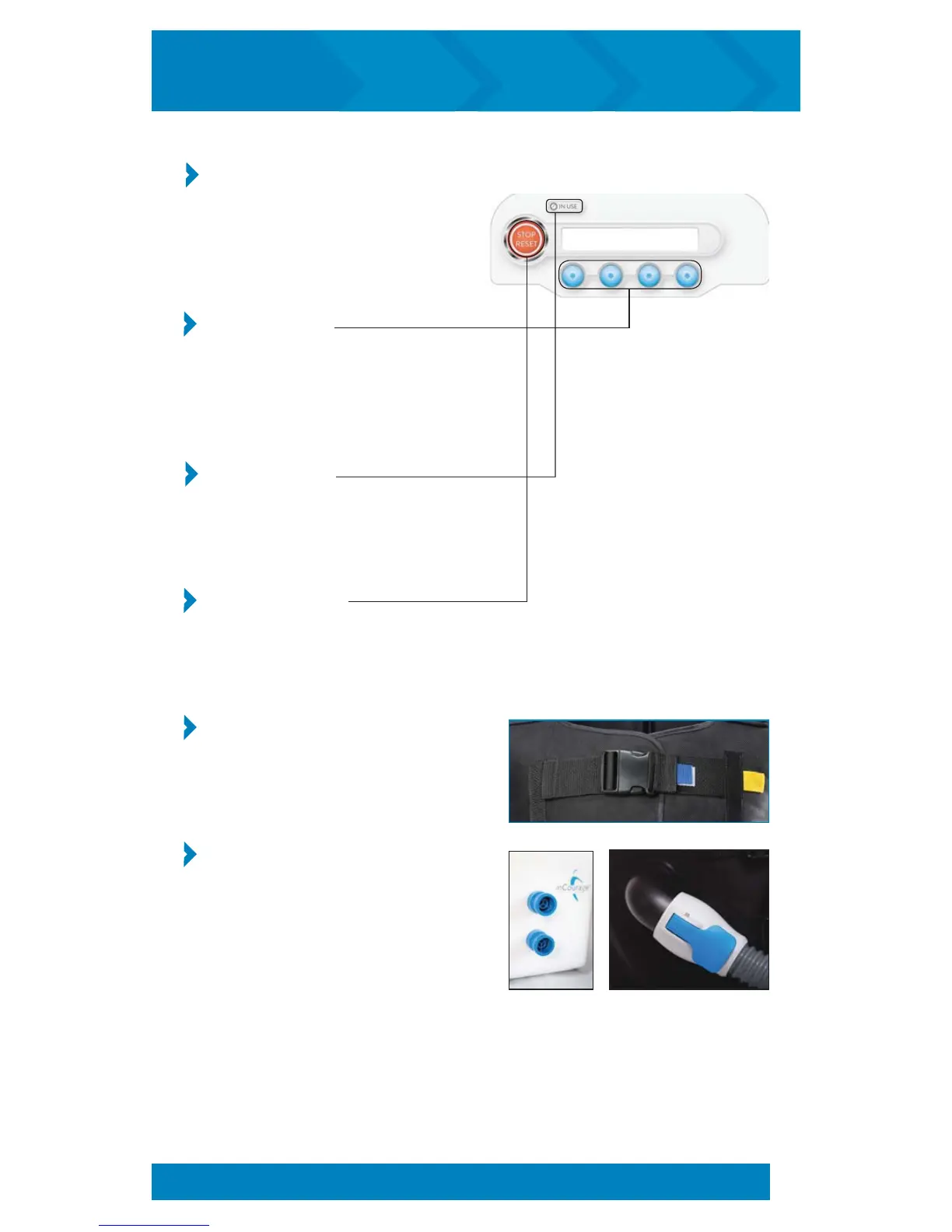
Control Panel
The control panel is located on
the top/front of the PTU and
provides all interactive menus
and performance readouts.
Control Buttons
The control buttons are located just
below the display. As the readout
above each button changes, the
function of the button changes.
Power Indicator
The power indicator glows green when
the unit is plugged in and the On/Off
button is in the On position.
Stop/Reset Button
This button ends all current functions,
resets the control board, and returns to
the main menu.
QuickFit Adjustable Straps
These straps allow you to size your vest
to the exact, repeatable, recommended
therapy spacing.
Air Ports
The air ports are located at the front
of the PTU and on the front of the vest.
The interconnecting hoses attach to the
ports to complete the connection from
the vest to the PTU.
COMPONENTS and CONTROLS (cont’d)
6
inCourage
®
Airway Clearance Therapy | INSTRUCTION MANUAL


 To Next Page