28
28
Controller Firmware Update
The NPC‐2006 controller can be updated using the USB interface. An update installs new firmware (soware) into the controller.
The firmware update file should be copied to C:\My Documents\Nitrous Power Controller\Firmware Updates so it can be located easily
during the update process.
When the controller enters update mode a copy of the current installed firmware will be made and placed into the update fi le directo‐
ry automacally. If an idencal firmware file already exists no second backup copy will be made.
Important—do not turn off power to the controller or unplug the USB cable during the update process. If this does occur the controller
will remain in update mode and when the USB connecon is established again the update process must be completed from the begin‐
ning.
Important—make sure the nitrous arming switch is off during the firmware update process.
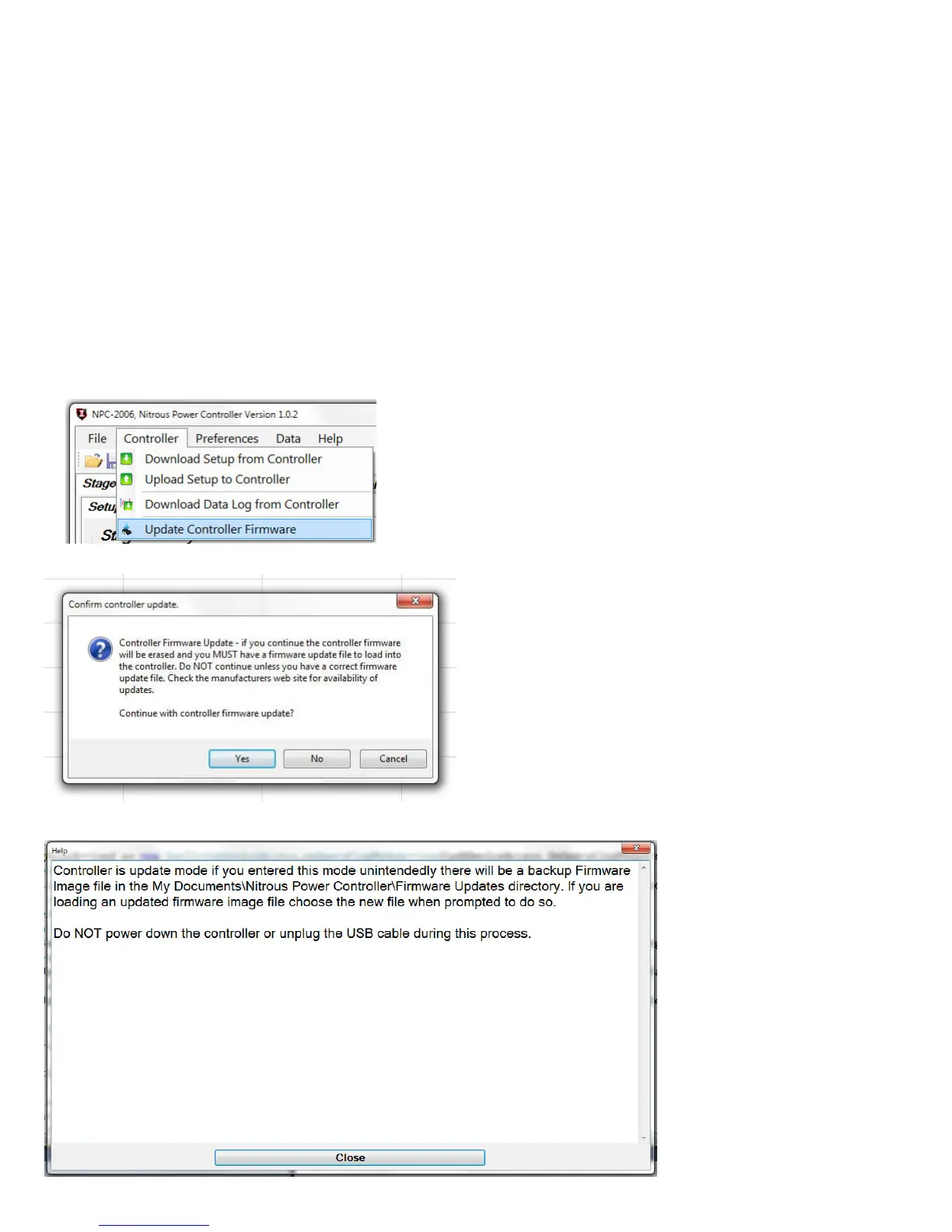
1—turn power on to the controller and connect the USB cable. Launch the PC soware.
2—Click on “Update Controller Firmware” from the Controller menu.
3—click on Yes to connue and put the controller into update mode.
4—once the controller reboots in update mode click on the “Close” buon to connue the firmware update process.
Connued on next page.


 To Next Page