IN3138HD User’s Manual
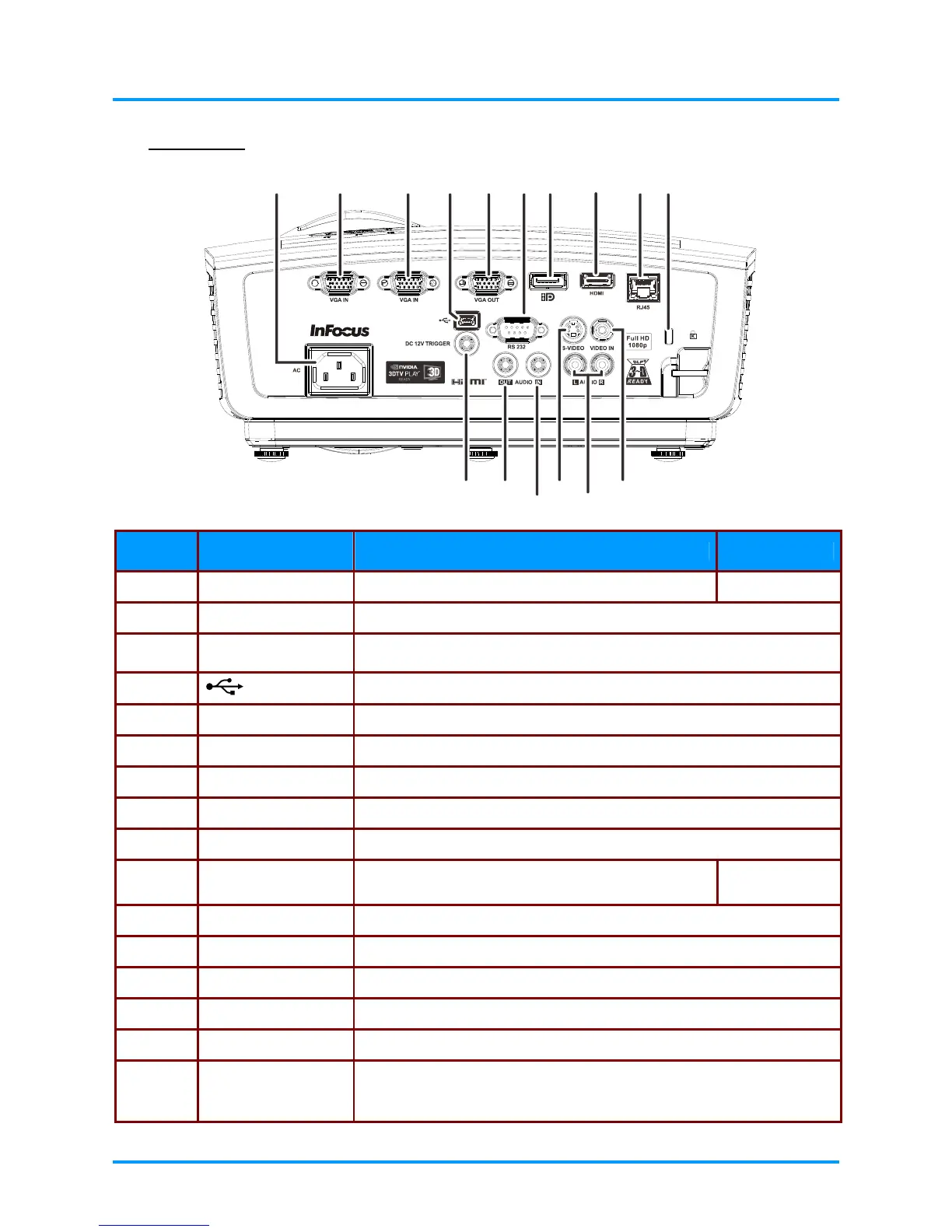
Rear view
12
10
3
456789
11
12
13
14
1516
ITEM LABEL DESCRIPTION SEE PAGE
1.
AC IN Connect a POWER cable
10
2.
VGA IN Connect a RGB cable from a computer
3.
VGA IN Connect a RGB cable from a computer
4.
(USB)
Service use only.
5.
VGA OUT Connect a RGB cable to an external monitor/display
6.
RS-232C Connect a RS-232 serial port cable for remote control
7.
DP Connect a DISPLAYPORT CABLE to a DISPLAYPORT device
8.
HDMI Connect an HDMI cable from a HDMI device
9.
RJ45 Connect a LAN cable from Ethernet
10.
Kensington Lock
Secure to a permanent object with a Kensington®
Lock system
45
11.
VIDEO IN Connect a COMPOSITE cable from a video device
12.
AUDIO IN (L and R) Connect an AUDIO cable from an audio device
13.
S-VIDEO Connect a S-VIDEO cable from a video device
14.
AUDIO IN Connect an AUDIO cable from an audio device
15.
AUDIO OUT Connect an AUDIO cable to an audio amplifier
16.
DC 12V TRIGGER
When connected to the screen through a commercially available cable,
the screen deploys automatically on start up of the projector. The screen
retracts when the projector is powered off (see notes on next page).
–4 –



 To Next Page