22
www.infopia21.com
CAUTION
1. If the code is not displayed after for a while, pull the blood glucose test
strip out of the port, and re-start the procedure from the beginning.
2. If the code on the LCD display window and on the test vial does not
match, try another new blood glucose test strip. If the mismatch
persists, please contact your local representative for help.
3. If the meter does not power on, pull the blood glucose test strip out of
the port, and re-insert the blood glucose test strip.
4. Avoid testing under direct sunlight, for a more accurate test result.
5. If you apply your blood sample too early, ERROR5 message will appear
on LCD ( refer to p34).
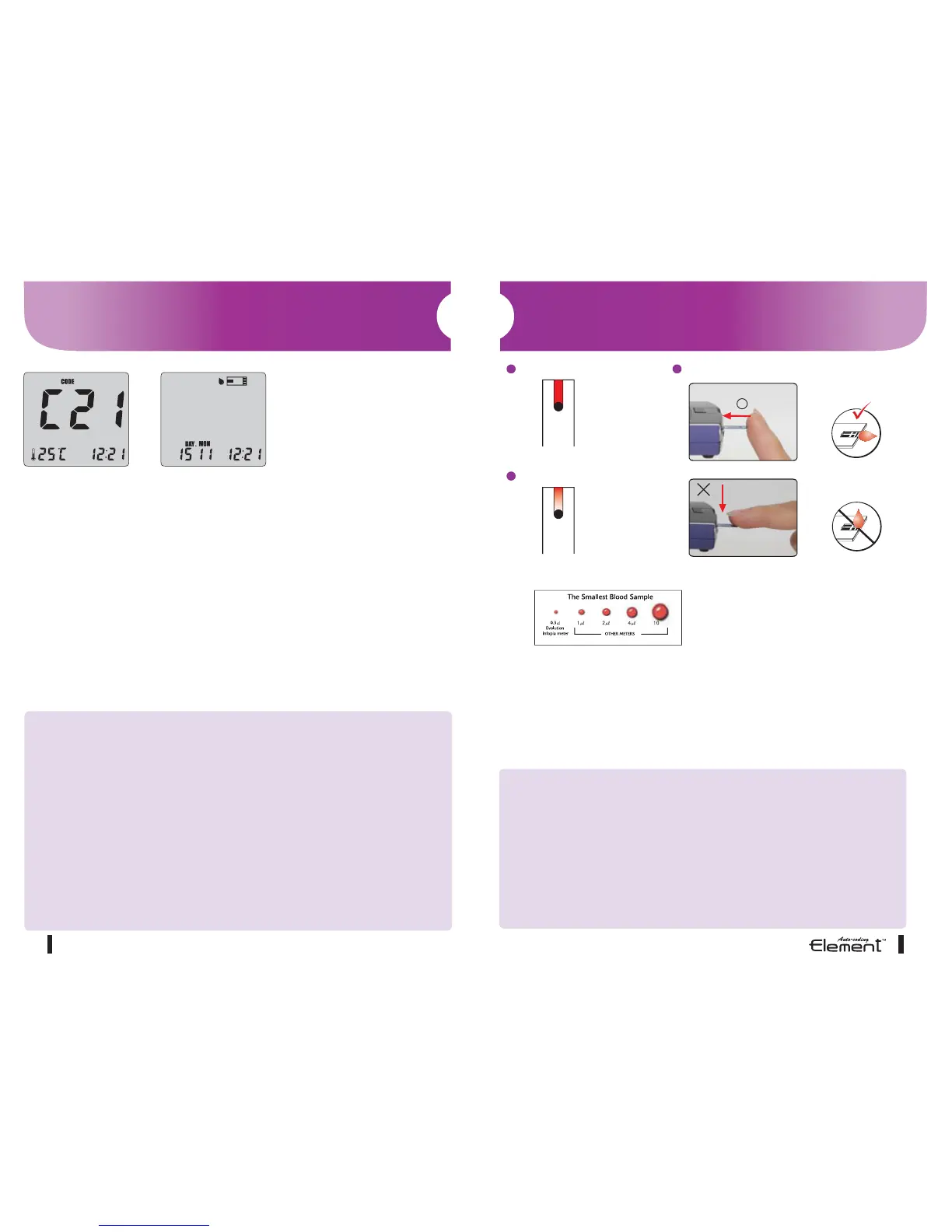
Step 1
• Firmly insert the blood glucose test strip into the blood glucose test meter
port with the “infopia” facing towards you.
• The blood glucose test meter automatically turns on displaying the code,
ambient temperature and the date and time.
• The Element
TM
Auto-coding will automatically recognize the blood glucose
test strip code number.
• A blinking blood glucose test strip will appear at the top of the screen indicat-
ing the blood glucose test meter is ready for testing.
Note : Inserting the test strip in the wrong direction will turn the meter on, but
you will be unable to test.
Testing Procedure
23
CAUTION
1. If the countdown does not start, do not add more blood to the blood
glucose test strip! Discard the blood glucose test strip an restart
testing.
2. If you do not conduct the test within 3 minutes, the blood glucose test
meter will automatically power off to save battery life. In this case
you need to start the test procedure again from the beginning.
3. You may get an inaccurate result if the blood sample is not
completely filled in a single action.
Step 2
• Place the top edge of the blood glucose test strip to the area you
prepared for testing.
• The blood will automatically be “drawn” into the blood glucose test strip
channel.
• When the chamber has enough blood, your blood glucose test meter will
automatically count down.
Correct Applying Blood
Completely Filled
Incorrect
Poorly lled
Correct
Incorrect
• Element
TM
Auto-coding blood glucose test
meter only requires 0.3㎕ sample volume.
• Apply your blood to the glucose test strip
and do not take off your finger until you get
the beep sound.
The test will automatically start.
Testing Procedure
sample size



 To Next Page