INFOSEC UPS SYSTEM - 4, rue de la Rigotière - 44700 Orvault - FRANCE - www.infosec-ups.com
Hot Line – Tel + 33 (0)2 40 76 15 82 - Fax + 33 (0)2 40 94 29 51 - hotline@infosec.fr – 07 11 AA 59 203 07
5
2. INSTALLATION AND SETUP
NOTE: Before the installation of the unit, please inspect it. Be sure that nothing inside the
package is damaged. Please keep the original package in a safe place for future use.
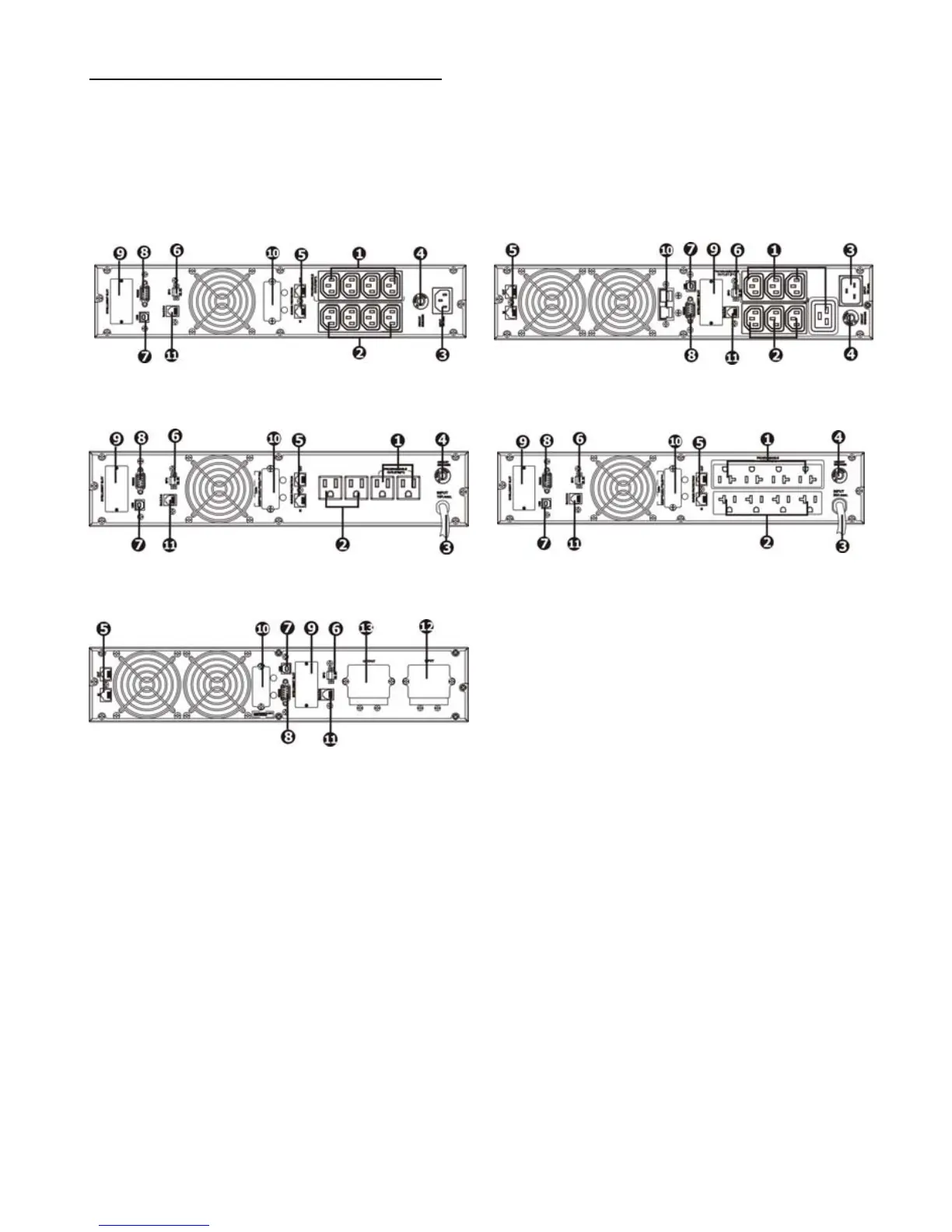
2.1 Rear panel view
E3 LCD RT IEC
800/1000/1500/2000/2500
E3 LCD RT IEC
3000/3500
E3 LCD RT NEM
800/1000/1500/2000
E3 LCD RT NEM
2500
E3 LCD RT NEMA
3000/3500
1 - Programmable outlets: connect to non-critical loads.
2 - Output receptacles: connect to mission-critical loads.
3 - AC input.
4 - Input circuit breaker.
5 - Network/Fax/Modem surge protection.
6 - Emergency Power Off function connector (EPO).
7 - USB communication port.
8 - RS-232 communication port.
9 - SNMP intelligent slot.
10 - External battery connector.
11 - External battery number detection port.
12 - Input terminal.
13 - Output terminal.















 To Next Page