INFOSEC UPS SYSTEM – 4 rue de la Rigotière – 44700 Orvault – France – www.infosec-ups.com
Hot Line Tel : +33 (0)2 40 76 15 82 – fax : +33(0)2 40 94 29 51 – hotline@infosec.fr – 03 16 AA 59 203 26
Note 1: ● means LED is ON, and ○ means LED is OFF.
Note 2: In Normal mode, only the LED “Green” is lighting
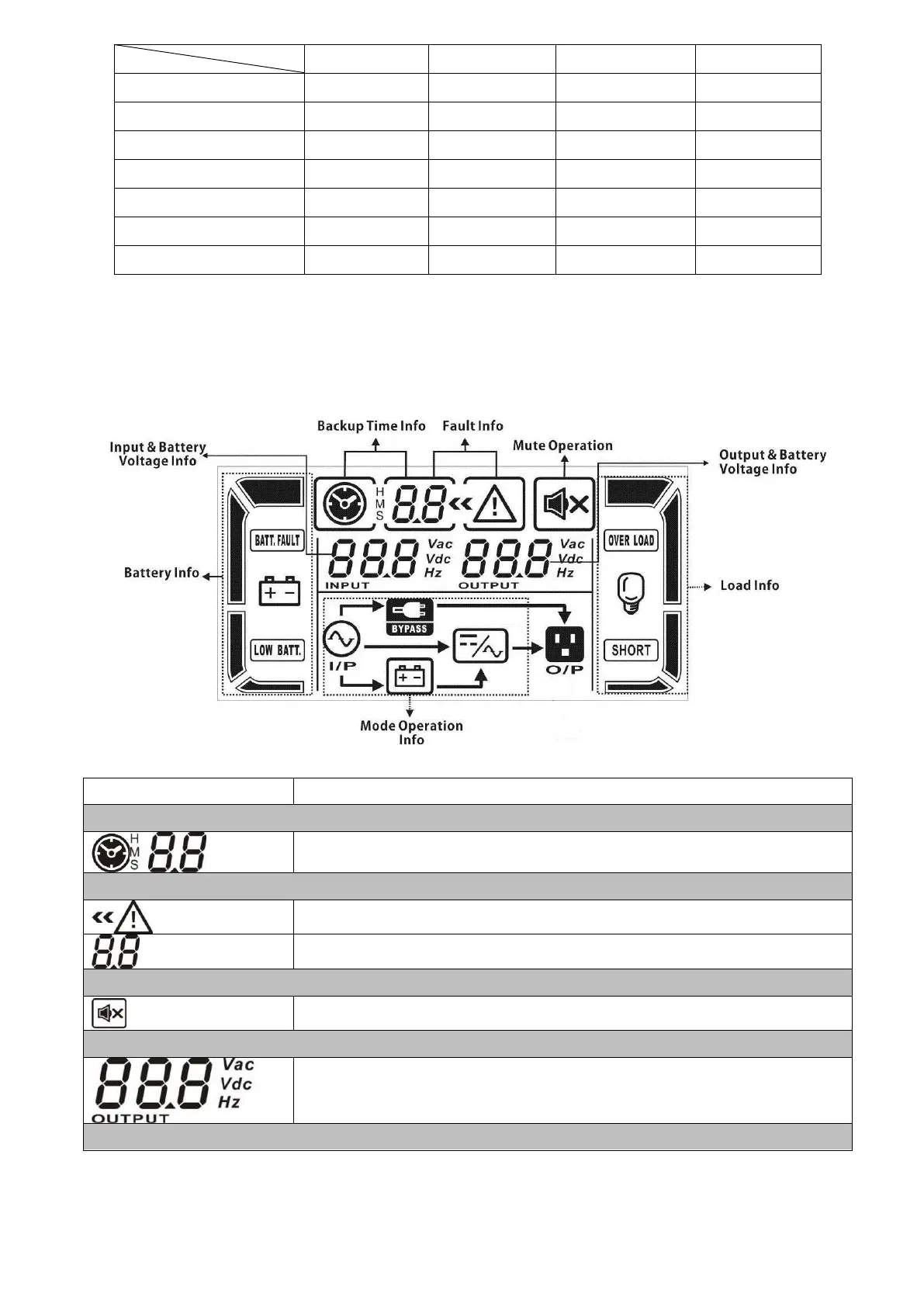
LCD Panel:
Indicates backup time in numbers when the UPS is in battery mode
H: hours, M: minutes, S: seconds
Indicates that the warning and fault occurs.
Indicates fault codes (listed in details in section 3-9).
Indicates that the UPS alarm is disabled.
Output & Battery voltage information
Indicates output voltage, frequency or battery voltage.
Vac: output voltage, Vdc: battery voltage, Hz: frequency














 To Next Page