service@innocn.com
English
8
The terms HDMI and HDMI High-Definition Multimedia Interface, and the HDMI Logo are trademarks or registered
trademarks of HDMI Licensing Administrator, Inc. in the United States and other countries.
This device complies with part 15 of the FCC Rules. Operation
is subject to the following two conditions:
(1) This device may not cause harmful interference,
(2) this device must accept any interference received, including
interference that may cause undesired operation.
CAN ICES-3 (B)/NMB-3(B)
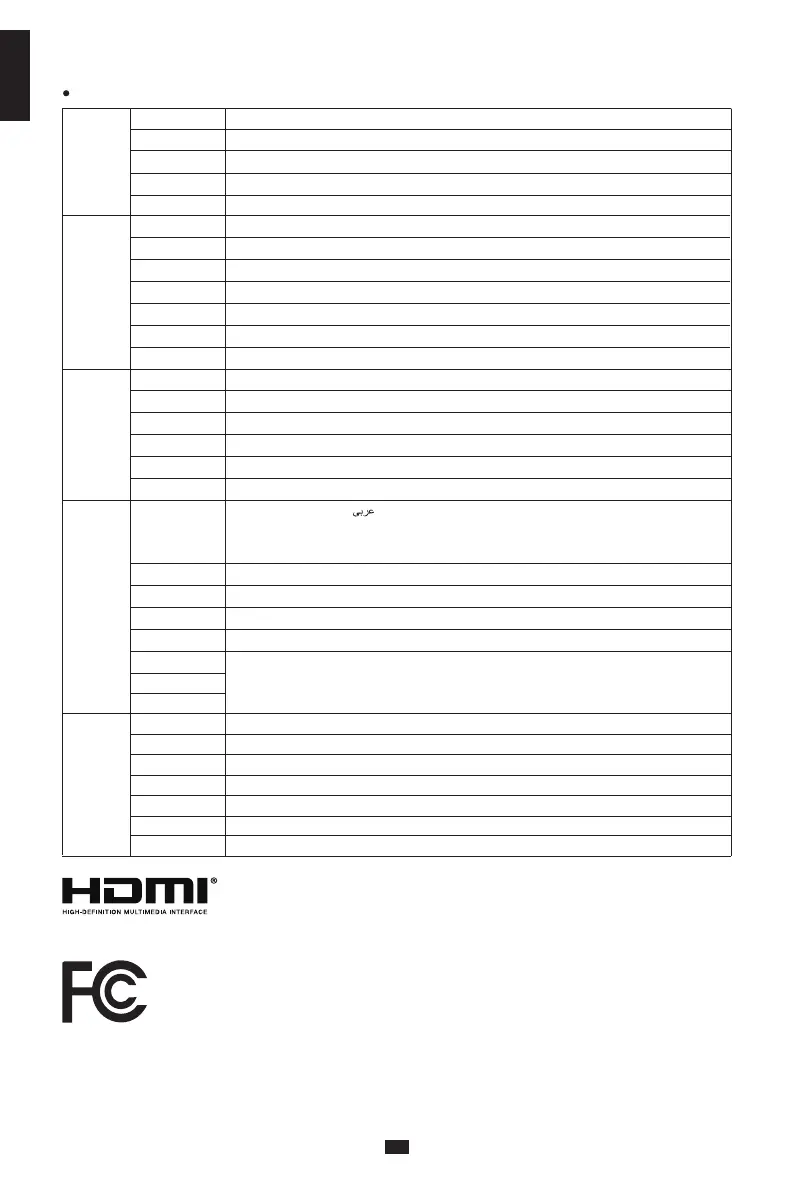
Game
Settings
Off/On
Off/On
Off/On
Off/On
Off/Normal/Fast/Ultrafast
Off/On/Position
Off/Crosshair 1/Crosshair 2/Crosshair3/Crosshair 4/Crosshair 5/Crosshair6
RTS/RPG Mode
FPS Arena Mode
MOBA Arena Mode
Adaptive-Sync
Response Time
Refresh Rate
Game Crosshair
Picture
Sttings
PIP/PBP
OSD
Settings
Other
Settings
Off/Movie mode/Reading mode/Night mode/Care eyes mode
0-100
0-100
Off/On
Wide Screen/4:3/1:1/Auto
Brightness
Contrast
DCR
Contextual model
Aspect ratio
PIP/PBP Mode Off/PIP Mode/PBP 2win 1:1/PBP( Phone1)/PBP( Phone2)
DP/HDMI/Type-C
Auto/DP/HDMI/Type-C
Top Right/Top Left/Bottom Right/Bottom Left
Small/Medium/Large
5-100
0-100
0-100
0-5
0-100
Brightness/Contrast/Volume/Mute/Shadow Balance/
Game Crosshair/Refresh Rate
/
Contextual model/
PIP/PBP Mode/Input Signal/Dynamic Brightness
Sub-Singal Source
Audio source
PIP Position
PIP Size
Window Swap
Language
OSD Time Out
OSD H-Position
OSD V-Position
OSD transparency
Hotkey1 Setting
Hotkey2 Setting
Hotkey3 Setting
Input Sinal Auto/DP/HDMI/Type-C
Volume
Mute Off/On
Off/On
Off/On
Auto Power
Eyeshield Remind
No/YesReset
Input Source: HDMI/ Resolution: 2560x1080@60Hz/Mode: Standard Mode/ SN:0000000000000Information
English/简体中文/한국어/ /Portugues do Brasilazil/ Deutsch/Nederland/ Suomi/
Français/Ελληνικά/Indonesia/Italiano/日本語/Malaysia/Polskie/Português/Pусский/
Español/ไทย/Українська/Tiếng Việt/繁體中文/Türkçe
Functions of the monitor vary with models, and the functions in this manual are for reference only.


 To Next Page
 Loading...