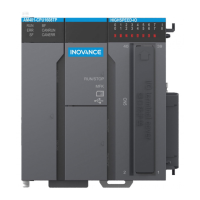
The AM600 Series PLC (NPN) is a CoDeSys-based medium-sized Programmable Logic Controller developed and manufactured by Inovance. It fully supports the IEC61131-3 programming system, real-time EtherCAT fieldbus, and cam synchronous motion control. This PLC is equipped with unique high-speed I/O ports designed for high-speed applications.
Function Description
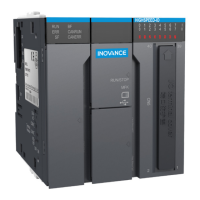
The AM600-CPU1608TN model, as an example, serves as the central processing unit (CPU) module. It offers a 10 MB program storage space and 20 MB data storage space. Connectivity is robust, featuring two RS485 ports, one CANopen/CANlink port, and one LAN port. It supports the EtherCAT bus protocol and includes built-in 16-in-8-out high-speed I/O with sink-type output.
External Interfaces
The CPU module provides a comprehensive set of external interfaces:
- MFK (Multi-functional key): Used for operations like resetting the IP address.
- SD card slot: For storing user programs and data, supporting up to 32 GB.
- LED indicators: Include RUN (operation), ERR (CPU module error), SF (system error), and BF (bus error).
- DIP switch: For RUN/STOP control and termination resistor settings for CAN and RS485.
- DB9 (CN1) receptacle: Two RS485 ports supporting MODBUS protocol.
- DB9 (CN2) receptacle: One CANopen/CANlink port.
- Network port (CN3): Supports MODBUS TCP protocol, standard Ethernet functions, system program commissioning, and user program download/commissioning (IPv4 only).
- Network port (CN4): Dedicated for EtherCAT protocol.
- USB interface: For program download and commissioning.
- High-speed I/O: 16-point high-speed input and 8-point high-speed output.
- I/O indicator: Shows the signal effectiveness of all I/Os.
- Local expansion bus interface: Supports up to 8 local modules, with actual number and configuration depending on power consumption. Hot plugging is not supported.
- 24 V power input terminal: DC 24 V voltage input, used with an AM600 power module.
- Grounding switch: For system digital GND and housing GND. Not used by default, only when digital GND is a reference plane for stability.
Important Technical Specifications
- Programming method: IEC 61131-3 programming languages (LD, FBD, IL, ST, SFC, CFC).
- Program execution mode: Compile and run.
- User program storage space: 10 MB.
- Flash space for power failure memory: 512 KB.
- SD card capacity: Up to 32 GB.
- Program power failure memory: Flash or SD card retention (only available when power is on for more than 35s before going out).
- Internal 5 V power output current: 1500 mA (rated value).
- Interrupt mode: 8-point input interrupt (CPU module high-speed DI), supports rising edge and falling edge interrupts.
- Signal Name: X0-X5 (differential or single-ended), X6-XF (single-ended).
- Input Type: 24 V input for both, Differential input for X0-X5.
- Rated input voltage: 24 VDC (-15% to +20%, rippling within 5%).
- Rated input current: 7.3 mA@24 VDC (typical).
- ON current: More than 5 mA.
- OFF current: Less than 1.5 mA.
- Input resistance: 3.3 kΩ.
- Max. counting speed: 800 Kpps (two-phase quadruplicated frequency), 200 kHz (single input).
- Least ideal duty cycle of 2-phase input: (40%: 60%)–(60%: 40%).
- Common terminal: Each point has a separate common terminal for X0-X5; 5 points share 1 common terminal for X6-XF.
Output Specification
- Signal Name: Y0-Y7.
- Output polarity: Sink.
- Voltage of the control circuit: 5 VDC–24 VDC.
- Rated load current: 0.1 A/point, 0.5 A/COM.
- Max. voltage drop at ON: 0.2 V (typical).
- Leakage current at OFF: Less than 0.1 mA.
- Output frequency: 200 kHz (external equivalent load above 12 mA required).
- Common terminal: 4 points share 1 common terminal.
Usage Features
- Wiring Precautions: Total length of high-speed I/O cables should be within 3.0 m. Avoid bundling extension cables with power cables to prevent interference. Shielded cables are recommended for extension cables. Maintain a minimum bending radius of 76 mm for cables.
- Communication Connections:
- RJ45 Cable: Insert until a click is heard. Secure the cable end near the device to prevent tension.
- EtherCAT Bus: Uses a CN4 port. Requires 26AWG Cat 5e shielded twisted pair cables (8P8C-3-prong connectors). Max distance between two nodes is 100 m. Supports CoE (PDO, SDO) and DC-distributed clock synchronization.
- CANopen/CANlink Bus: Uses a CN2 terminal (DB9 connector). Recommended to use shielded twisted cables with two 120 Ω termination resistors at both ends of the bus. Single-point grounding for the shield.
- RS485 Serial Communication: Uses a CN1 terminal (DB9 connector).
- Ethernet Connection for Monitoring: Connects point-to-point with a computer or HMI, or to a hub/switch for multi-point connection. Requires Cat5 shielded twisted pair with an iron-shelled connector for reliability.
- Programming Tool: Inovance provides "InoPro" as a free user programming tool for AM600 series PLCs, available from distributors or their website.
- Start and Stop: The system can be started or stopped using the RUN/STOP DIP switch on the module or via the host computer.
- IP Address Reset: The MFK key can be used to restore the CPU module's IP address to default (192.168.1.88) if forgotten, effective only in STOP state.
Maintenance Features
- Installation: Must be carried out by specialists. Disconnect all external power supplies before installation/removal. Avoid dusty, oily, corrosive, combustible, high-temperature, or vibrating environments. Install in a control cabinet with lock (IP20+ protection).
- Wiring: Must be carried out by trained personnel. Disconnect power supplies before wiring. Ensure good insulation and correct cable connections. Tighten terminal bolts within the specified torque range. Do not bundle control, communication, and power cables together; maintain a distance of over 100 mm. Use shielded cables for high-frequency signals.
- Operation and Maintenance: Maintenance and inspection by trained personnel only. Do not touch terminals with power on. Disconnect power before cleaning, re-tightening screws, or removing/connecting communication wirings or extension cards.
- LED Display: The CPU module's LED display shows system status and fault codes (e.g., "Er 40" for CPU Local expansion bus error). A table of fault codes and remedies is provided for troubleshooting.
- Module Connection: Modules connect via interfaces and latches. Slide the latch, connect the module, then slide the latch back to secure. I/O terminal blocks are mounted to CN5 and fixed with a torque of 0.2-0.25 N·m.
- DIN Rail Mounting: Pull down mounting hooks, hang the module onto the DIN rail, press firmly until it engages, then push the hooks onto the rail until a click is heard.
- Disposal: Scrapped modules should be treated as industrial waste. Batteries must be disposed of according to local laws and regulations.
- Warranty: Inovance provides an 18-month free warranty from the manufacturing date under normal use conditions. Damage due to improper use, unauthorized repair, natural disasters, physical damage, or non-compliance with instructions will be charged for maintenance.

 Need help?
 General

 To Next Page
