12
NS-46E480A13/NS-55E480A13 Insignia 46"/55" 1080p LED TV
www.insigniaproducts.com
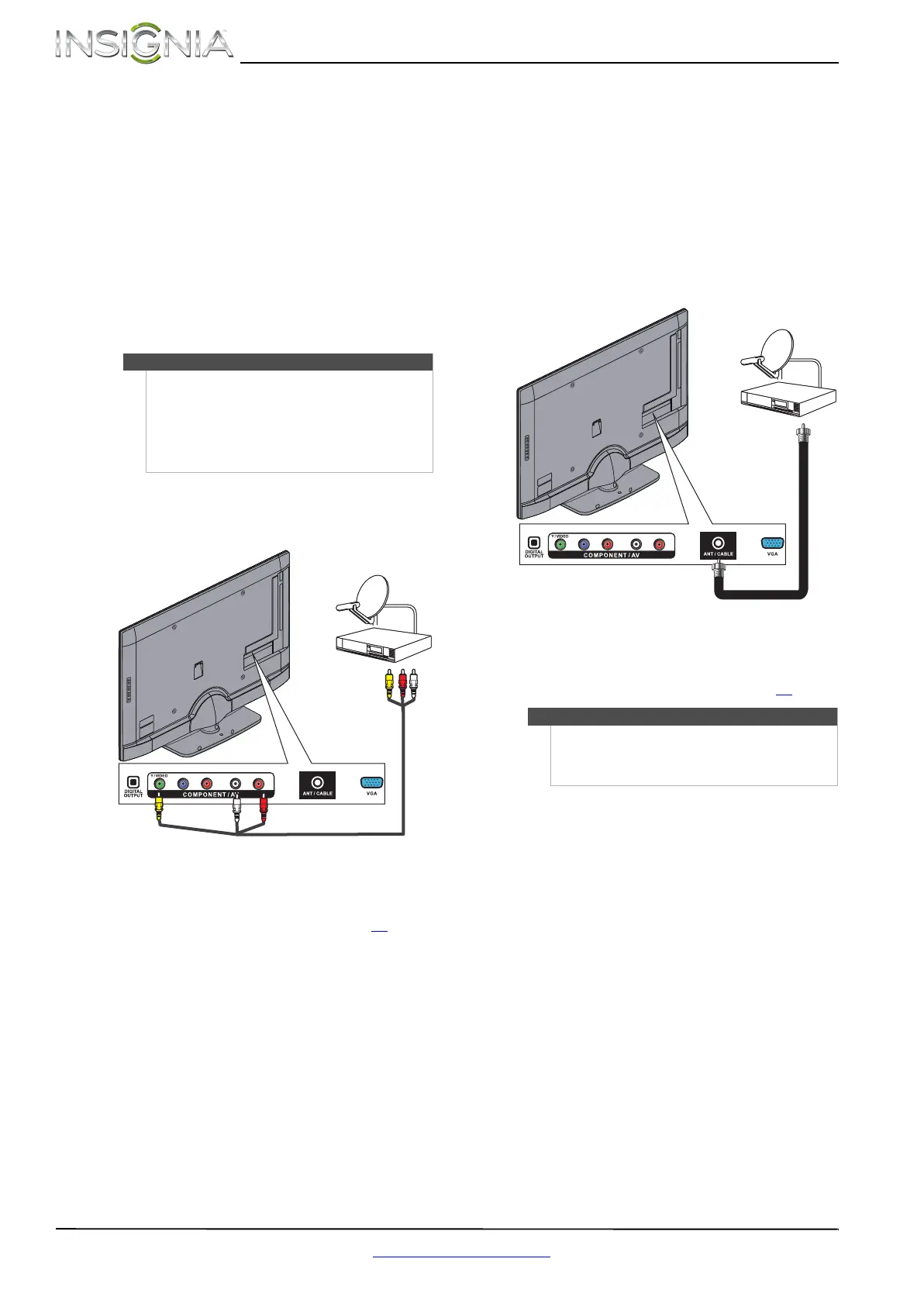
Using composite video (good)
To connect a cable or satellite box using
composite video:
1 Make sure that your TV’s power cord is
unplugged, and all connected equipment is
turned off.
2 Connect the incoming cable from the cable wall
jack to the cable-in jack on the cable or satellite
box.
3 Connect an A/V cable (not provided) to the
COMPONENT/AV Y/VIDEO jack and L and R
audio jacks on the back of your TV and to the
composite video and audio out jacks on the
cable or satellite box.
4 Plug your TV’s power cord into a power outlet,
turn on your TV, then turn on the cable or
satellite box.
5 Go through the Setup Wizard on page 21
.
Using coaxial (good)
To connect a cable or satellite box using coaxial:
1 Make sure that your TV’s power cord is
unplugged, and all connected equipment is
turned off.
2 Connect the incoming cable from the cable wall
jack to the cable-in jack on the cable or satellite
box.
3 Connect a coaxial cable (not provided) to the
ANT/CABLE jack on the back of your TV and to
the coaxial out jack on the cable or satellite box.
4 Plug your TV’s power cord into a power outlet,
turn on your TV, then turn on the cable or
satellite box.
5 Go through the Setup Wizard on page 21
.
Note
•The COMPONENT/AV Y/VIDEO, Pb, and Pr
video jacks (used to connect a component
device) share the L and R audio jacks with the
COMPONENT/AV Y/VIDEO jack (used to
connect a composite device).
• When you connect the audio using the
L and R audio jacks, the audio output is analog.
Y / VIDEO
P
B
P
R
L R
Cable or satellite box
A/V cable
Cables are often color-coded to
match color-coded jacks.
Note: The yellow video connector
on the AV cable connects to the
green COMPONENT/AV Y/VIDEO
jack.
Back of TV
Notes
• Use a coaxial cable to eliminate interference and
noise from radio waves.
• Do not bundle the coaxial cable with the power
cord or other cables.
Y / VIDEO
P
B
P
R
L R
Cable or satellite box
Coaxial cable
Back of TV








 To Next Page