33
It
De
Multi-zone playback
You can listen to audio in a room (called Zone 2) other
than the one where this unit is located (called the main
room).
0 DSD format files cannot be output to Zone 2.
0 With “NET” and “BLUETOOTH”, you cannot select
different inputs for the main room and separate room.
For example, if “NET” has been selected in the main
room and then “BLUETOOTH” is selected as playback
source in the separate room, the input in the main
room will change to “BLUETOOTH” accordingly.
Furthermore, you cannot select separate network
services for the main room and a separate room with
the “NET” input.
0 When listening to radio broadcasting, you cannot
select different stations for the main room and
separate room. Therefore broadcasting of the same
station will be heard in the both rooms.
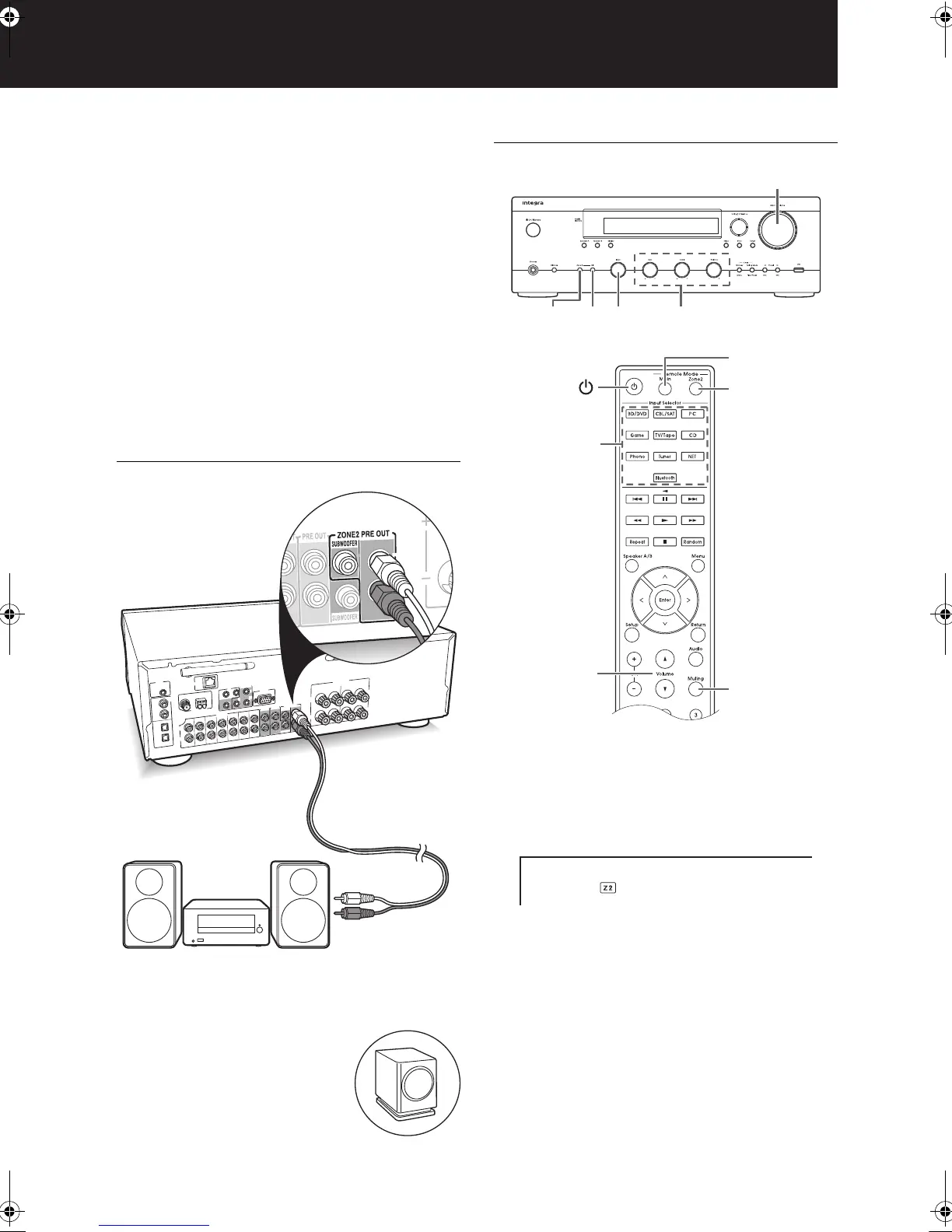
Multi-zone connection
Connect the ZONE 2 PRE OUT L/R jacks of the unit and
the line-in jacks of the pre-main amplifier in a separate
room with an RCA cable.
You can also connect a subwoofer
with built-in amplifier to the ZONE 2
PRE OUT SUBWOOFER jack.
Performing multi-zone playback
1. Press the Remote Mode Zone2 button of the remote
control, point the remote control at the unit and press
the Í button.
“Z2” lights on the display and the multi-zone feature is
enabled. (Zone 2 is now on.)
2. Press the Input Selector button of the input to be
played in a separate room.
To control on the main unit: press the Zone 2 button
and within 8 seconds, turn the Input control to select the
input to be played in the other room. (To play the same
source in the main room and separate room, press the
Zone 2 button twice.)
To adjust the volume and sound quality: Adjust on the
device in Zone 2. When you have connected a device
that doesn’t allow volume adjustment, you can adjust on
this unit by selecting “Variable” in “5. Zone2”-“Zone2 Out”
(> 37) in the setup menu. To adjust the volume, bass,
treble, and balance on this unit, press the Zone 2 button
InputOffZone 2 Bass, Treble, Balance
Volume
/
Remote Mode
Zone2
Remote Mode
Main
Master Volume
Muting
Input
Selector
DTM40.7_mst.book 33 ページ 2015年7月24日 金曜日 午後12時58分



 To Next Page