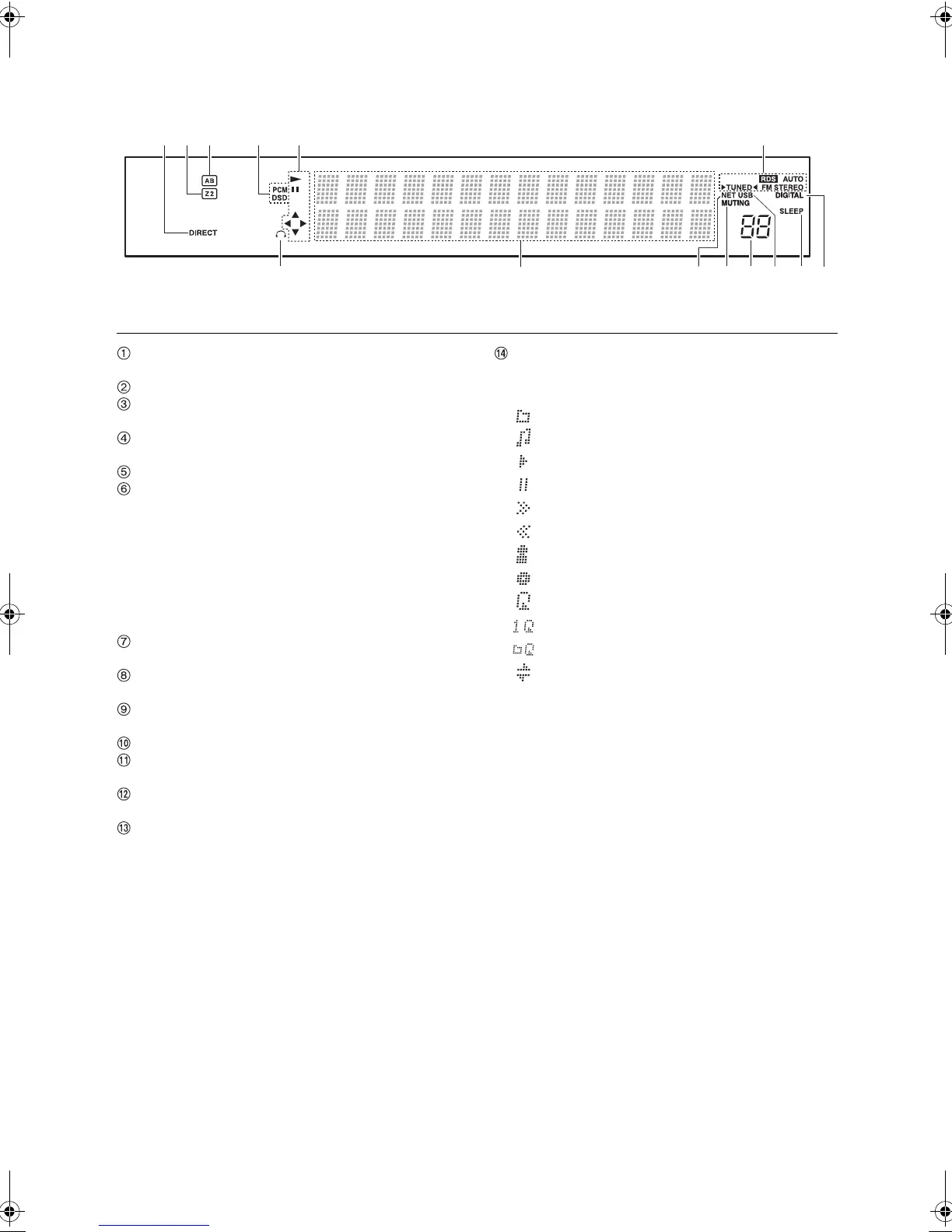
Names and functions of parts
8
Display
DIRECT indicator: This indicator appears when Direct
of the audio quality setup is on.
Z2: Lights when Zone 2 output is on.
Speaker selection display (A/B): Displays the
selected speaker terminals.
PCM/DSD: Lights according to the type of input digital
signals.
Playback/Pause/Cursor display
AM/FM reception statuses
AUTO: This indicator appears when Auto Tuning Mode
is selected.
FM STEREO: This indicator appears when the unit is
tuned into a stereo FM broadcast.
RDS (Australian model): This indicator appears when
the unit receives RDS information.
1TUNED2: This indicator appears when the unit is
tuned into a radio station.
Headphone indicator: Stays lit when headphones are
connected.
NET: Lights when “NET” is selected as the input
source. It will flash if the connection is not correct.
MUTING indicator: This indicator flashes when audio
is muted temporarily.
Volume level
USB: Lights when “USB” is selected as the input
source. It will flash if the connection is not correct.
SLEEP indicator: This indicator appears when the
sleep timer is set.
DIGITAL: Lights when the selected input source is
digital.
Message display area: Track information and menus
appear here.
The following icons appear.
: Folder
: Track/Broadcast station name
: Playing back
: Paused
: Searching forward
: Searching backward
: Artist name
: Album name
: Repeat all tracks
: Repeat one track
: Repeat tracks in the folder or playlist (DLNA)
: Random
DTM40.7_mst.book 8 ページ 2015年7月24日 金曜日 午後12時58分



 To Next Page