44
First Time Setup
—Continued
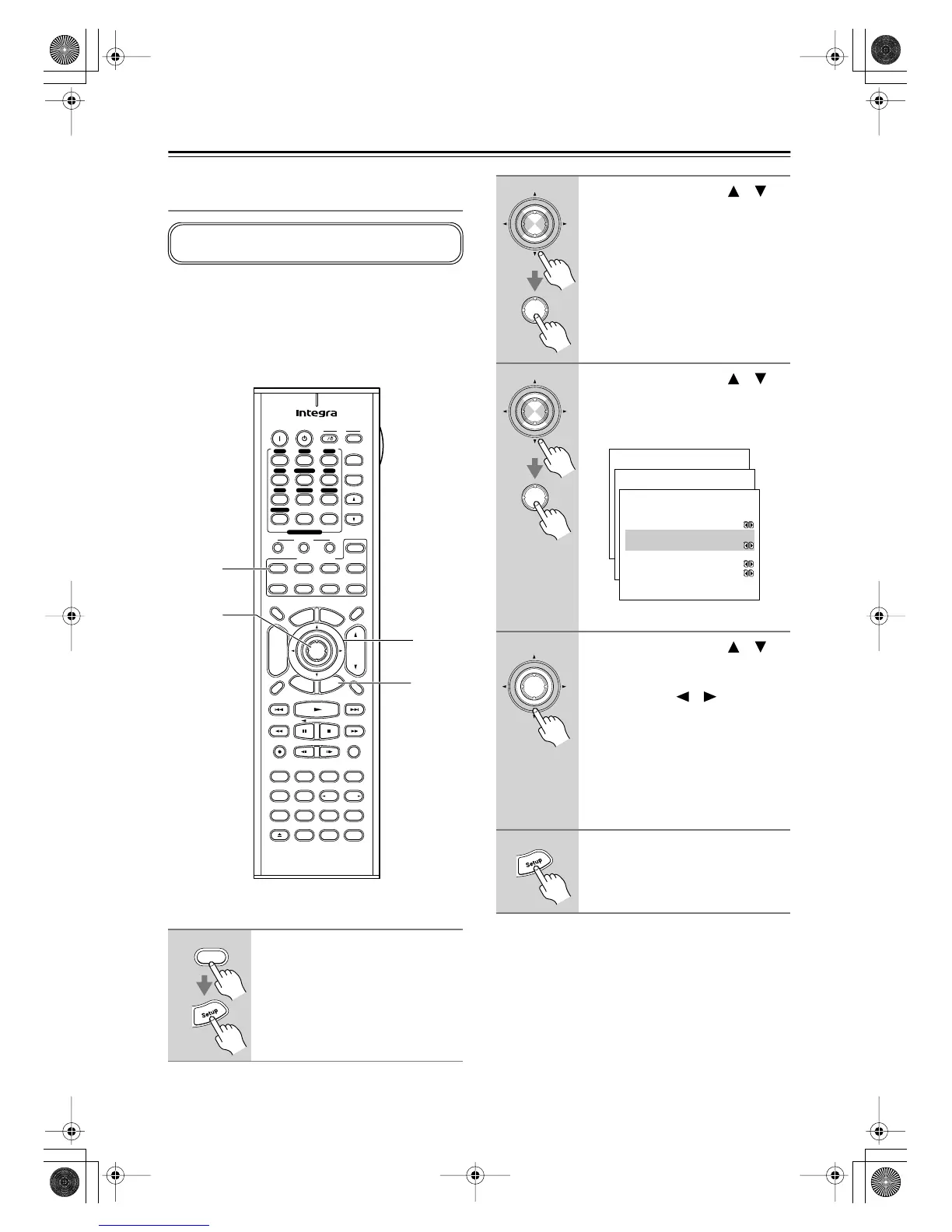
Minimum Speaker Impedance
(not American models)
If the impedance of any of the connected speakers is 4
ohms or more, but less than 6 ohms, set the Minimum
Speaker Impedance to “4 ohms.”
Note:
Before you change this setting, turn down the volume.
Notes:
• This procedure can also be performed on the AV
receiver by using its [Setup] button, arrow buttons, and
[Enter] button.
1
Press the [Receiver] button fol-
lowed by the [Setup] button.
The main menu appears onscreen.
This setting is not set automatically by the Automatic
Speaker Setup function (see page 39).
Pure A
On Standby
TV
Display Muting
RandomRec
Last Memory
AngleSubtitleAudio
MemorySearchA
-
BRepeat
RC
-
585M
E
x
i
t
G
u
i
d
e
Prev
CH
TV CH
TV VOL
--
/
---
Dimmer
Tape
TV
Input
Sleep
Input
I
Enter
Test Tone
CH SEL
Surround
THX
Direct
StereoAll ST
Level
+
Level
-
L Night
DSP DSP
T
o
p
M
e
n
u
M
e
n
u
S
e
t
u
p
R
e
t
u
r
n
VOL
CH
Disc
SATTV VCR Cable
DVD
Receiver
CD
+
10 0
Clear
123
456
789
+
-
Video OffOpen/Close
Macro
123
MD/CDR
Re-EQ
+
-
Input Selector
V1 V 2 V3
CD
Phono
Tape
V
4 DVD
Multi CH
Tuner
Remote Mode
Zone 2
2–4
1, 5
2, 3
1
Receiver
2
Use the Up and Down [ ]/[ ]
buttons to select “1. Initial
Setup,” and then press [Enter].
The Initial Setup menu appears.
3
Use the Up and Down [ ]/[ ]
buttons to select “3. Hardware
Setup,” and then press [Enter].
The Hardware Setup menu appears.
(Menus vary depending on country.)
4
Use the Up and Down [ ]/[ ]
buttons to select “b. Sp Imped-
ance Minimum,” and then use the
Left and Right [ ]/[ ] buttons to
select:
4 ohms:
Select if the impedance of any
connected speaker is 4 ohms
or more, but less than 6 ohms.
6 ohms:
Select if the impedances of all
connected speakers are
between 6 and 16 ohms.
5
Press the [Setup] button.
The setup menu closes.
Enter
Enter
Enter
Enter
Menu
------------------------
1.Initial Setup
2.Speaker Setup
Advanced Setup
3.Surround Setup
4.Audio Adjust
5.Listening Mode Preset
6.Preference
Basic Setup
1.Initial Setup
------------------------
2.Component Video
3.Hardware Setup
1.Digital Input
1-3.Hardware Setup
------------------------
:Not Activated
b.Zone2 Out
:Fixed
c.Sp Impedance Minimum
:6ohms
d.TV Format :AUTO
a.Powered Zone2
Enter
DTR-6.5,5.5En.book Page 44 Wednesday, July 28, 2004 9:07 AM



 To Next Page