16
Remote Controller
—Continued
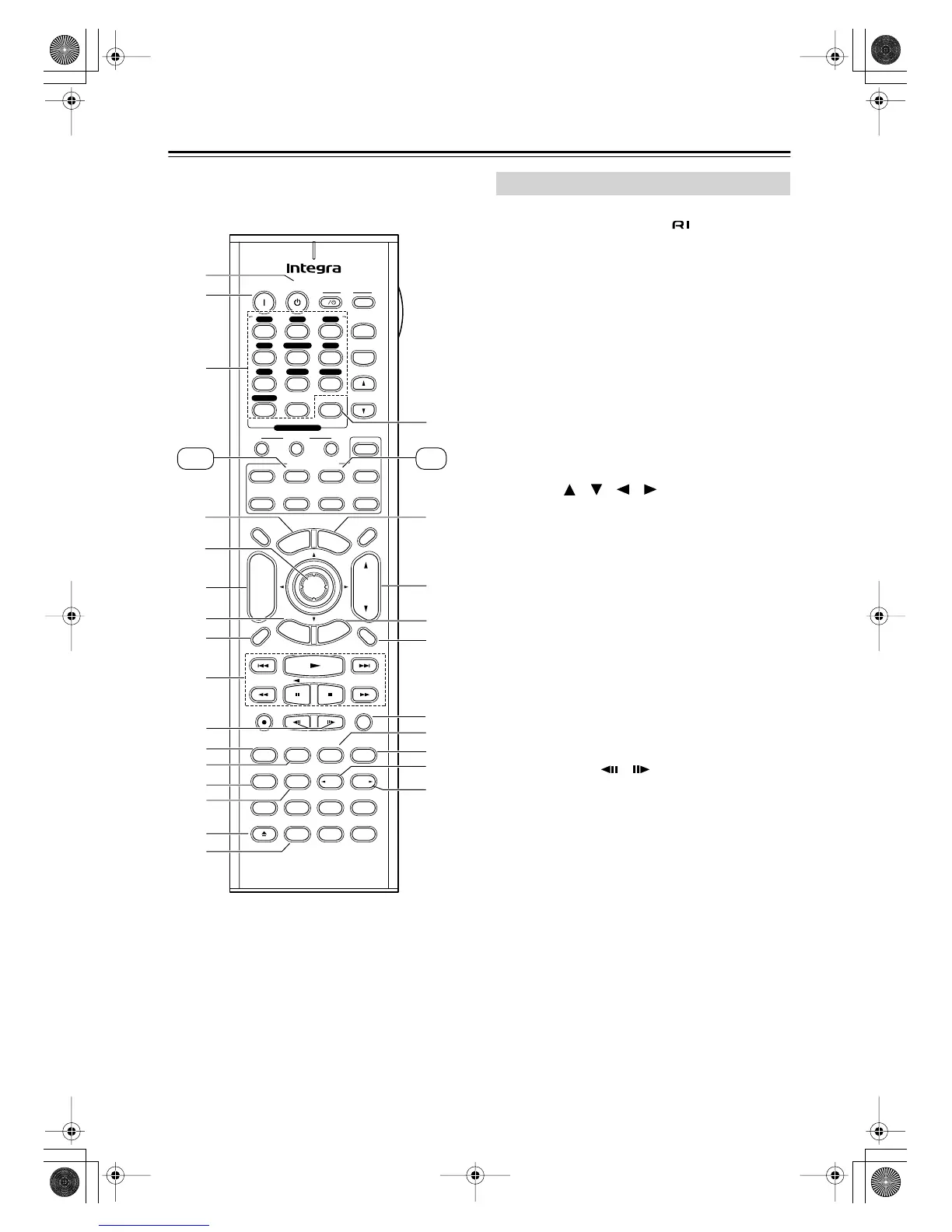
DVD mode is used to control an Integra DVD player
connected to the AV receiver via .
To set the remote controller to DVD mode, press the
[DVD] Remote Mode button.
A
Standby button
This button is used to set the DVD player to
Standby.
B
On button
This button is used to turn on the DVD player and to
set it to Standby.
C
Number buttons
These buttons are used to enter title, chapter, and
track numbers, and to enter times for locating spe-
cific points in time.
D
Top Menu button
This button is used to select a DVD’s top menu.
E
Arrow [ ]/[ ]/[ ]/[ ] & Enter buttons
These buttons are used to navigate DVD menus and
the DVD player’s onscreen setup menus.
F
Disc +/– button
This button selects discs on a DVD changer.
G
Return/Exit button
This button is used to exit the DVD player’s
onscreen setup menu.
H
Display button
This button is used to display information about the
current disc, title, chapter, or track on the DVD
player’s display, including the elapsed time, remain-
ing time, total time, and so on.
I
Playback buttons
From left to right: Previous, Play, Next, Fast
Reverse, Pause, Stop, and Fast Forward.
J
Step & Slow [ ]/[ ] buttons
These buttons are used for frame-by-frame playback
and slow-motion playback.
K
Audio button
This button is used to select foreign language
soundtracks and audio formats (e.g., Dolby Digital
or DTS).
L
Subtitle button
This button is used to select subtitles.
M
Repeat button
This button is used to set the repeat playback func-
tions.
Pure A
On Standby
TV
Display Muting
RandomRec
Last Memory
AngleSubtitleAudio
MemorySearchA
-
BRepeat
RC
-
585M
E
x
i
t
G
u
i
d
e
Prev
CH
TV CH
TV VOL
--
/
---
Dimmer
Tape
TV
Input
Sleep
Input
I
Enter
Test Tone
CH SEL
Surround
THX
Direct
StereoAll ST
Level
+
Level
-
L Night
DSP DSP
T
o
p
M
e
n
u
M
e
n
u
S
e
t
u
p
R
e
t
u
r
n
VOL
CH
Disc
SATTV VCR Cable
DVD
Receiver
CD
+
10 0
Clear
123
456
789
+
-
Video OffOpen/Close
Macro
123
MD/CDR
Re-EQ
+
-
Input Selector
V1 V 2 V3
CD
Phono
Tape
V
4 DVD
Multi CH
Tuner
Remote Mode
Zone 2
6
Q 8
9
0
A
B
1
2
3
4
5
6
7
T
O
P
M
N
K
L
U
S
7
9
J
B
A
3
5
4
8
R
V
W
Y
X
Z
DVD CD
Round numbers are for DVD mode.
Square numbers are for CD mode.
DVD Mode
DTR-6.5,5.5En.book Page 16 Wednesday, July 28, 2004 9:07 AM



 To Next Page