50
First Time Setup
—Continued
Speaker Level Calibration
Here you can adjust the level of each speaker with the
built-in test tone so that the volume of each speaker is the
same at the listening position.
Notes:
• The speakers cannot be calibrated while the output of
the AV receiver is muted, while a pair of headphones
is connected, or when using the multichannel input.
• Because the DTR-6.5 supports THX, the test tone is
output at the standard level of 0 dB (absolute vol-
ume setting 82). If you normally listen at volume
settings below this, be careful because the test tone
will be much louder.
Notes:
• This procedure can also be performed by using the
remote controller. First press the [Test Tone] button to
output the test tone. Use the [Level–] and [Level+]
buttons to set the volume, and use the [CH SEL] but-
ton to select the speakers.
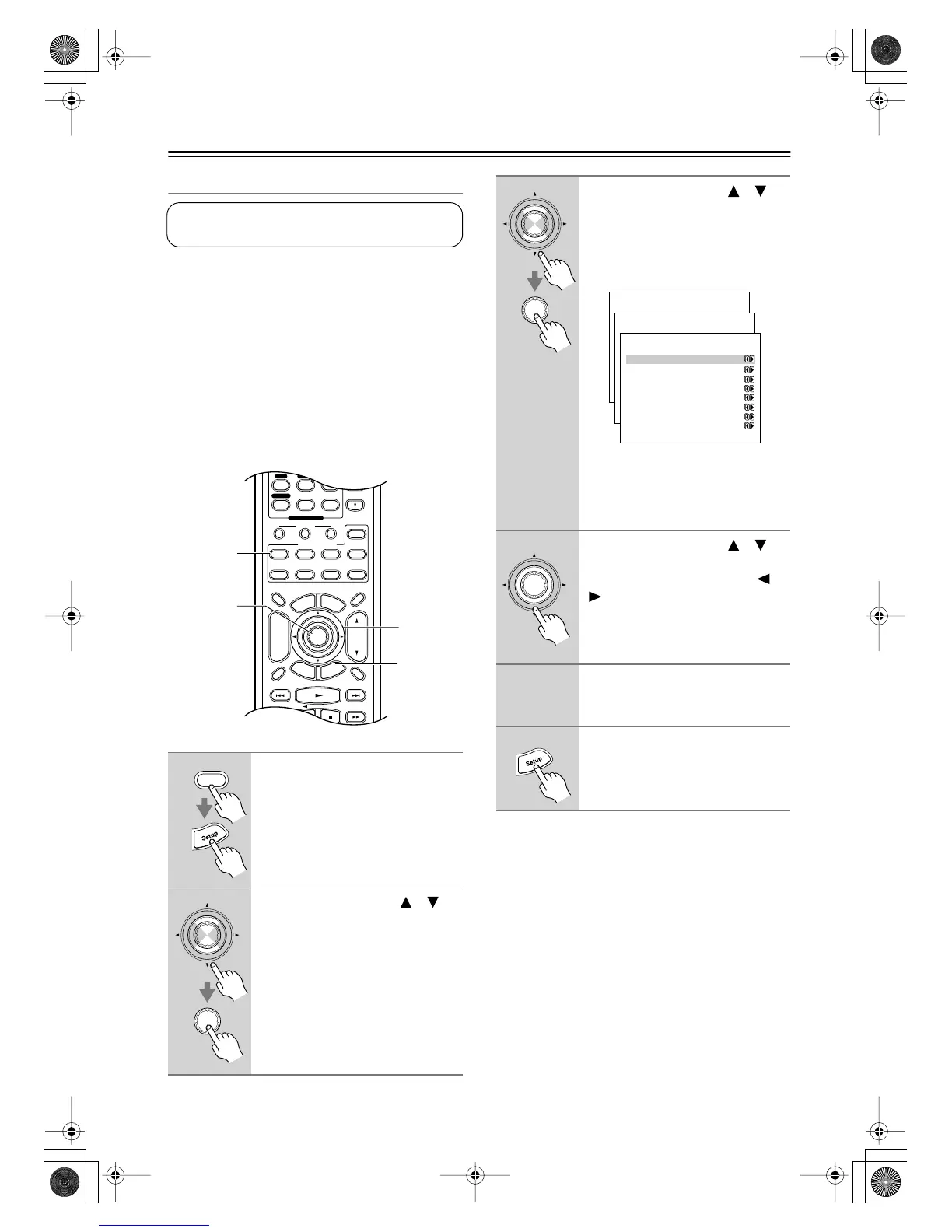
1
Press the [Receiver] button fol-
lowed by the [Setup] button.
The main menu appears onscreen.
2
Use the Up and Down [ ]/[ ]
buttons to select “2. Speaker
Setup,” and then press [Enter].
The Speaker Setup menu appears.
This setting is set automatically by the Automatic
Speaker Setup function (see page 39).
Display Muting
RandomRec
E
x
i
t
G
u
i
d
e
Prev
CH
TV VOL
--
/
---
Dimmer
Tape
TV
Input
Sleep
Enter
T
o
p
M
e
n
u
M
e
n
u
S
e
t
u
p
R
e
t
u
r
n
VOL
CH
Disc
SATTV VCR Cable
DVD
Receiver
CD
+
10 0
Clear
789
Macro
123
MD/CDR
+
-
Input Selector
CD
Phono
Tape
Tuner
Remote Mode
Zone 2
1, 6
2–4
2, 3
1
Receiver
Enter
Enter
3
Use the Up and Down [ ]/[ ]
buttons to select “3. Level Cali-
bration,” and then press [Enter].
The Level Calibration menu appears
and the pink noise test tone is output by
the front left speaker.
Note:
Speakers that you set to No or None on
the Speaker Configuration page
(page 46) cannot be selected.
4
Use the Up and Down [ ]/[ ]
buttons to select each speaker,
and use the Left and Right [ ]/
[] buttons to set the volume.
The volume can be adjusted from –12
to +12 dB in 1 dB steps (–15 to +12 dB
for the subwoofer).
5
Repeat step 4 until the volume of
the test tone from each speaker
is the same.
6
Press the [Setup] button.
The setup menu closes.
Enter
Enter
Menu
------------------------
1.Initial Setup
2.Speaker Setup
Advanced Setup
3.Surround Setup
4.Audio Adjust
5.Listening Mode Preset
6.Preference
Basic Setup
2.Speaker Setup
------------------------
2.Speaker Distance
3.Level Calibration
4.Equalizer Settings
1.Speaker Config
2-4.Equalizer Settings
------------------------
Left
a. 80Hz : 0dB
b. 250Hz : 0dB
c. 800Hz : 0dB
d.2.5kHz : 0dB
e. 8kHz : 0dB
Use Settings :Manual
2-3.Level Calibration
------------------------
b.Center : 0dB
c.Rught : 0dB
d.Surr Right : 0dB
e.Surr Back R : 0dB
f.Surr Back L : 0dB
g.Surr Left : 0dB
h.Subwoofer : 0dB
a.Left : 0dB
Enter
DTR-6.5,5.5En.book Page 50 Wednesday, July 28, 2004 9:07 AM



 To Next Page