Advanced Operations
En-78
Zone 2 Video Output
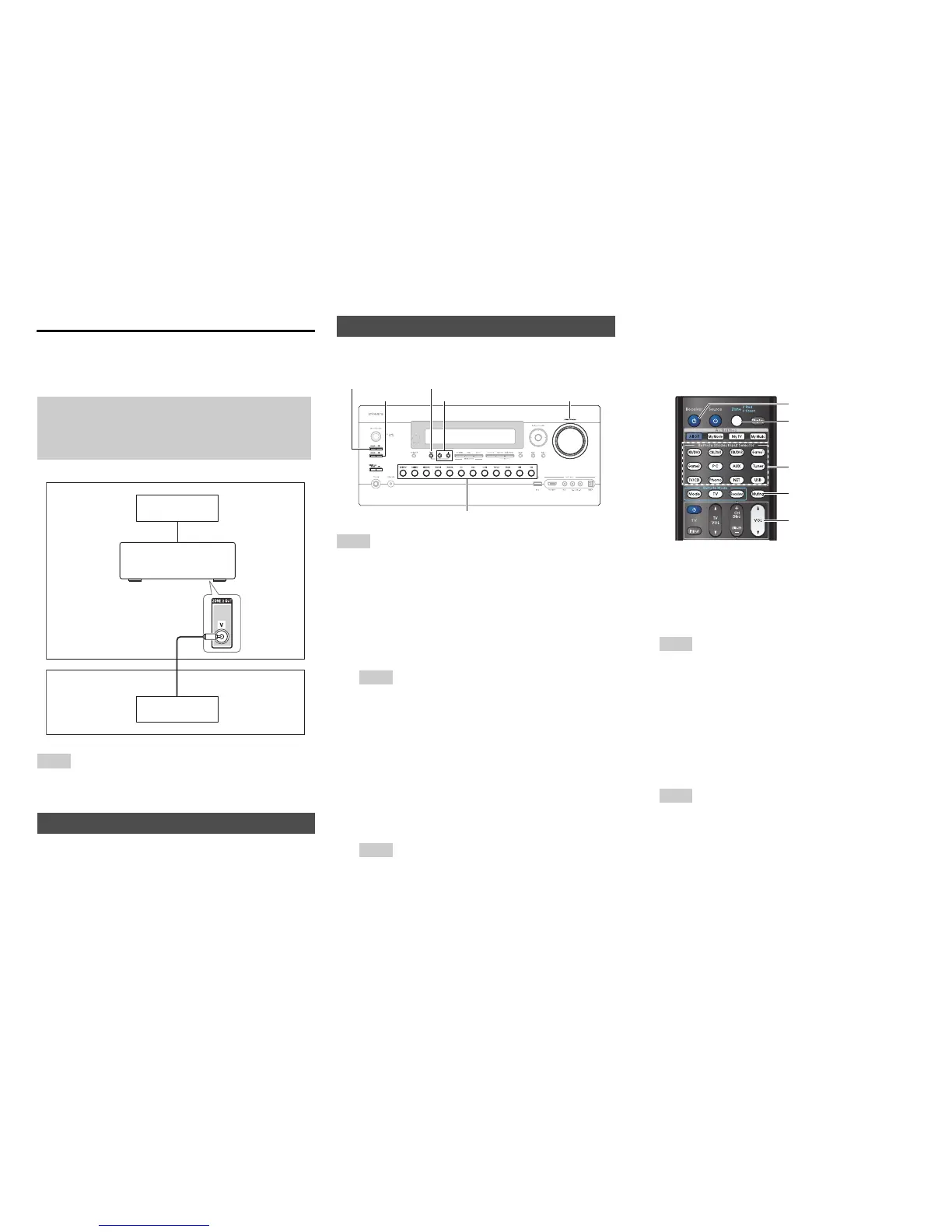
The AV receiver features a composite video output for
connection to a TV in Zone 2, so you can enjoy both audio
and video in that zone.
Note
•The ZONE 2 OUT V jack only outputs video from components
connected to composite video inputs.
See “Multi Zone” (➔ page 73).
■ Operating on the AV receiver
Tip
• The Whole House Mode function shares the input source of main
room with Multi Zone (➔ page 47).
■ Operating on the remote controller
To control Zone 2/3, you must press Zone on the remote
controller first.
Zone turns red when Zone 2 is on, and green when Zone 3
is on.
Hookup
• Use a composite video cable to connect the AV receiver’s
ZONE 2 OUT V jack to a composite video input on your
Zone 2 TV.
Setting the Zone 2/3 Out
Main room
TV
Zone 2
AV receiver
TV
Controlling Multi Zone Components
1
To turn on Zone 2/3 and select an input source,
press Zone 2 or Zone 3 followed by an input
selector button within 8 seconds.
Zone 2/3 turns on, the Z2 or Z3 indicator lights on the
AV receiver’s display.
Tip
• The corresponding trigger output goes high (+12 V).
To select AM or FM, press Tuner input selector and
Zone 2 or Zone 3 repeatedly.
To select the same source as the main room’s, press
Zone 2 or Zone 3 twice. “Zone 2 Selector: Source”
or “Zone 3 Selector: Source” appears on the AV
receiver’s display.
2
To turn off Zone 2/3, press Off for each Zone.
The zone is turned off.
Tip
• The corresponding trigger output goes low (0 volts).
Input selector buttons
Zone 2, Off
Zone 3, Off
Tone
Master Volume
–, +
1
Press Zone repeatedly, then point the remote
controller at the AV receiver and press 8Receiver.
Zone 2/3 turns on, the Z2 or Z3 indicator lights on the
AV receiver’s display.
Tip
• The corresponding trigger output goes high (+12 V).
2
To select an input source for Zone 2/3, press Zone
repeatedly, followed by an Input Selector button.
To select AM or FM, press the Tuner input selector
and Zone repeatedly.
3
To turn off Zone 2/3, press Zone repeatedly,
followed by 8Receiver.
The zone is turned off.
Tip
• The corresponding trigger output goes low (0 volts).
8Receiver
Muting
VOLq/w
Zone
Input selector buttons



 To Next Page