Need help?
Do you have a question about the Integra Luxtec MLX and is the answer not in the manual?
Details necessary steps for setting up the unit, including power connection and ensuring adequate cooling airflow.
Use membrane switches (+/-) to adjust light intensity from 0-100% in 5% increments.
Press display to view lamp time, system operation time, or software version.
Place unit in stand-by mode to unplug headlight or change cables. Unit shuts off automatically after 15 minutes.
Press the main Power Switch to shut off the system.
Step-by-step guide on safely removing the xenon lamp module from the light source unit.
Instructions for installing a new xenon lamp module and reassembling the unit securely.
Describes the procedure to reset the lamp age meter after a lamp replacement.
Provides guidelines for routine maintenance and cleaning of the light source exterior and vents.
Guides users through identifying and resolving issues like no light output, reduced output, or no power.
Explains fault symbols displayed by the unit and the corresponding actions or resets required.
Details RF emissions, harmonics, and flicker compliance, along with manufacturer's declarations for the MLX light source.
Covers immunity requirements like ESD, transients, surges, voltage dips, and magnetic fields with manufacturer's declarations.
Guidance on conducted and radiated RF emissions for non-life-supporting equipment and relevant electromagnetic environments.
Provides calculated separation distances between the MLX light source and portable/mobile RF communications equipment.
Details the terms, conditions, duration, and exclusions of the limited express warranty for the MLX light source.
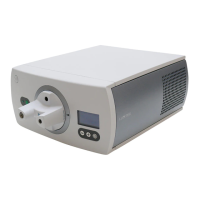
The Luxtec MLX 300 Watt Xenon Light Source is a medical device designed to provide high-intensity white light for illuminating a surgical field during medical and surgical procedures. It achieves this by supplying light to a fiber optic cable. The device is engineered to deliver 300 watts of cool, white, infrared (IR) filtered light, ensuring optimal visualization during operations.
The primary function of the Luxtec MLX light source is to generate and deliver high-intensity white light through a fiber optic cable to the surgical site. This illumination is crucial for surgeons to clearly visualize the operative field, enhancing precision and safety during various procedures. The device utilizes a Xenon Short Arc Lamp, known for its bright, white light output, which is housed within an easily serviceable lamp module. This design allows for straightforward replacement of the lamp without requiring specialized tools, minimizing downtime and simplifying maintenance.
The light source features a turret with multiple labeled ports, designed to accommodate various fiber optic cable types, including those compatible with ACMI, Olympus, Storz, and Wolf systems. This versatility ensures broad compatibility with different surgical instruments and setups. An active port indicator on the front panel helps users identify the correct port for cable insertion, preventing damage to the optical components and ensuring proper light delivery.
The MLX light source incorporates a self-diagnostic check that runs for 3-4 seconds upon startup, ensuring all systems are functioning correctly before the Xenon lamp illuminates. This feature enhances operational reliability and alerts users to potential issues early on. The device also includes a stand-by mode, which allows the surgeon to temporarily halt light emission, for example, when repositioning a headlight or changing cables during laparoscopic or endoscopic procedures. If left in stand-by mode for 15 minutes, the lamp automatically shuts off, though the cooling fans continue to run, conserving lamp life and preventing overheating.
Operating the Luxtec MLX light source is designed to be intuitive and user-friendly. To begin, a fiber optic cable is inserted into the appropriate port on the turret, guided by the active port indicator. The unit is powered on by pressing the Power Switch located on the front panel. After the brief self-diagnostic check, the Stand-by Light blinks, and the Xenon lamp illuminates once the Stand-by Button is pressed.
Light intensity adjustment is managed via membrane switches on the front panel. Users can increase or decrease the light output in 5% increments, with a range of 0% to 100%. Holding down the '+' or '-' button allows for quicker intensity changes. The manual strongly recommends using the minimum intensity necessary for good visualization to optimize lamp life and prevent excessive heat.
The System Status Display provides valuable operational information. A single press reveals the lamp time and total system operation time, allowing users to monitor lamp usage and plan for replacements. A second press displays the software version of the system monitor, which can be useful for troubleshooting or support. The display automatically reverts to showing light output after 15 seconds of inactivity.
Safety features are integrated into the design and operation. The light source monitors air intake temperature and will automatically shut off if the ambient temperature exceeds 40°C (104°F), preventing overheating and potential damage. Users are cautioned about the heat generated by the fiber optic cable end fitting, which can remain hot immediately after shutdown, posing a burn risk. Therefore, it is advised to allow the unit and cable to cool for a period before handling.
The device is designed for use with hospital-grade power cords and requires proper grounding. It is crucial to ensure adequate clearance (at least 2 inches or 5.08 cm) around the unit for cooling airflow and to avoid placing it near air exhausts or other equipment that could obstruct ventilation.
Maintenance of the Luxtec MLX light source is designed for simplicity and safety. The most common maintenance task is the replacement of the Xenon lamp module. This process is tool-free and involves a few straightforward steps: ensuring the power is off and disconnected, removing retaining screws from the top plate, sliding off the top cover, unscrewing and removing the lamp module door, and finally, grasping the module by its tabs and pulling it directly up. When replacing the lamp, the new module (P/N 001320LX) is oriented to face forward, seated securely, and the door and top cover are reattached. After replacement, the lamp age meter can be reset by inserting a pointed object into the designated RESET slot on the rear of the unit. It is important to note that the system age reading cannot be reset.
Fuse replacement is also a user-serviceable task. The fuses are located in the power entry module at the rear of the unit. After disconnecting the power cord, a small flat screwdriver can be used to pry open the retaining door and remove the red plastic block containing the fuses. Blown fuses should be replaced with those of the same rating (Luxtec P/N 600987, or T6.3AL250).
Cleaning and disinfection are essential for maintaining hygiene and performance. Before cleaning, the unit must be allowed to cool for at least 15 minutes, and the power cord must be unplugged. The exterior of the light source can be cleaned and disinfected using 70% isopropyl alcohol, with a 5-minute evaporation period before reconnecting power. Regular removal of dust accumulation from the fan and vent holes using a vacuum cleaner and a soft brush is recommended, especially during lamp replacement, to ensure optimal cooling and prevent overheating.
The design emphasizes user safety during maintenance, particularly for lamp replacement, where protective facemasks and safety glasses are recommended due to the nature of the Xenon lamp. All general warnings and precautions outlined in the manual must be strictly followed during any maintenance procedure.
 General
| Category | Medical Equipment |
|---|---|
| Type | Surgical headlight |
| Light Source | LED |
| Manufacturer | Integra |
| Model | MLX |
| Power | Battery Powered |
| Beam Angle | Adjustable |


 To Next Page