Desktop Board Features
19
LAN Subsystem
The LAN subsystem includes:
• Intel
ICH7
• Broadcom NetLink BCM5788 Gigabit (10/100/1000 Mb/s) Ethernet LAN controller
• RJ-45 LAN connector with integrated status LEDs
The subsystem features:
• CSMA/CD protocol engine
• LAN connect interface between ICH7 and the controller
• PCI Express power management
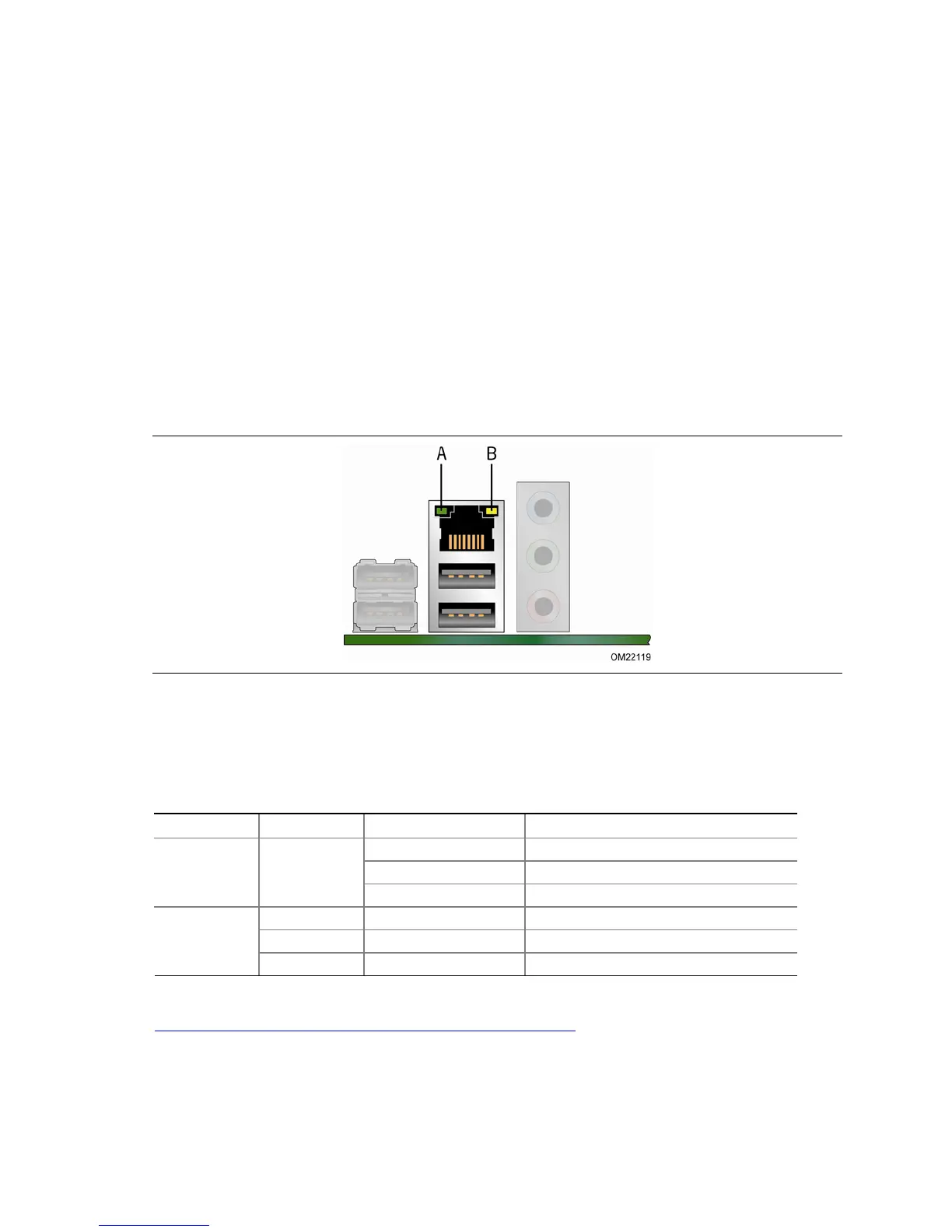
Two LEDs are built into the RJ-45 LAN connector located on the back panel (see
Figure 2). These LEDs indicate the operating states of the LAN.
Figure 2. LAN Status LEDs
Table 4 describes the LED states when the board is powered up and the LAN
subsystem is operating.
Table 4. LAN Connector LEDs
LED LED Color LED State Indicates
A (Link) Off LAN link is not established
Green
On LAN link is established
Blinking LAN activity is occurring
N/A Off 10 Mb/s data rate
Green On 100 Mb/s data rate
B (Speed)
Yellow On 1000 Mb/s data rate
For information about LAN software and drivers go to
http://www.intel.com/support/motherboards/desktop



 To Next Page