Installing and Replacing Desktop Board Components
49
Serial Port Header
See Figure 21, C for the location of the serial port header. Table 8 shows the pin
assignments for the header.
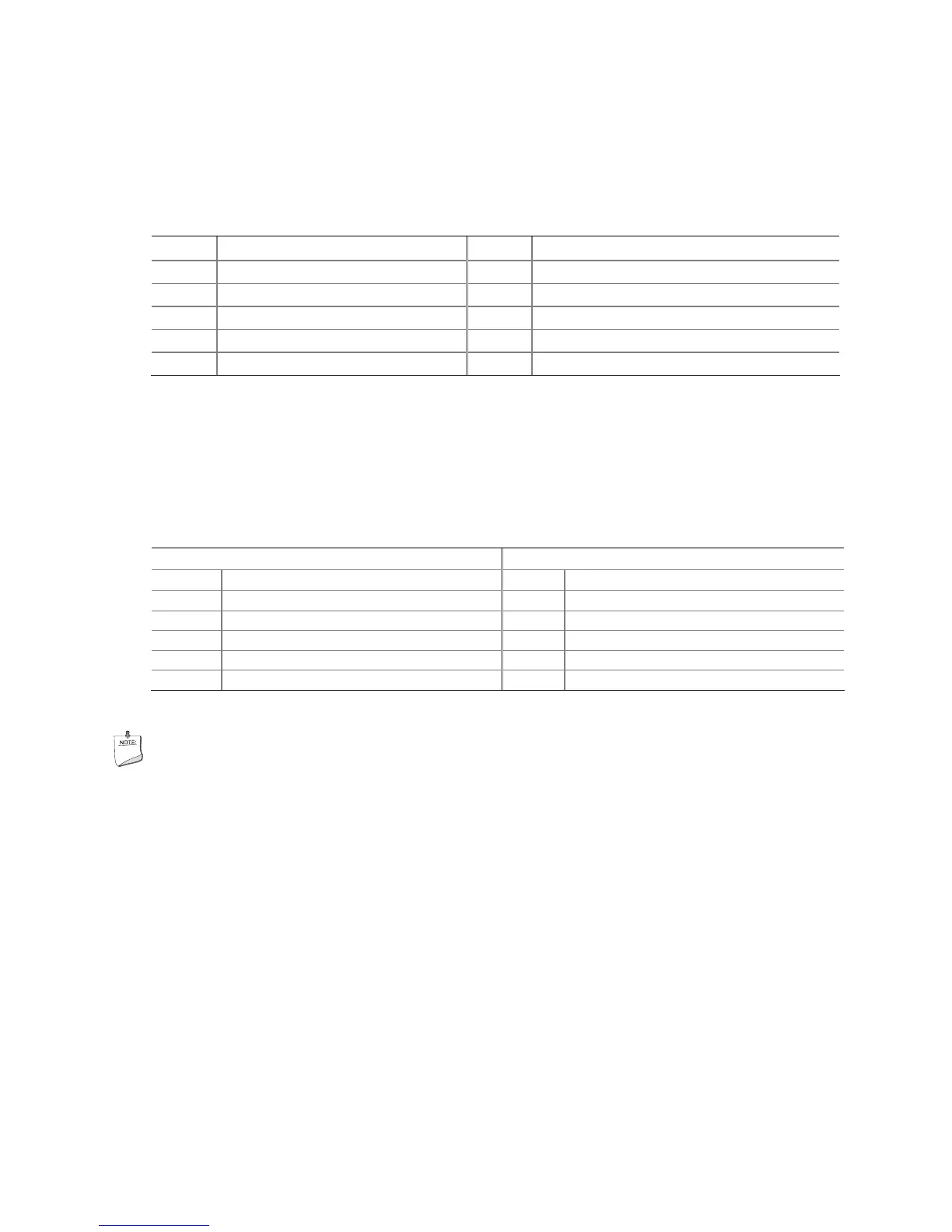
Table 8. Serial Port Header Signal Names
Pin Signal Name Pin Signal Name
1 DCD 2 RXD#
3 TXD# 4 DTR
5 Ground 6 DSR
7 RTS 8 CTS
9 RI 10 No Connection
USB 2.0 Headers
See Figure 21, D for the location of the three USB 2.0 headers. Table 9 shows the pin
assignments for each USB 2.0 header. Each USB header can be used to connect two
USB devices.
Table 9. USB 2.0 Header Signal Names
USB Port A USB Port B
Pin Signal Name Pin Signal Name
1 Power (+5 V) 2 Power (+5 V)
3 D- 4 D-
5 D+ 6 D+
7 Ground 8 Ground
9 Key 10 No Connection
Note: USB ports may be assigned as needed.
NOTE
Computer systems that have an unshielded cable attached to a USB port might not
meet FCC Class B requirements, even if no device or a low-speed USB device is
attached to the cable. Use a shielded cable that meets the requirements for a
full-speed USB device.





 To Next Page