6
2. Accessories
» Network cable
» Power supply
» Installation guide
3. Installation
The following scenario describes the product installation for use in
Router
mode. For
Repeater
,
Wireless Client
and
Access Point
modes refer to the topic
4.2. Conguration in other product usage scenarios below.
Step 3
Step 2
Step 1
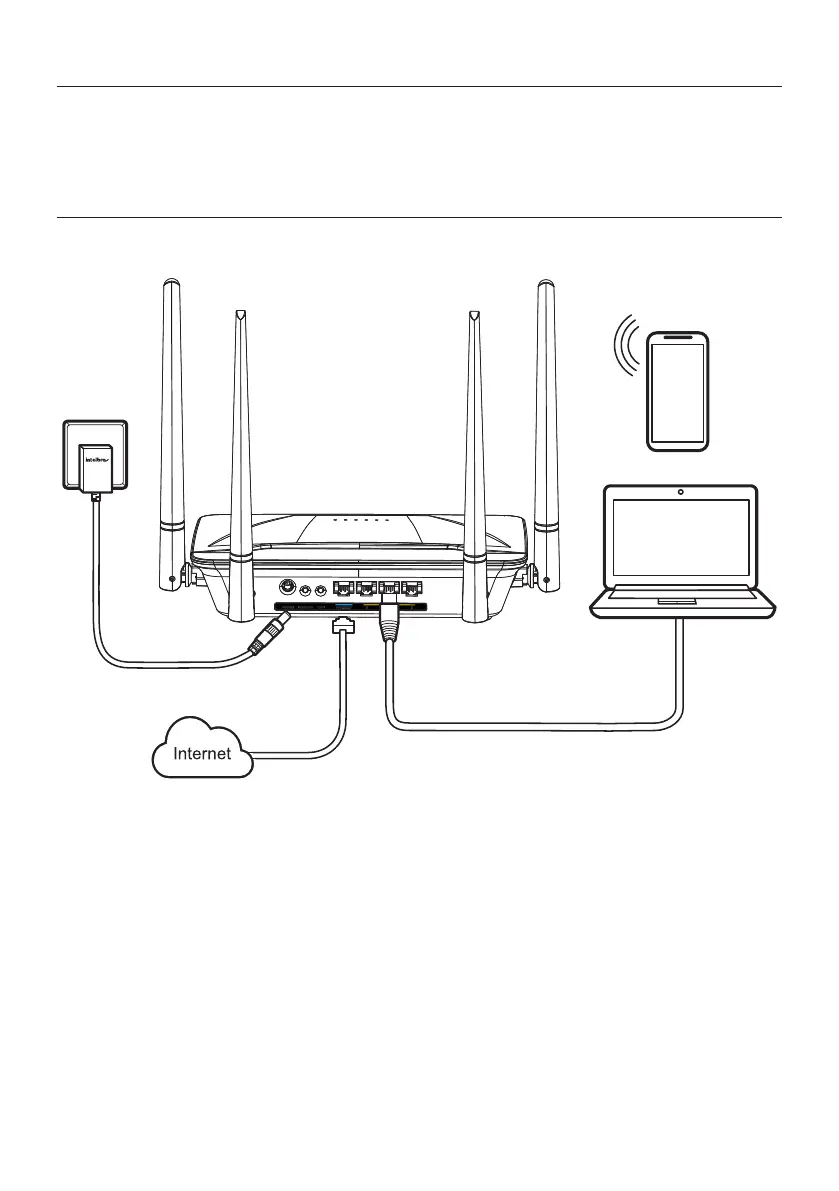
Example of Installation in Router mode
1. Connect the power supply to the router and then plug it into the electrical outlet. The LEDs will light up;
2. Connect the network cable from the Internet (for example, from your modem or other device) to the
Internet
port of
the router;
3. Connect the computer to one of the
LAN
(1/2/3/) ports on the router using a network cable;
Note:
»
If you wish to access your router via Wi-Fi instead of via network cable, connect to the Wi-Fi network
under the name
INTELBRAS
or
INTELBRAS_5G
, after performing steps
2
and
3
.
» To access the 5GHz Wi-Fi network, your devices must support this technology. If in doubt, please refer to the
manufacturer’s manual and check for compatibility with the same technologies as ACtion RF 1200.



 To Next Page