20
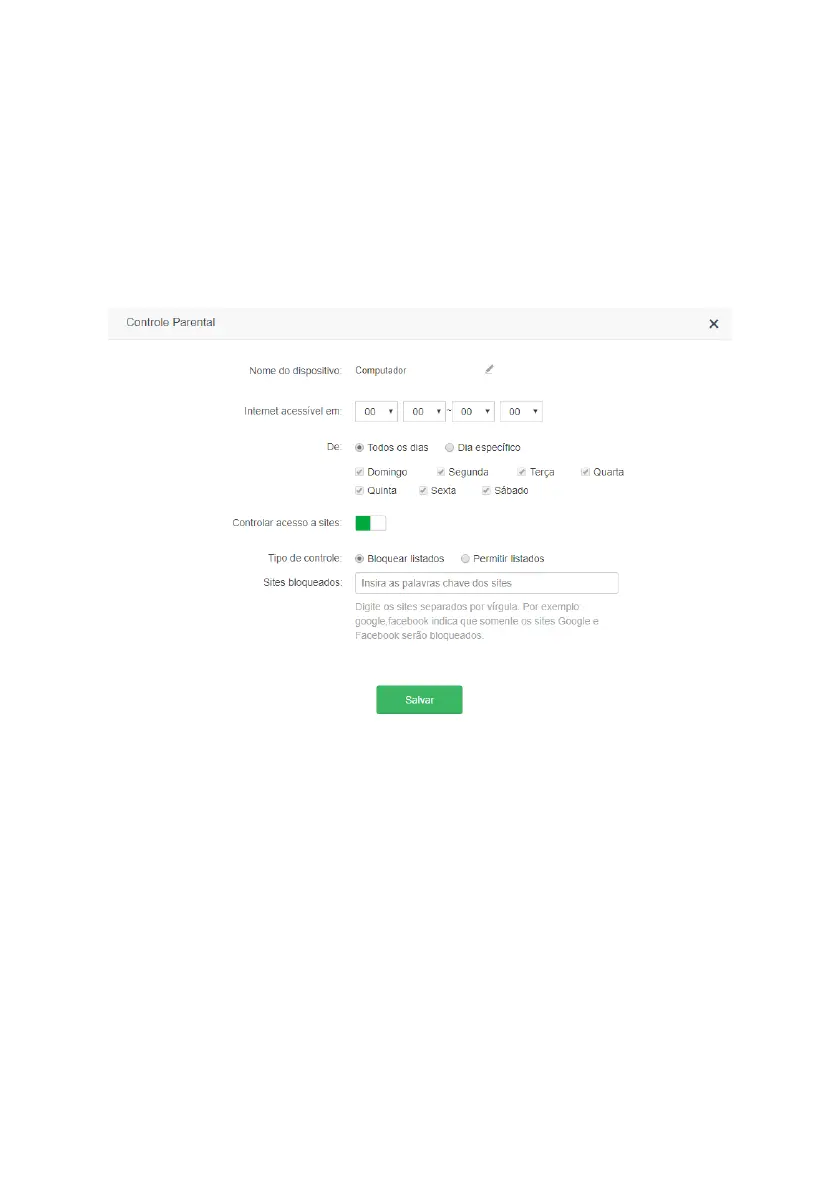
» Internet accessible at: choose the time when the device will be able to access the internet.
» From: choose the days on which the device can access the internet at the time congured in the option
Internet acces-
sible at
.
» Control access to websites: enable/disable control of the websites that the device will be able to access.
» Control type: if you want to block only some sites, select
Block listed
, so the sites entered in
Blocked websites
will not
be accessible to the device. If you want to allow only some sites, select
Allow listed
, so the device will only access the
sites listed under
Allowed websites
, blocking access to any other websites.
» Blocked websites: enter sites separated by commas. For example: google, facebook indicates that only Google and
Facebook websites will be blocked.
» Allowed websites: enter sites separated by a comma. For example:
Google
,
Facebook
indicates that only Google and
Facebook websites will be accessible.
Note: the site lter is done by word, i.e., any site containing the keyword will be blocked or allowed.
Edit screen of a device in parental control
When click on
Save
the device will already be controlled as congured above.
Note: if any device is not appearing in the list you can add it manually by clicking
Add,
the MAC address of the device
is required.
4.8. IPv6
In the menu
IPv6
you can congure IPv6 addressing options.
Conguring IPv6 WAN



 To Next Page