34
Through this option various information related to the operation of ACtion RF 1200 is displayed. This same information is
accessible by clicking on the router gure in the
Internet Status
menu page.
System Logs
The logs page displays information other than the events that occurred during the router’s operating time.
Automatic maintenance
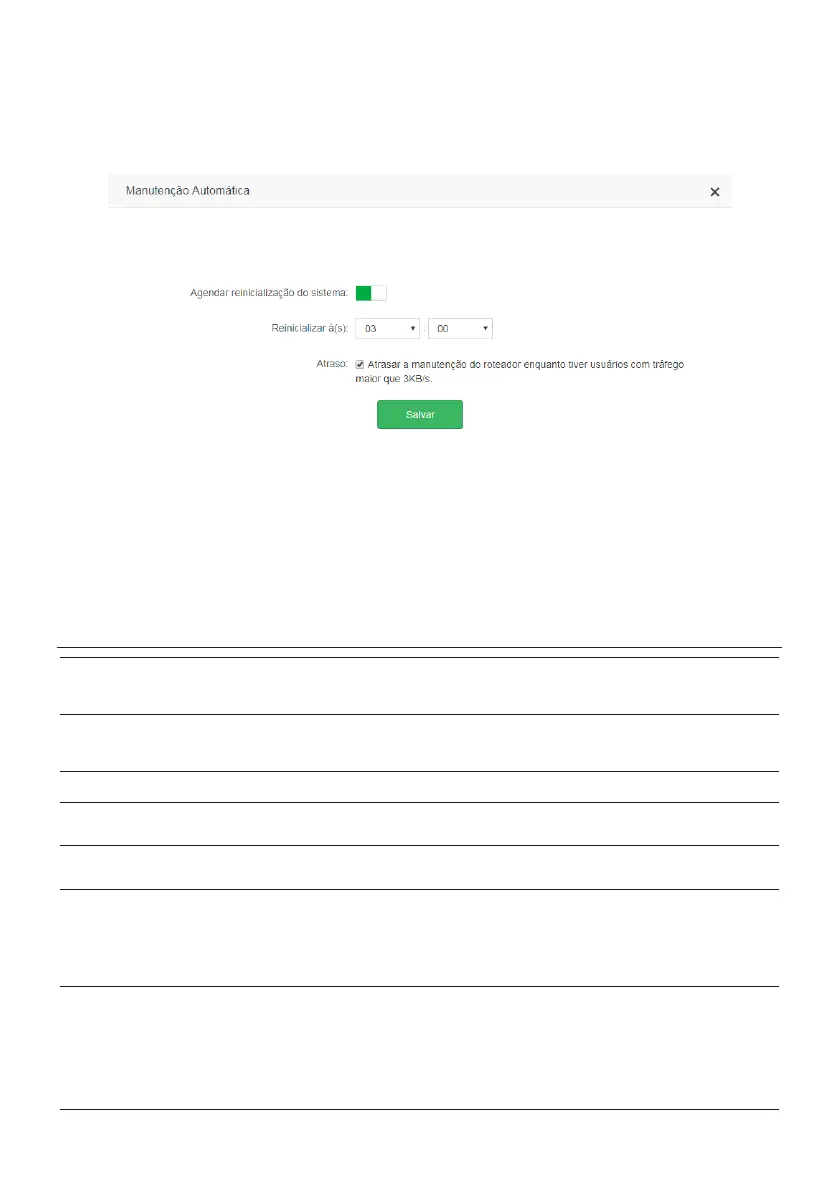
Automatic maintenance conguration screen
The function
Automatic Maintenance
allows you to restart the router daily at a specic time. By default, this function is enab-
led, so the product will restart at the scheduled time as long as there are no users connected with trafc over 3 kB/s. You can
change the time at which the router will restart in the option
Restart.
If you want to restart your router even when you have
trafc over 3 kB/s, uncheck the option
Delay
.
Note: automatic maintenance works when the router time is synchronized with the internet and when the product is active
for more than 05:00 hours.
5. Frequently Asked Questions (FAQ)
What to do when I can't
access the Internet?
Check if all cables are connected correctly, according to the item
3. Instalação
and that all network equipment is active.
Turn the router and the other equipment that provide your Internet connection off and on again.
Check with your Internet Service Provider to ensure that there is no problem with your broadband service.
If the problem continues, contact our technical support for more details.
What do I do when I can't
access the web wizard?
Check all physical connections, according to the item
3. Instalação
.
Your computer/laptop must be connected to the
LAN
port of your router, or connected to your router’s Wi-Fi network.
Make sure that your computer is congured to
obtain an IP address automatically
from the network settings.
Try accessing your ACtion RF 1200 via the link
http://meuintelbras.local
.
What can I do if I forget the
wireless password?
Connect a device via the network cable to one of the
LAN
ports on the router. Then, using a web browser, access the ACtion RF 1200
conguration interface, go to the menu
Wi-Fi Network Settings > Wi-Fi Network Name and Password
and set your password again.
What can I do if I forget the
password to access the web
interface?
Restore the factory settings by pressing the button
RST/WPS
on the back of the ACtion RF 1200 for about 20 seconds until the leds light up (1
second) and turn off afterward.
What do I do when the 5 GHz
network does not appear in
my device?
Make sure the 5 GHz Wi-Fi Network is not disabled by going to the ACtion RF 1200 Setup page in the menu
Wi-Fi Network Settings > Wi-Fi
Network Name and Password
.
Since not all devices support 5 GHz frequency, check the technical specications of your device to see if it supports 5 GHz Wi-Fi networks.
What to do when I can't get a
good Wi-Fi connection?
For a good connection to the router, your device must be within the signal range of the router, i.e., receiving Wi-Fi signal properly, and with little
interference from other Wi-Fi routers or devices at the same operating frequency (2.4 or 5 GHz). To improve your connection you can try:
» Refer to the item
Cuidados e segurança
to check the best place to install your router.
» Change your router’s operating channel. Refer to the topic
Canal e largura de banda
in the item
4.5. Congurações da rede Wi-Fi
for more
information.
» Some devices do not support higher speeds. Check the technical specications of your device to see if it supports the same technologies
as your router.
My device’s Wi-Fi network
(mobile phone, computer)
sometimes disconnects and
reconnects to the router’s
network. What to do?
Option 1: did you save both Wi-Fi networks (2.4 and 5 GHz) on your device, leaving it to automatically choose between them? If so, remove one
of the networks on your device (for example, forgetting the network on the smartphone). Make sure the behavior stops happening. Some devices
may be switching between saved networks, so you'll notice disconnections. We recommend keeping saved only one of the networks on the device
that has this problem.
Option 2: did you give equal names to the Wi-Fi 2.4 and 5 GHz networks? If so, change the names to make them different. For example, if
your 2.4GHz network has been set up with the name My Network, change the name of the 5GHz network to My 5G network in the menu Wi-Fi
network settings >
Wi-Fi network name and password
. For more details on Wi-Fi settings, please refer to the item
4.5. Congurações da rede
Wi-Fi
.
Note:
If no option solves your problem, please contact our support.



 To Next Page
 Loading...


