28
2. Enable the function by activating the option
DMZ
;
3. Fill in the eld
IP Address
with the address of the device you want to turn into a DMZ;
4. Click on
Save
.
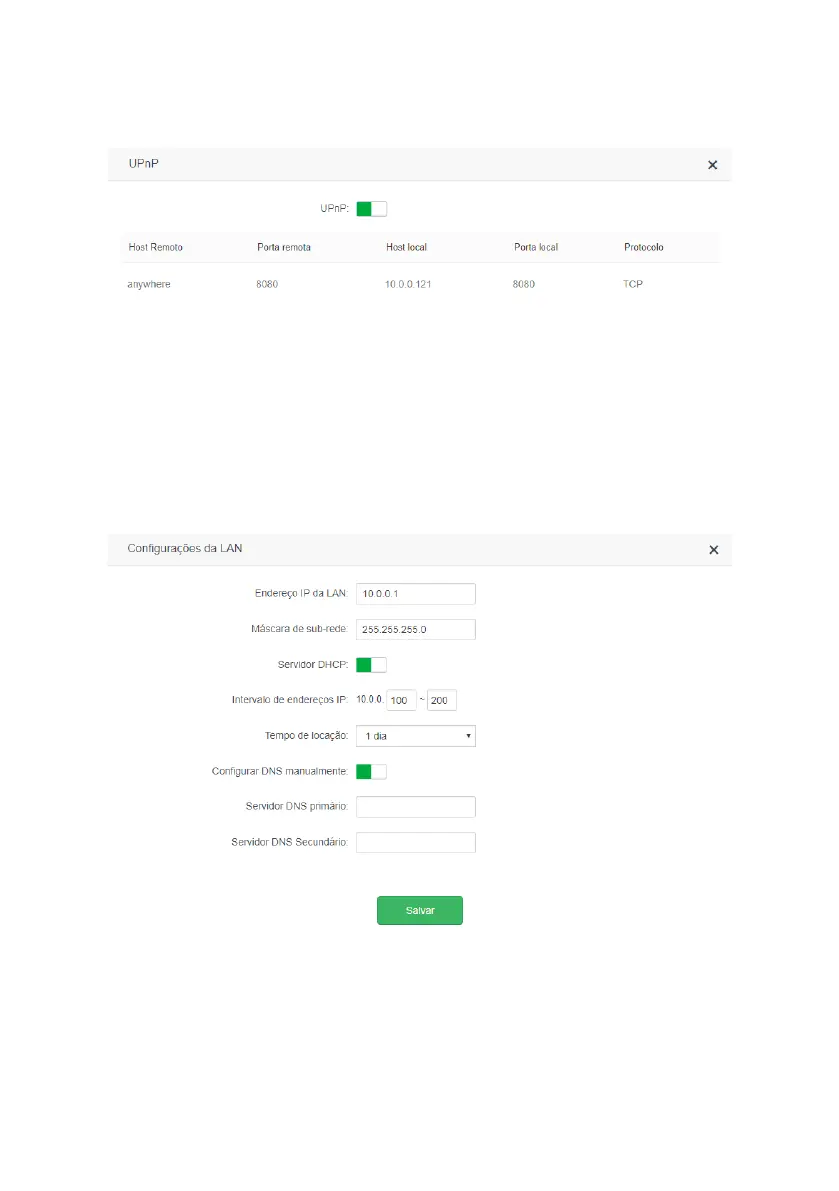
UPnP
UPnP conguration screen
UPnP
allows applications to request port forwarding to the router automatically. This option is enabled by default. If
you want to disable it, go to the menu
If you want to disable it, go to the>UPnP
of the web conguration interface
and uncheck the option
UPnP
. In the same menu you can see which applications and devices are being forwarded via
UPnP
request.
4.10. System settings
The following describes the options available in the menu
System Settings
of the ACtion RF 1200 web interface.
LAN settings
LAN settings screen
In the menu
LAN Settings
you can change the following settings:
» LAN IP Address: IP address of the router LAN. When changing this information you should use the new IP address to
access the router interface or perform access using the address
http://meuintelbras.local.



 To Next Page