18
In the menu
Beamforming+
you can enable the function
Beamforming+,
which detects the positions of devices in the
5 GHz Wi-Fi network, such as mobile phones and tablets, and strengthens the signal transmission to these positions for
better web browsing, gaming performance and video playback experience.
Note:
for the
Beamforming+
function to work correctly, the wireless devices that will connect to the Wi-Fi network
5 GHz of ACtion RF 1200 must support
Beamforming+
function. Please refer to the instructions for use or the manu-
facturer of your devices if you need more information.
Anti-interference
In the menu
Anti-interference
you can activate, deactivate or leave the operation automatically.
» Automatic: in
automatic
mode the router limits the accepted signal level in Rx from the ambient noise level.
» Activated: in
activated
mode the router limits the accepted signal level at Rx from the modulation sensitivity level at
which it operates.
» Deactivated: disables the function.
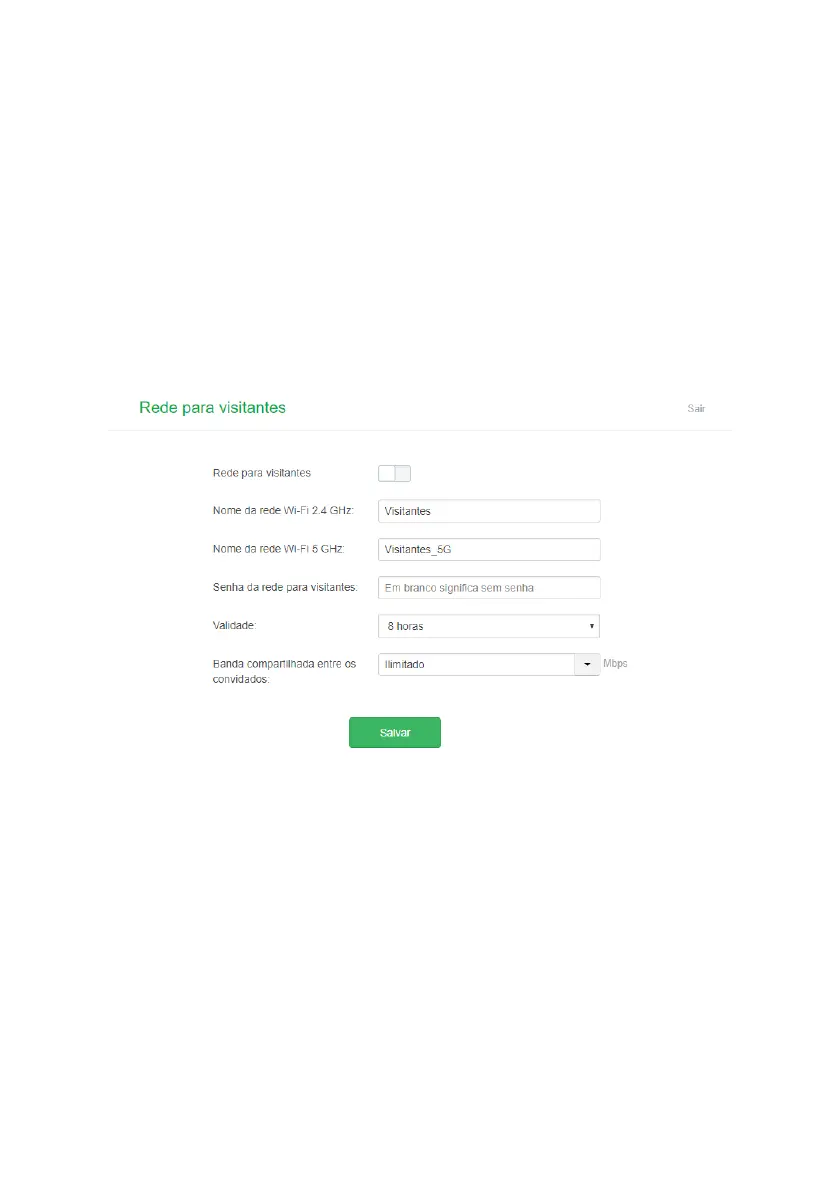
4.6. Network for visitors
Network conguration screen for visitors
In the menu
Network for visitors
you can congure a separate network for visitors. With this you do not need to give
your main Wi-Fi network password to other people.
» 2.4 GHz Wi-Fi network name: the name you want for your 2.4 GHz Wi-Fi network, for example,
Visitors
. This eld
allows you to create a name with up to 32 characters.
» 5GHz Wi-Fi network name: the name you want for your 5GHz Wi-Fi network, e.g.,
Visitors_5G
. This eld allows you
to create a name with up to 32 characters.
» Network password for visitors: password you want for your 2.4GHz Wi-Fi network and 5GHz visitors. This is the
password you will enter for visitors. Leave this eld blank if you want to congure an open network, you do not need a



 To Next Page