15
4.7. Parental control menu
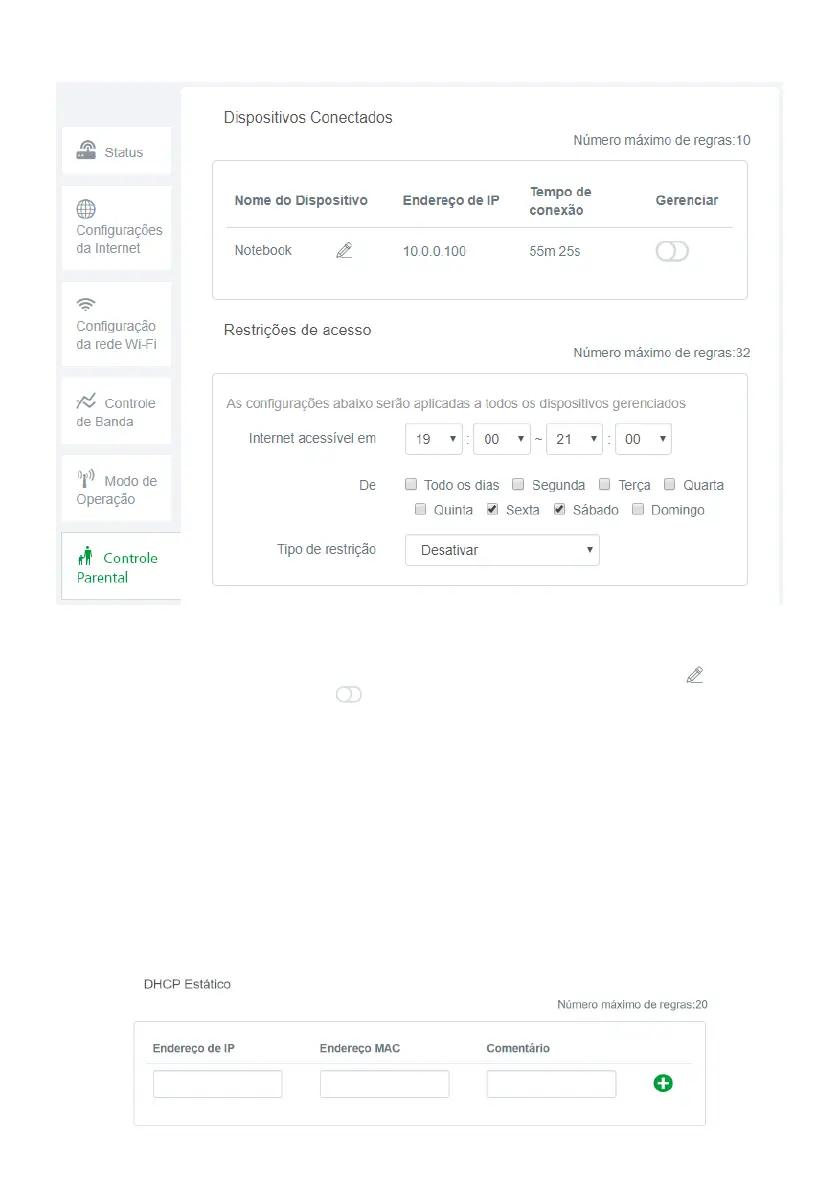
Parental control conguration screen
Parental control
allows you to manage when connected devices can use the Internet; block or release certain content.
» Connected devices: displays the connected devices. You can change the device name by clicking and choosing
whether to manage the device by clicking .
» Access Restrictions: you can choose when managed devices can access the Internet and what content they can access:
» Internet accessible at: choose the time when the device will be able to access the internet.
» Type of restriction: you can choose between:
» Disable: causing managed devices to access the internet at the specied time without any restrictions.
» Allow only: allowing access only to sites entered in the eld
Name or website URL
at the specied time.
» Prohibit only: blocks access only to sites entered in the eld
Name or website URL
at the specied time.
» Name or website URL: allows you to add words or websites that will be blocked or allowed depending on the type of
constraint selected in the
Type of constraint
.
After lling in the information, click
Save
to apply the changes made.
4.8. Advanced settings menu
Static DHCP
Static DHCP conguration



 To Next Page