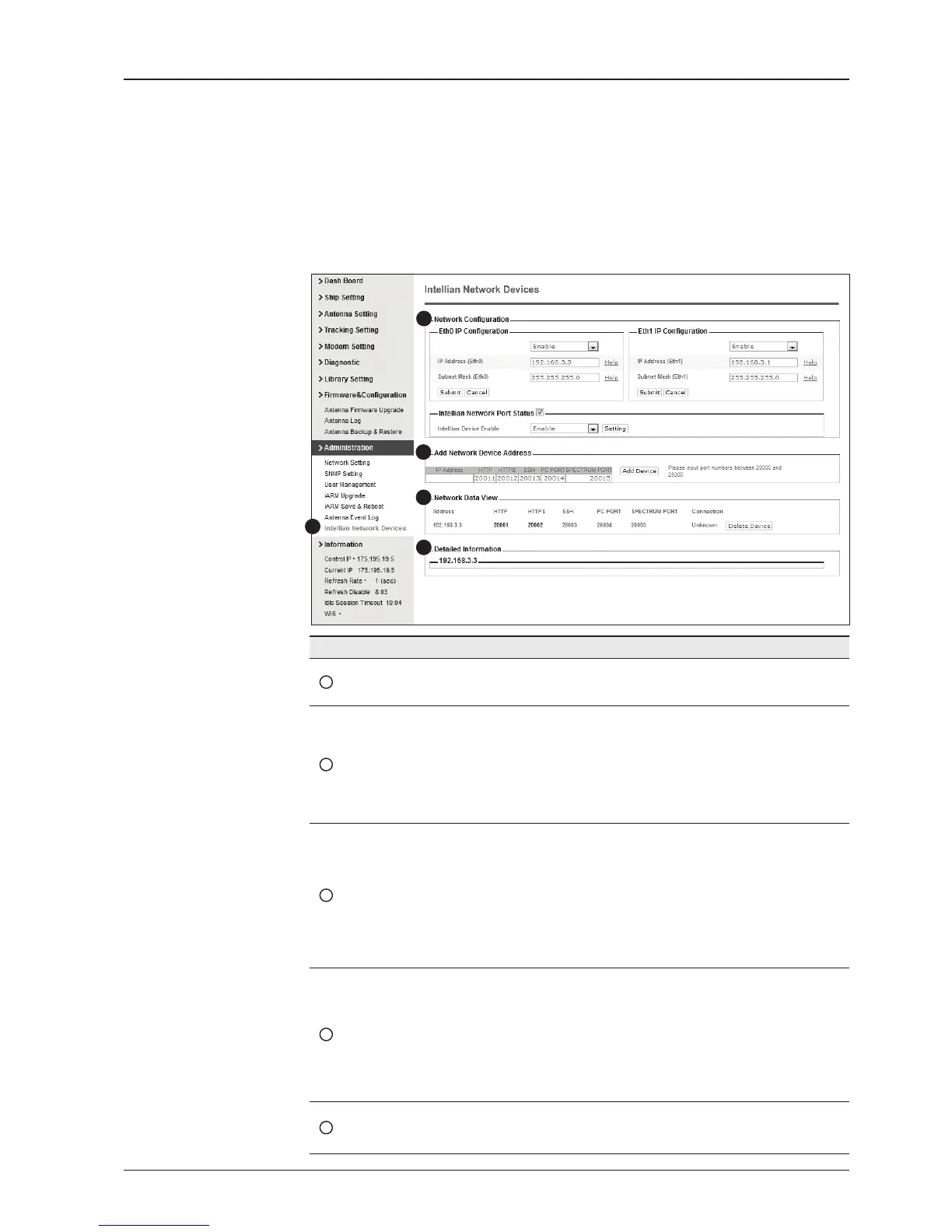
Intellian Network Devices
1
3
4
5
2
No. Item Description
1
Intellian Network
Devices
Add up to 8 network devices and enable to monitor real time
information of the connected device.
2
Network
Conguration
• Eth0 IP Conguration : ACU network Eth0 IP and subnet
mask setting.
• Eth1 IP Conguration : ACU network Eth1 IP and subnet
mask setting.
• Intellian Network Port Status : not used on t-series.
3
Add Network Device
Address
Add Intellian network devices, then you can browse the
various information of the device.
• IP Address : IP address of the device to be monitored.
• HTTP, HTTPS, SSH : Set port number(These port
numbers will be matched the http, https or SSH port
number of each device).
4
Network Data View
Displays the setting information of the added device
(IP address, http, https, SSH port number, current
connection).
If you click the http/https port number of each device,
then you can connect to the device’s web page.
If you click Delete Device button, then you can’t see its
information.
5
Detailed Information
Displays the information of each device. (Updated every 3
second).


 To Next Page
 Loading...











