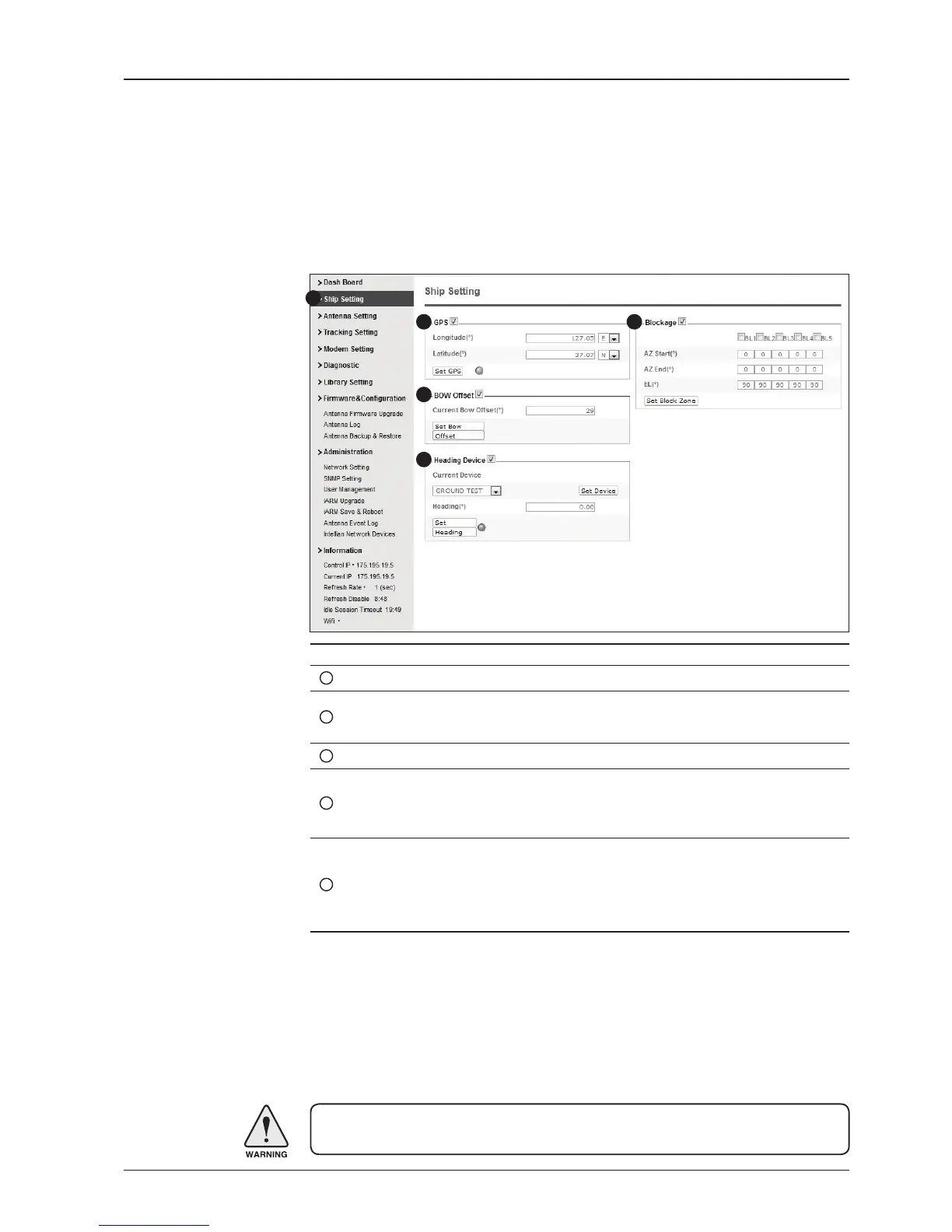
No. Item Description
1
Ship Setting Set the ship information and block zone.
2
GPS
Set GPS information.
- Longitude (East/West)
- Latitude (North/South)
3
Bow Offset Set Bow Offset if needed.
4
Heading Device
Set ship’s heading device (NONE, NMEA, NMEA2000,
Ground Test) and ship’s heading information
5
Blockage
Set the antenna’s block zones up to 5 by azimuth and eleva-
tion sectors. AZ. START is where the relative azimuth starts
and AZ. END is where the relative azimuth ends (Range: 0 -
360°). EL. Limit is where the elevation starts (Range 0 - 90°).
WARNING: Enter the SETUP mode for conguration. Tick the checkbox before
modifying the settings. After conguration, click ‘Set ...’ button to submit the settings.
Ship Setting
Antenna Settings
1
3
4
5
2


 To Next Page
 Loading...










